Category: Mobile Development

  • Top iOS App Development Companies in the USA for Startups & Enterprises 2026

    Top iOS App Development Companies in the USA for Startups & Enterprises 2026

    Finding a reliable iOS app development company in the USA is harder than it looks. There are hundreds of agencies, and most of them sound the same.

    This guide cuts through the noise. You will find a clear comparison of the top 10 iOS app development companies in the USA for 2026, along with honest breakdowns of cost, timelines, services, and what to ask before you hire anyone.

    Whether you are a startup testing an MVP or an enterprise upgrading a legacy system, this article gives you the full picture. No fluff, no filler.

    Quick Comparison Table: Top iOS App Development Companies in the USA 2026

    Here is a fast overview of the top companies. Top iOS App Development Companies in the USA for 2026
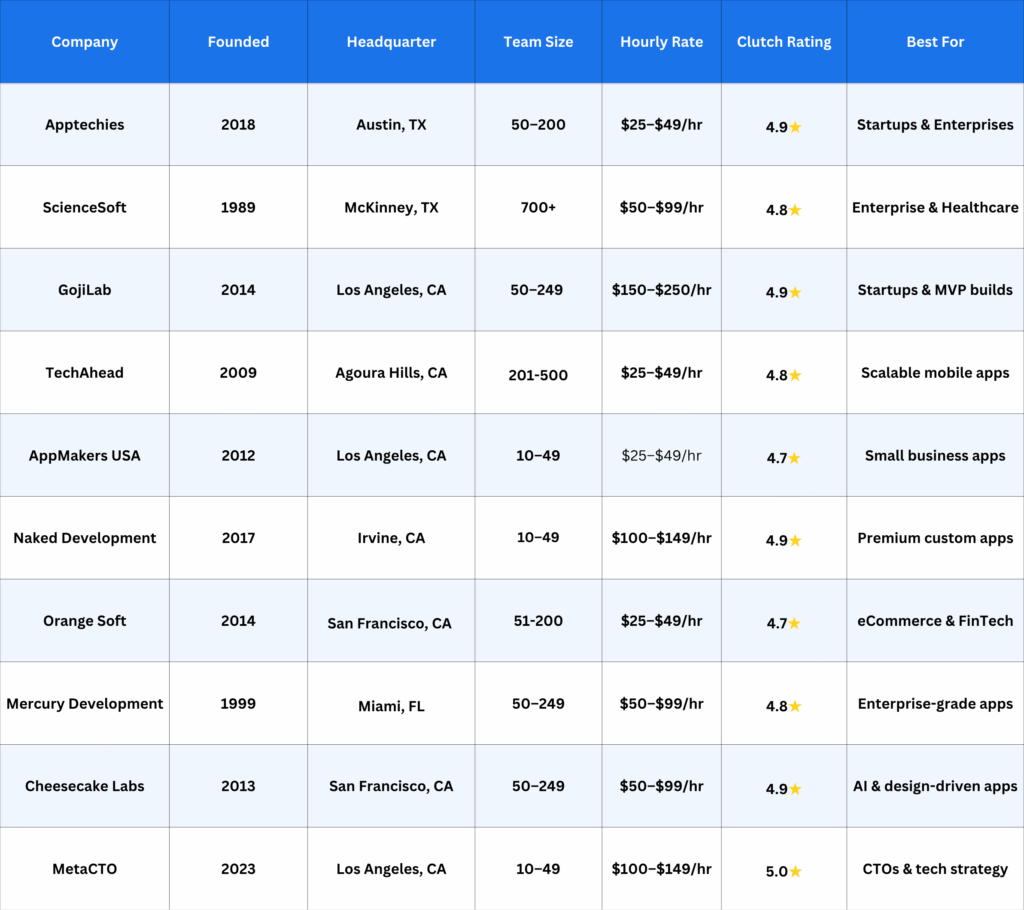
    Top iOS App Development Companies comparison table

    Each company below was selected based on Clutch ratings, client reviews, portfolio quality, and specialization. This is all the information you require.

    Apptechies

    The iOS app development company is built for startups that need speed and enterprises that need scale.
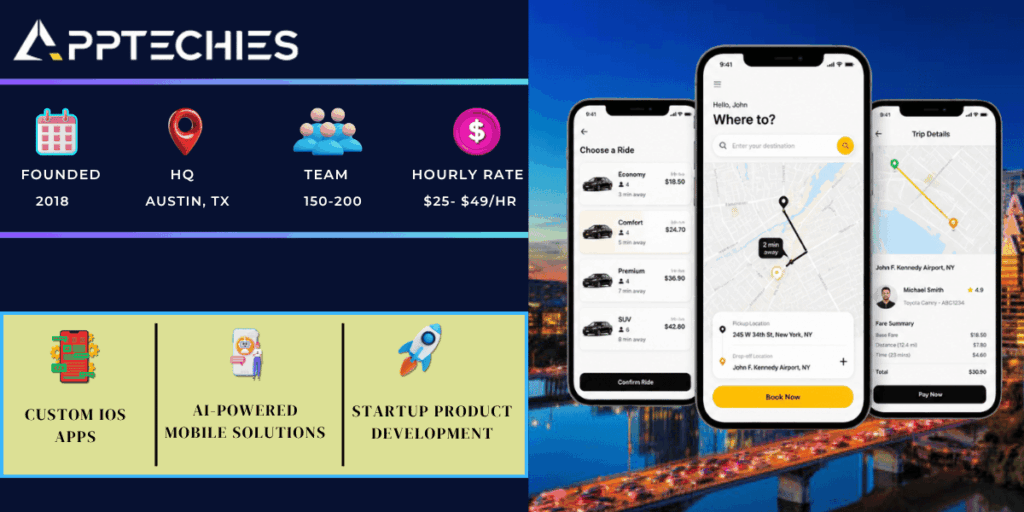
    Apptechies details

    Apptechies builds custom iOS apps from the ground up. They focus on clean architecture, fast delivery, and post-launch support. Their team works well with startups that are launching their first app as well as enterprises that need advanced features like AI integration or third-party API connections.

    What sets them apart is how they handle the full product cycle. From strategy and design to development and ongoing maintenance, they stay involved. They also offer startup-friendly pricing, which is rare for a New York-based iOS app development company.

    ScienceSoft

    A 35-year-old technology firm with deep expertise in enterprise mobile development.
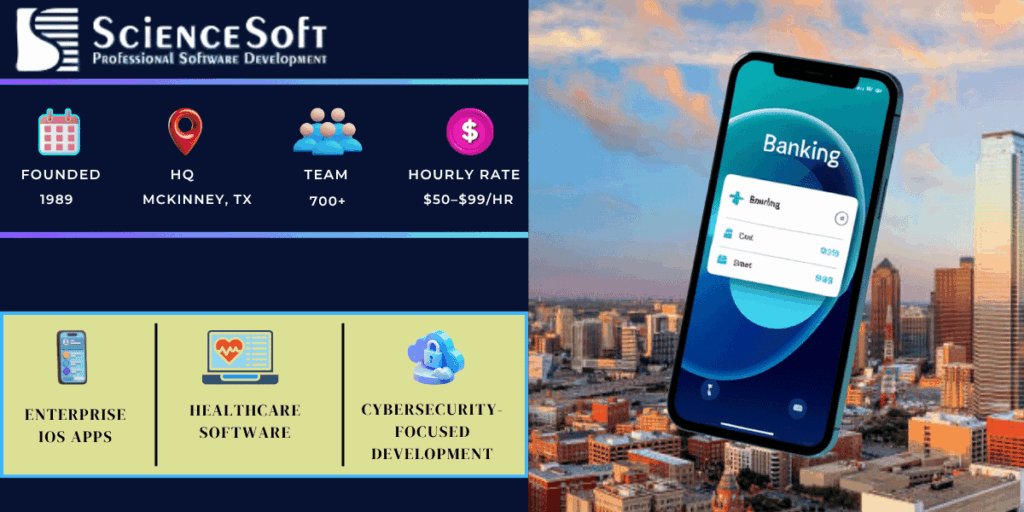
    ScienceSoft

    ScienceSoft has been building software since before the iPhone existed. That experience shows. They are especially strong in regulated industries like healthcare and finance, where security and compliance are non-negotiable.

    Their team is large enough to handle complex enterprise projects but structured enough to give each client focused attention. If your app needs HIPAA compliance, HL7 integration, or government-level security, ScienceSoft is one of the few US firms that handles it reliably.

    GojiLab

    A product-focused iOS studio known for building clean, fast MVPs for startups.
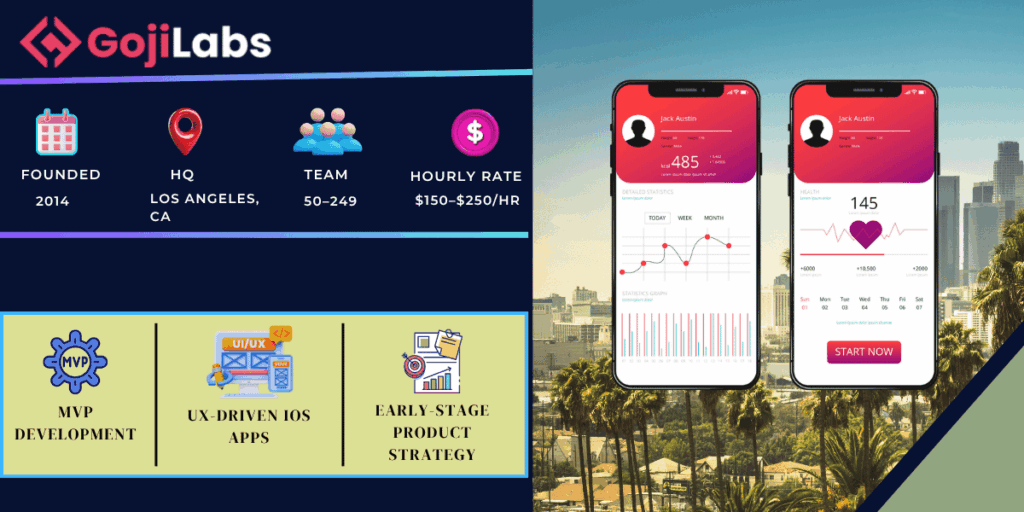
    GojiLab

    GojiLab works best with founders who have a clear idea but need someone to build it properly. They are fast without being sloppy. Their UX-first process means your app will look great and feel even better, which matters when you are trying to impress investors or early users.

    They also use the best iOS app development software available, including SwiftUI and Xcode 15, so the code they ship is modern and maintainable. Small team, high output, and strong client reviews on Clutch.

    TechAhead

    A full-service mobile agency with a strong track record across startups and Fortune 500 clients.
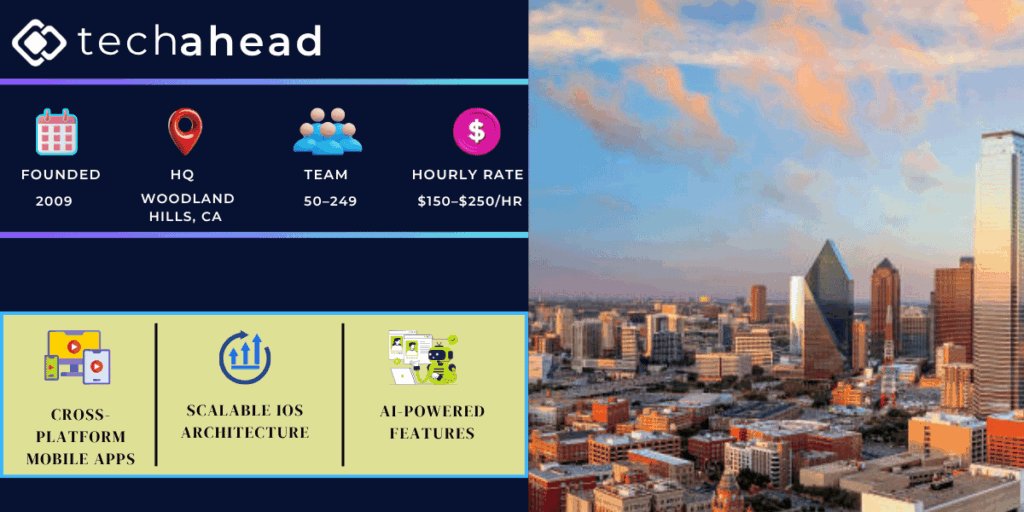
    TechAhead has delivered over 3,000 apps. They know how to build something that scales because they have done it for brands like Disney, AXA, and multiple fast-growing startups. Their pricing is competitive for a California-based iOS app development company.

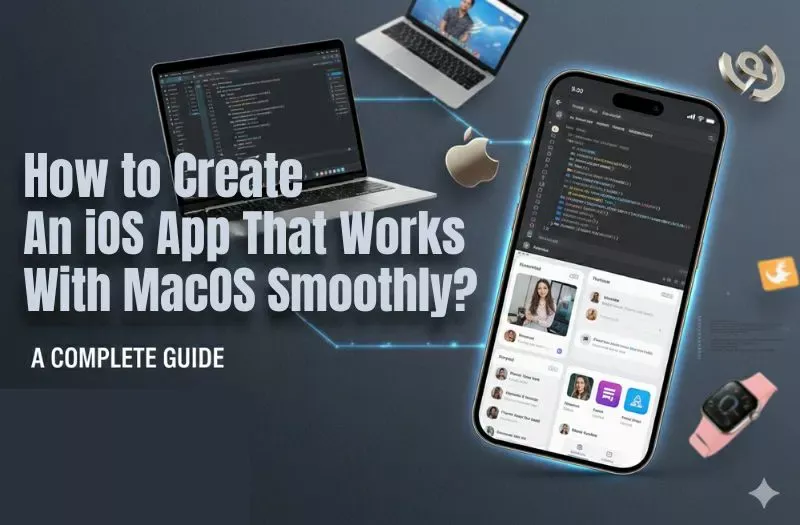
    They also understand how to create an iOS app that works on macOS using Catalyst, which is useful if you want one codebase that runs on both iPhone and Mac. That is a real advantage in 2026 when users expect seamless cross-device experiences.

    AppMakers USA

    A Los Angeles agency focused on helping small businesses launch affordable, quality iOS apps.
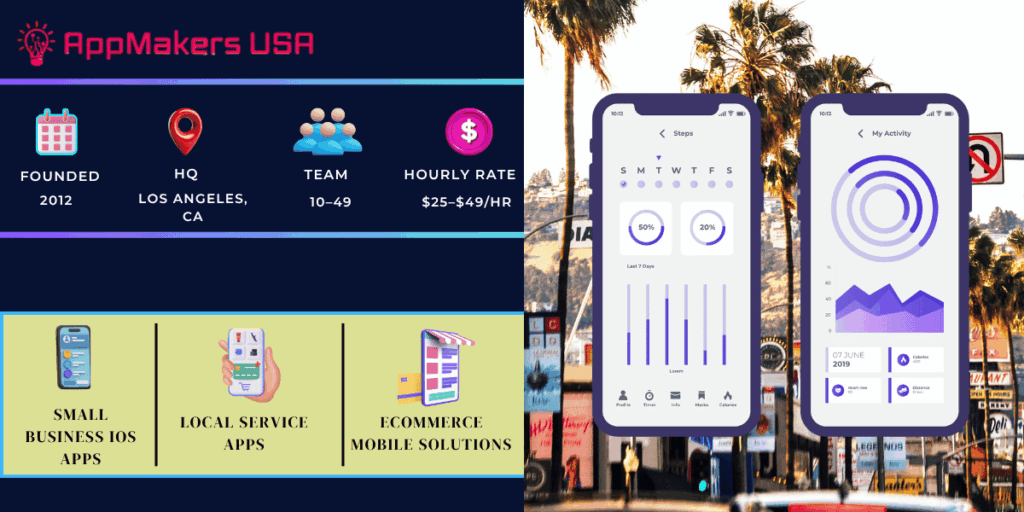
    AppMakers USA focuses on getting businesses online fast. They do not overcomplicate things, which is exactly what small business owners need. Their apps are well-designed, practical, and reasonably priced. 

    They are not the best choice for a complex enterprise build, but for local service businesses, restaurants, or small eCommerce brands looking for a solid iOS presence, they deliver real value at a fair price.

    Naked Development

    A boutique iOS studio in California known for premium, design-first mobile products.
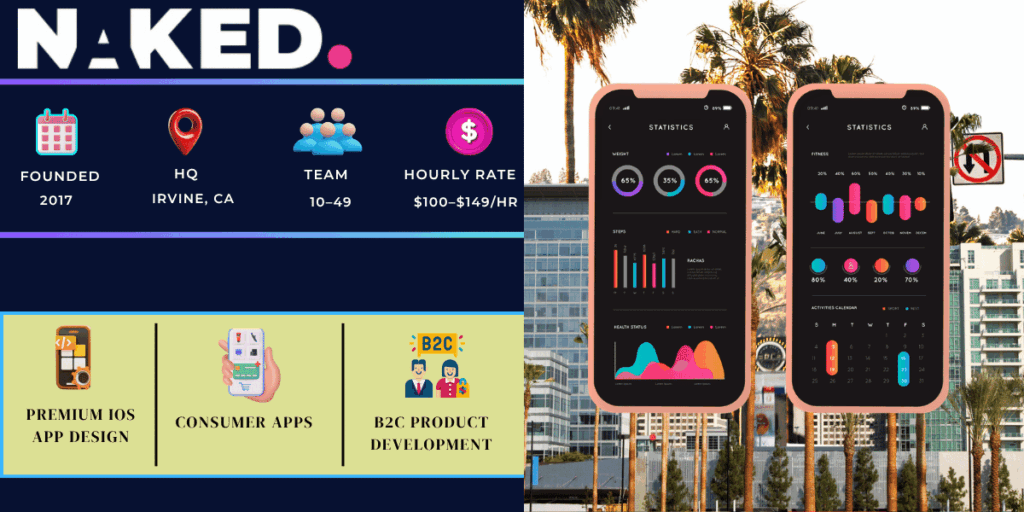
    Naked Development

    Naked Development is for clients who want their app to stand out visually and function flawlessly. They charge more than most agencies on this list, but the quality matches the price. Their portfolio includes consumer-facing apps with millions of users.

    If your product competes in a crowded market where design is a differentiator, Naked Development is worth the investment. They think about user psychology as much as they think about code.

    Orange Soft

    A New York-based iOS agency with strong expertise in eCommerce and financial apps.
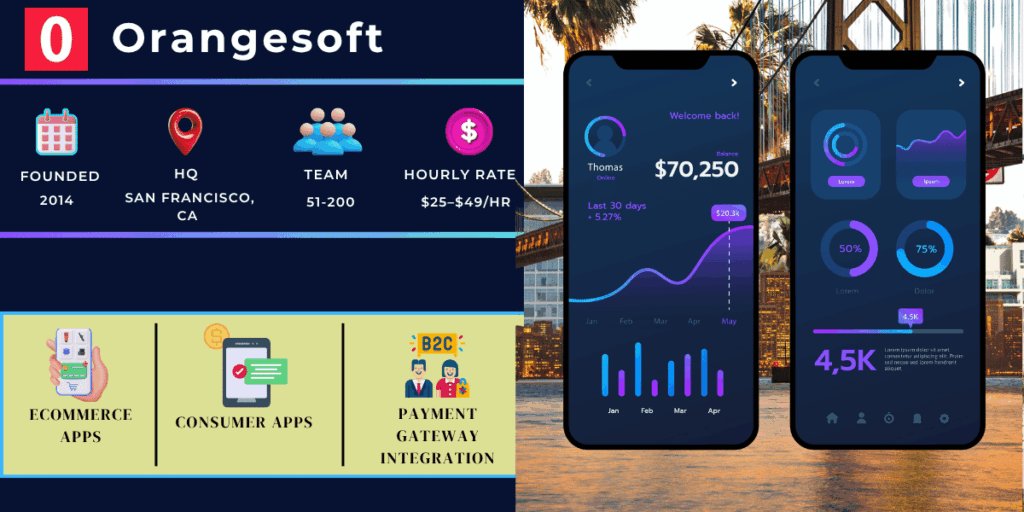
    Orange Soft

    Orange Soft has built a reputation in two specific areas: eCommerce and financial technology. If your app needs a smooth checkout experience, complex payment flows, or real-time financial data, their team knows how to handle it.

    They have also worked with clients exploring alternative app store for iOS distribution options alongside standard App Store launches. That is useful for enterprise clients who want more control over distribution.

    Mercury Development

    A veteran iOS development firm with over two decades of experience building enterprise-grade apps.
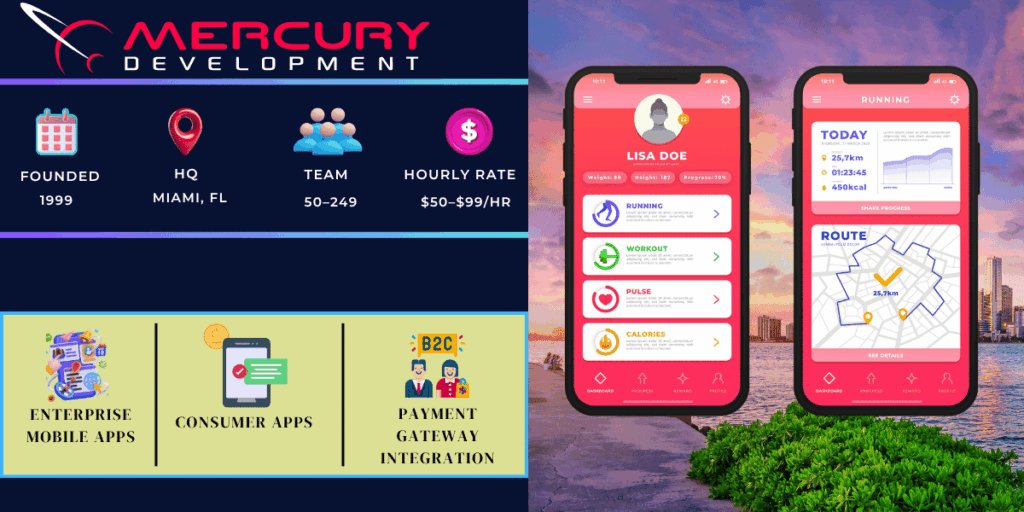
    Mercury Development

    Mercury Development has been around since the pre-smartphone era. They have adapted every step of the way, which makes them a trusted partner for enterprises upgrading old systems or building complex IoT-connected apps.

    Their long-term client retention rate is encouraging.  It means they deliver post-launch value, not just a finished app. If you need a firm that will still be your partner three years from now, Mercury is worth a serious look.

    Cheesecake Labs

    A San Francisco studio known for product design, AI features, and user-focused iOS development.
    Cheesecake Labs

    Cheesecake Labs blends design thinking with solid engineering. They are one of the few US firms that puts UX research at the start of every project instead of treating it as optional. The result is apps that users actually enjoy using.

    They are strong in AI integration, which is becoming a must-have feature in 2026. If you want on-device AI, smart recommendations, or machine learning features built into your iOS app, their team has hands-on experience making it work.

    MetaCTO

    A fractional CTO and iOS development firm for founders who need tech leadership and great code.
    Meta CTO

    MetaCTO is not just a development shop. They act as a fractional CTO for startups that need senior technical guidance alongside quality development. Their 5.0 Clutch rating is the highest on this list and reflects consistent client satisfaction.

    They are a strong fit for non-technical founders who need someone to own the technical decisions, not just follow a spec sheet. Higher rates, but the strategic value they add often justifies the cost.

    Why Businesses Prefer iOS Apps for Growth in 2026

    iOS still drives stronger business results than most alternatives. Here is why companies continue to prioritize it.

    Higher Revenue Potential

    iOS users spend significantly more in apps than Android users. The App Store generated over $89 billion in revenue in 2023, and that number is growing. If your business model depends on in-app purchases or subscriptions, iOS is the higher-value audience.

    Better Security

    Apple’s closed ecosystem gives iOS apps a security advantage that matters. Strict App Store review, hardware-level encryption, and regular OS updates reduce exposure to vulnerabilities. This is especially important for healthcare, finance, and legal apps that handle sensitive data.

    Premium Audience

    iOS users have higher average incomes and spend more on apps, subscriptions, and purchases. Brands targeting professionals, high-income households, or premium consumer segments consistently see better conversion rates on iOS.

    Better App Performance

    Apple controls both the hardware and software, which means iOS apps run more efficiently. SwiftUI and the latest Xcode tools let developers build apps that load fast, use less battery, and handle multitasking smoothly.

    Stronger Customer Engagement

    Push notifications, widgets, Siri shortcuts, and Apple Watch integration give iOS apps more ways to stay connected to users. Retention rates on iOS tend to be higher, which matters for subscription businesses and loyalty programs.

    Industries That Need iPhone Apps in 2026

    Almost every industry benefits from an iOS app, but some depend on it more than others. Here are the top sectors leading mobile adoption this year.

    Healthcare

    Telehealth video consultations, prescription reminders, and patient portals are now standard expectations. iOS apps with HIPAA-compliant data handling give healthcare providers a secure way to reach patients remotely.

    Taxi & Transportation

    Real-time GPS tracking, driver-rider matching, and in-app payment are table stakes. Any transportation business without a polished iOS app is losing customers to competitors who have one.

    Education

    From K-12 learning apps to professional certification platforms, iOS apps make content more accessible. Features like offline mode, video lessons, and interactive quizzes improve completion rates.

    eCommerce

    Mobile commerce currently accounts for more than half of all internet sales. iOS apps with Apple Pay integration, personalized product feeds, and one-tap checkout directly increase sales.

    FinTech

    Banking apps, investment trackers, and crypto wallets need the security and reliability that iOS provides. Face ID authentication and secure enclave storage make iOS the preferred platform for financial apps.

    Food Delivery

    Order tracking, restaurant browsing, and real-time delivery updates require a smooth, fast app. iOS users place more food delivery orders and spend more per transaction than the average Android user.

    Fitness

    Apple Health integration, HealthKit data, and Apple Watch compatibility make iOS the natural home for fitness apps. Workout tracking, nutrition logging, and sleep analysis all connect seamlessly.

    Real Estate

    AR-powered property tours, mortgage calculators, and map-based property search are transforming how people buy and rent. iOS apps make these features appear natural and straightforward. 

    How to Choose the Best AI-Powered iOS App Development Company in the USA

    The right company depends on your project, budget, and long-term goals. Use these five criteria to narrow down your options quickly.

    Proven Industry Experience

    Look for a company that has built apps in your specific industry. An iOS app development company that has only built retail apps may struggle with the compliance requirements of a healthcare build. Ask to see case studies in your sector, not just a general portfolio.

    Red flag: No case studies, vague project descriptions, or only mockups in the portfolio.

    Certified iOS Developers

    Check whether the team includes Apple-certified developers who are up to date on the latest Swift and SwiftUI standards. Companies using outdated Objective-C for new projects are a warning sign. The best iOS app development software in 2026 is built around Swift and Xcode 15.

    Red flag: No mention of developer credentials or team qualifications on the company website.

    Process Transparency & Communication

    You should never wonder what your development team is doing. A reliable company will give you a clear project roadmap, regular progress updates, and access to project management tools. Ask about their sprint structure and how they handle scope changes.

    Red flag: Vague timelines, no defined communication schedule, or reluctance to share a project plan.

    Security & Compliance Knowledge

    If your app handles personal data, payments, or health records, the company must understand GDPR, HIPAA, PCI-DSS, or whichever regulations apply to your industry. Ask directly how they handle data security during development and in the final product.

    Red flag: Security treated as an afterthought or added only at the testing stage.

    Post-Launch Support & Scalability

    Most app problems appear after launch. Make sure the company offers a defined post-launch support plan, not just a vague promise to help if something breaks. Ask about their process for iOS updates when Apple releases a new OS version.

    Red flag: No SLA for post-launch support, or support billed by the hour with no retainer option.

    Key iOS App Development Services You Should Check Before Hiring

    A full-service iOS app development company should offer more than just coding. Here is what to look for.

    Expert Planning and Strategy for iOS App Development

    Good development starts before a single line of code is written. A strategy session should cover your target users, competitive landscape, feature priorities, and monetization model. This phase prevents expensive mistakes later.

    If a company skips this step and jumps straight into wireframes, that is a sign they are more focused on billing hours than building the right thing.

    Easy-to-Use iOS App Interface Design Services

    iOS users expect polished, intuitive design. The best firms have dedicated UX designers who conduct user research and prototype before development begins. Apple’s Human Interface Guidelines should be a starting point, not a limit.

    Ask to see how design decisions are tested with real users. A company that skips user testing ships apps that look good in mockups but frustrate users in practice.

    Build Custom iOS Apps Based on Your Business Goals

    Cookie-cutter templates do not work for serious business apps. Custom iOS development means the architecture, features, and user flow are built around your specific goals. This is what separates an iOS app development company from a template shop.

    Custom development also makes it easier to learn how to create an iOS app that works on macOS using Mac Catalyst, since the codebase is structured for flexibility from day one.

    Ensuring Secure and High-Quality iOS App Performance

    Performance testing should be done throughout development, not just before launch.  Look for companies that use automated testing, TestFlight beta distribution, and performance profiling with Instruments. A slow or crashy app will lose users fast, no matter how good the idea is.

    What Is the Real Cost to Build an iOS App in 2026?

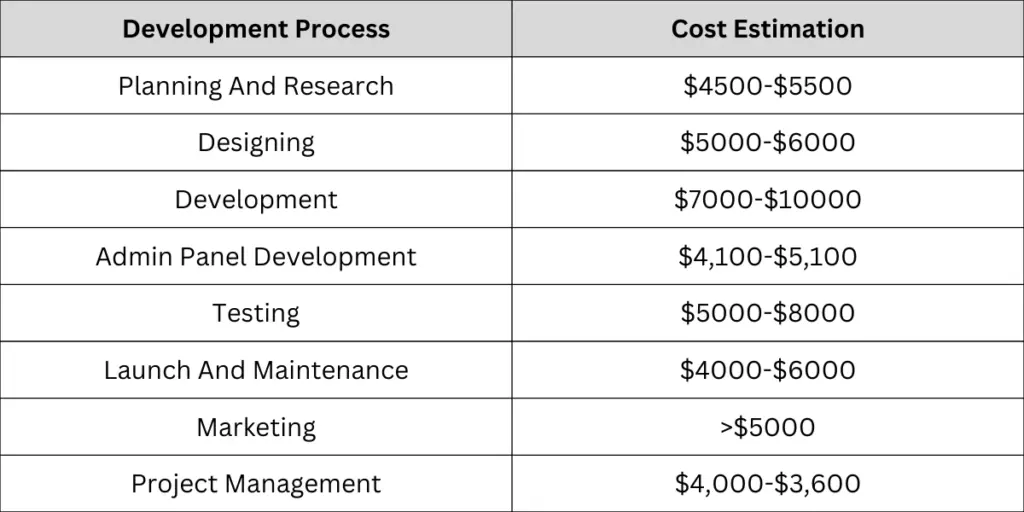
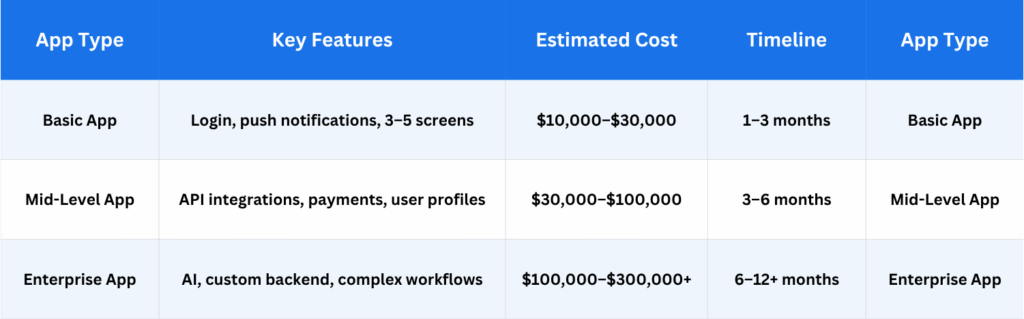
    The cost to build an iOS app in 2026 ranges from $10,000 to $300,000 or more. That wide range comes down to complexity, team location, and how custom the features are.

    App Development Pricing Based on Project Size
    App Development Pricing Based on Project Size

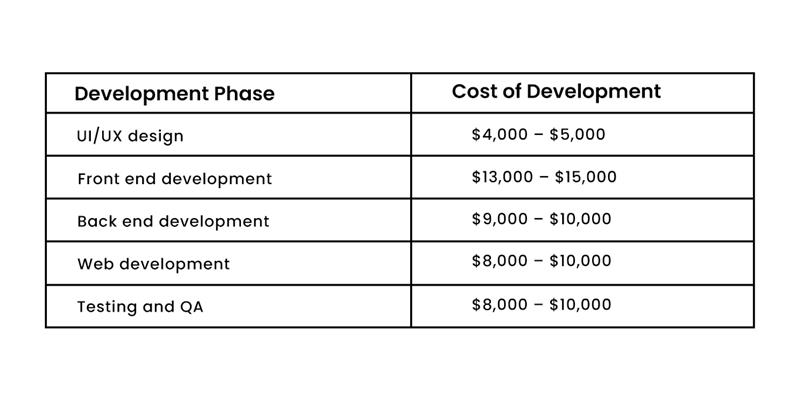
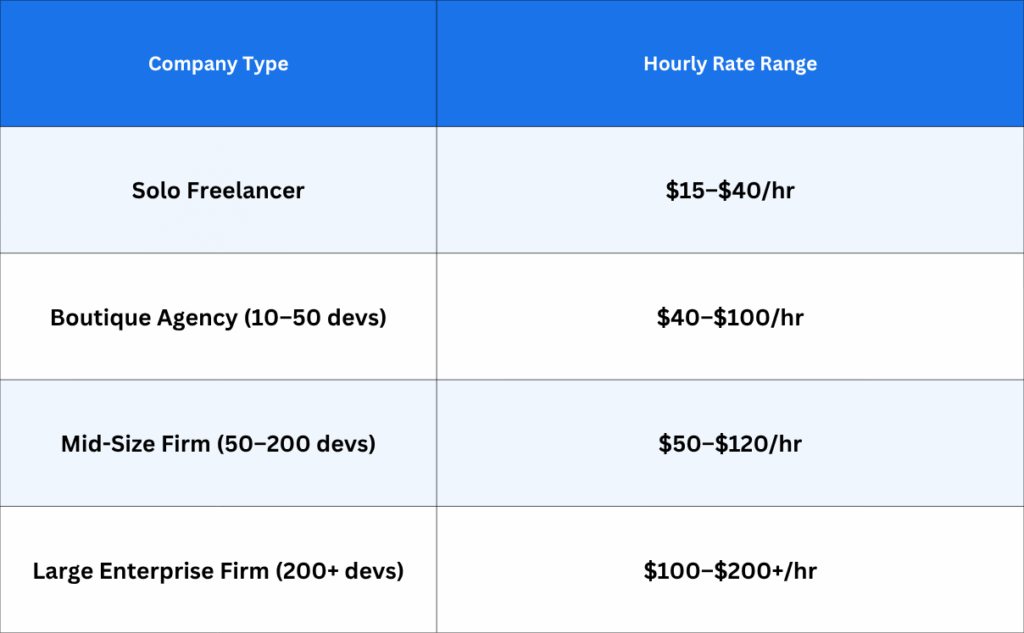
    iOS Developer Hourly Rates by Company Size in the USA
    iOS Developer Hourly Rates by Company Size in the USA

    Important Cost Factors in iOS App Development

    These elements have the biggest impact on your final budget:

    • App complexity: More features mean more development hours and higher cost.
    • iOS-only vs. cross-platform: Building for iPhone only costs less than adding iPad or macOS support.
    • Design requirements: Custom animations, branded UI components, and accessibility work add cost.
    • Third-party integrations: Connecting to payment gateways, maps, or external APIs adds development time.
    • Post-launch maintenance: Budget 15–20% of the original build cost per year for ongoing support.

    Modern Tech Stack Used by Top iOS App Development Companies

    The technology a company uses tells you a lot about the quality of the app they will build. Here is what to expect from a top-tier iOS app development company in 2026.

    • Swift: Apple’s primary coding language. Fast, safe, and modern. The standard for all new iOS apps.
    • SwiftUI: Apple’s framework for building app interfaces. Faster to develop and easier to maintain than older UIKit-only apps.
    • Xcode: Apple’s official development environment. Used for coding, testing, and submitting apps to the App Store.
    • Core Data / CloudKit: Used for local storage and syncing user data across Apple devices.
    • ARKit: Apple’s augmented reality framework. Used for try-on features, 3D product views, and navigation apps.
    • Core ML / Create ML: Tools for adding on-device machine learning without sending data to external servers.
    • HealthKit / WatchKit: Used for fitness and wellness apps that connect to Apple Watch and Apple Health.
    • StoreKit 2: The modern framework for handling in-app purchases and subscriptions.

    Why Choose a US-Based iOS Development Partner?

    Offshore development can look cheaper on paper. But the real cost of miscommunication, time zone friction, and rework often cancels out any savings.

    A US-based iOS app development company brings time zone alignment, which means faster decisions and fewer delays. They also operate under US legal standards, so contracts, IP ownership, and NDAs are straightforward to enforce.

    Quality standards matter too. The App Store review process is strict. Companies with experience submitting to the App Store from the US understand exactly what Apple expects, which reduces rejection risk and speeds up launch.

    That said, if budget is a hard constraint, some hybrid models work well. A US-based project manager leading a partially offshore team can balance cost and quality. Just make sure the communication layer is solid.

    Things You Should Expect from an iOS Development Partner

    • A clear, written project timeline with defined milestones
    • Regular progress updates, at least weekly
    • Access a staging version of the app for your own testing.
    • Transparent billing with no hidden fees
    • App Store submission handled by the developer
    • At least 30–90 days of post-launch bug-fix support included
    • Code ownership transferred to you at the end of the project

    Top iPhone App Trends Businesses Should Know in 2026

    These are the features and technologies shaping iOS development right now. Companies that build with these trends in mind are building for the future.

    AI Integration

    AI is no longer a nice-to-have. iOS apps are using machine learning for personalized recommendations, smart search, fraud detection, and automated customer support. If your app does not use AI in some form, it is already behind the curve.

    AR and VR

    Apple Vision Pro has made AR a serious business tool, not just a gimmick. Retail apps use it for virtual try-on. Real estate apps use it for property tours. ARKit and RealityKit make these features accessible to any serious iOS development team.

    SwiftUI

    SwiftUI has matured into the default way to build iOS interfaces. It speeds up development, reduces bugs, and makes it easier to learn how to create an iOS app that works on macOS with minimal extra effort. Companies still writing only UIKit are working with an older toolset.

    Voice AI

    Siri integration, custom voice commands, and speech-to-text features are becoming standard in productivity and accessibility apps. Voice AI reduces friction for users who prefer hands-free interaction.

    On-Device AI

    Apple’s Neural Engine allows AI processing to happen directly on the device without sending data to the cloud. This improves privacy, speeds up responses, and works even without an internet connection.

    IoT Apps

    Smart home devices, connected healthcare equipment, and industrial sensors are all finding their control interface on iPhone. iOS apps that use HomeKit, CoreBluetooth, and Matter protocols are in high demand.

    Wearable Apps

    Apple Watch is the dominant wearable in the US. Apps that extend core functionality to the wrist, like workout tracking, payment, or health monitoring, give users more reasons to stay engaged throughout the day.

    Smart Questions Businesses Should Ask App Developers

    Go into vendor conversations prepared. These questions will help you spot the difference between a reliable partner and a company that overpromises.

    Q. Have you built similar apps before?

    Ans: A good answer includes specific examples and the challenges they solved. Vague references to ‘similar work’ without details are a red flag.

    Q. What technologies do you use?

    Ans: Look for current tools: Swift, SwiftUI, Xcode 15. If they are still leading with Objective-C for new projects, ask why.

    Q. Do you provide post-launch support?

    Ans: Get specifics. How long is the support period? What does it cover?Is it included in the price or charged separately? 

    Q. What is your development timeline?

    Ans: A credible company will give you a phased estimate, not a single deadline. Ask what happens if a milestone is delayed.

    Q. How Do You Handle Scope Changes?

    Ans: The most common cause of project cost overruns is scope creep. Ask for their written process for adding or removing features mid-project.

    Q. Who Owns the Code After Launch?

    Ans: You should own 100% of the code. If the answer is anything other than that, walk away.

    Average iOS App Development Timeline in 2026

    Most iOS apps take between 4 weeks and 12 months to build, depending on complexity. Here is a reliable breakdown.
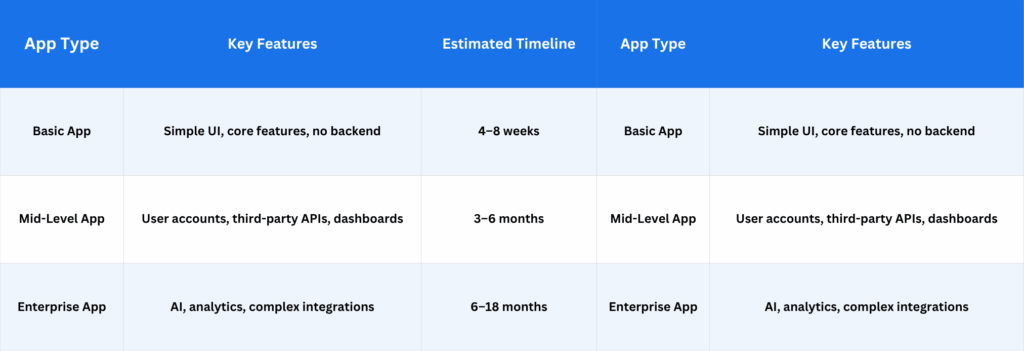
    Average iOS App Development Timeline in 2026

    These timelines assume a clear brief and responsive feedback from your side. Delays in approvals or frequent scope changes can add weeks to any project. Building a buffer of 10–15% into your timeline is always a good idea.

    What Makes Apptechies Different in 2026

    Apptechies is not just another iOS app development company on a long list. Here is what actually stands out after reviewing their work.

    AI-Powered Development

    Apptechies integrates AI features natively, not as add-ons. From on-device machine learning to smart user personalization, their team builds AI into the product architecture from day one. This means the app performs better and stays relevant longer.

    Fully Custom Development

    No templates, no shortcuts. Every app they build starts from a blank canvas based on your business goals. This approach takes longer than a template shop but produces something your users will actually use, and that you can scale without rebuilding.

    Startup-Friendly Approach

    Their $25–$49/hr rate is competitive for a New York firm with a 4.9 Clutch rating. They work with founders at the idea stage, which means they can help you validate the concept before spending on a full build. Not every iOS app development company will do that.

    Strong Industry Experience

    Apptechies has delivered apps across healthcare, eCommerce, FinTech, and logistics. That breadth means they understand the compliance, integration, and UX requirements that vary by industry, not just the technical requirements.

    Post-Launch Support

    After your app goes live, Apptechies stays on. They handle iOS updates, bug fixes, and feature additions under a defined support agreement. You will not be left figuring out why your app breaks after an Apple OS update on your own.

    If you are evaluating iOS app development companies and want to talk specifics, Apptechies is worth starting with.

    Frequently Asked Questions About iOS App Development

    Q. How much does iOS app development cost in the United States? 

    Ans: iOS app development in the USA typically costs between $10,000 and $300,000 or more. A basic app starts around $10,000–$30,000. Mid-level apps with custom features run $30,000–$100,000. Enterprise builds with AI, complex backends, and custom integrations cost $100,000 and up.

    Q. Which company is best for iOS app development?

    Ans: Your project determines which iOS app development business is best suited.  Apptechies and GojiLab are strong choices for startups. ScienceSoft and Mercury Development are better for large enterprise builds. MetaCTO is ideal for non-technical founders who also need strategic guidance.

    Q. How long does iPhone app development take?

    Ans: A basic iPhone app takes 4–8 weeks. Mid-level apps usually take 3–6 months. Enterprise apps with complex integrations and AI features take 6–18 months. Timeline depends heavily on scope clarity and how quickly your team provides feedback.

    Q. What technologies are used in iOS apps?

    Ans: The core stack includes Swift, SwiftUI, and Xcode. Most modern apps also use Core Data for storage, ARKit for augmented reality, Core ML for AI features, HealthKit for fitness data, and StoreKit 2 for in-app purchases. These are the best iOS app development software tools in 2026.

    Q. Is Swift better for iOS app development?

    Ans: Yes. Swift is Apple’s official language for iOS development and is faster, safer, and more modern than Objective-C. It works natively with SwiftUI and supports on-device AI through Core ML. Any company building new iOS apps in 2026 should be writing Swift, not Objective-C.

    Q. Why hire a US-based app development company?

    Ans: US-based companies offer time zone alignment, clearer communication, and enforceable contracts. They also have deeper experience with App Store submission requirements, which reduces rejection risk. The quality standard is generally higher, and IP ownership terms are easier to enforce under US law.

    Ready to Build Your iOS App?

    You now have a complete picture of the top iOS app development companies in the USA, what they charge, how long projects take, and what questions to ask before signing anything.

    The next step is simple. Pick two or three companies from this list that match your project type and budget, and schedule discovery calls. Good firms will listen more than they pitch in the first conversation.

    If you want to start with a company that offers competitive pricing, strong post-launch support, and a genuine startup-friendly process, Apptechies is a solid first call.

    Author Name: Ajay Chaudhary
    Author Bio: AJ Chaudhary, CEO of Apptechies. He is a full-stack developer with 10+ years of experience developing web and mobile applications. He has successfully delivered projects for different industries and helped companies turn concepts into scalable solutions. Passionate about technology, he simplifies complicated tech topics for entrepreneurs and startups by sharing insights.
    1. How Much Does It Cost to Build An AI-Powered App in Singapore in 2026?

      How Much Does It Cost to Build An AI-Powered App in Singapore in 2026?

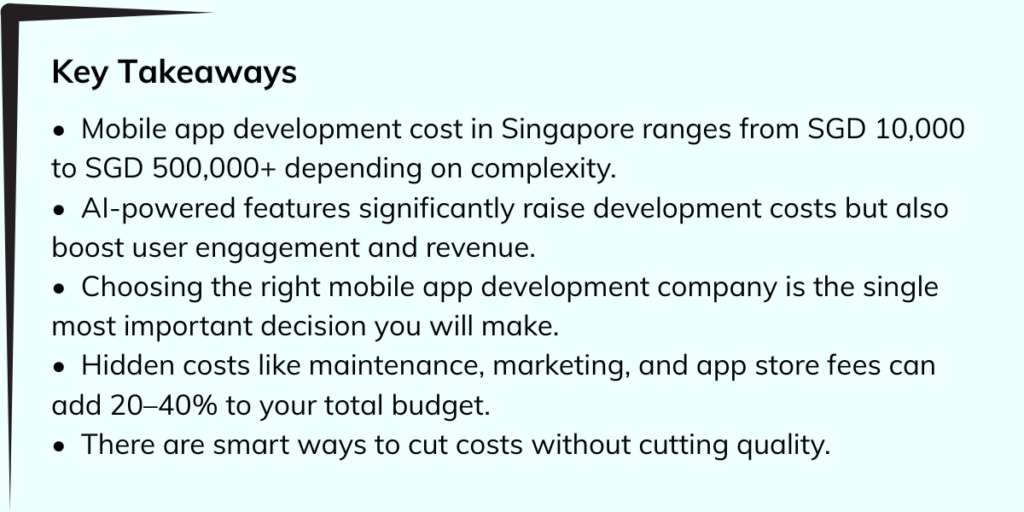
      Key Takeways

      Imagine spending months planning your app, hiring a team, and investing your savings, only to discover halfway through that you had no idea what the real costs looked like. It happens more often than you think.

      If you are a startup founder, a business owner, or someone with a great app idea, one of the first questions on your mind is probably: how much will this actually cost?

      In Singapore, the mobile app development scene is booming. With one of the most tech-forward economies in Southeast Asia, Singapore is home to world-class developers, cutting-edge AI tools, and a thriving digital ecosystem. But all of that comes with a price tag, and understanding that price tag before you start is what separates successful app launches from expensive missteps.

      Everything is explained in simple terms in this guide. No confusing tech jargon, no vague estimates. Just clear, practical numbers and the reasoning behind them.

      Cost to Build an AI-Powered App in Singapore in 2026?

      There is no one-size-fits-all answer. The cost of building a mobile app depends on what you want the app to do, how polished you want it to look, which platforms you want it on, and who builds it for you. Let us break it down properly.

      App Type & Features

      The features you include are the biggest driver of cost. More features equal more development time, and more development time means higher cost. Here is a general breakdown:

      App Type and Features in Singapore

      A basic app might be a simple tool with a few screens and minimal logic. A medium app adds layers, user accounts, third-party integrations, and maybe a chatbot. Advanced and enterprise-level apps are full platforms with machine learning, real-time processing, and robust security architectures.

      Platform: iOS, Android, or Both?

      iOS only: Roughly SGD 10,000 – 80,000 depending on complexity

      Android only: Similar pricing to iOS

      Both platforms (native): Roughly 1.5x to 2x the single-platform cost

      Cross-platform (React Native, Flutter): Can reduce costs by 30–40% while covering both platforms

      For most startups and businesses targeting Singapore and Southeast Asia, building for both iOS and Android makes sense. Cross-platform frameworks like Flutter or React Native are a popular way to do that without doubling the budget. The right iOS app development company will guide you toward the most cost-effective approach for your specific goals.

      UI/UX Design Complexity

      Good design is not decoration — it is how users experience your app. The more polished and custom the design, the higher the cost.

      • Basic UI (template-based): SGD 2,000 – 8,000
      • Custom UI with branding: SGD 8,000 – 25,000
      • Premium, animated UI with custom illustrations: SGD 25,000 – 60,000+

      Cutting corners on design often backfires. Users judge an app in the first few seconds. A clunky interface drives them away permanently. Investing in good UI/UX upfront saves you money on redesigns later.

      Backend Infrastructure and APIs

      Most apps need a backend — a server that stores data, handles logic, and connects to third-party services.

      • Simple backend (basic database, REST API): SGD 5,000 – 20,000
      • Medium backend (real-time sync, cloud functions): SGD 20,000 – 60,000
      • AI/ML backend (model training, inference pipelines): SGD 60,000 – 200,000+

      AI features like personalized recommendations, voice recognition, image analysis, or intelligent search all require specialized backend infrastructure. Working with a proper AI development company ensures that these systems are built to scale and perform reliably.

      Development Team: Freelancers vs. Agencies vs. In-House

      Who you hire makes a big difference in cost, quality, and reliability.

      For most businesses, partnering with a reputable mobile app development company in Singapore offers the best balance of quality, communication, and results. You get a full team, designers, developers, project managers, and QA testers, without the overhead of building one yourself.

      Ongoing Maintenance and Updates

      Your app does not stop needing attention after launch. Operating systems update. Security vulnerabilities emerge. Users request new features. Maintenance is a real and recurring cost.

      • Basic maintenance: SGD 500 – 2,000/month
      • Regular updates and new features: SGD 2,000 – 10,000/month
      • Enterprise-level support and SLA: SGD 10,000 – 30,000+/month

      Budget for at least 15–20% of your development cost annually for maintenance. Ignoring this leads to apps that break, frustrate users, and fall behind competitors.

      Hidden Costs to Keep in Mind

      • App Store fees: Apple charges SGD 148/year. Google charges a one-time SGD 34.
      • Third-party API fees: Payment gateways, maps, SMS, AI services, these all have usage fees.
      • Cloud hosting: AWS, Google Cloud, or Azure costs can range from SGD 100/month to several thousand, depending on traffic.
      • Legal and compliance: PDPA (Personal Data Protection Act) compliance in Singapore is mandatory and may require legal consultation.
      • Marketing: No one downloads an app that they do not know exists. Budget at least SGD 5,000 – 20,000 for initial marketing.

      What Factors Affect App Development Cost in Singapore?

      Beyond the basics, several factors specifically affect how much you will pay in Singapore.

      Talent Costs Are High

      Singapore developers are among the best-paid in Southeast Asia. The average software developer in Singapore earns SGD 70,000 – 110,000 annually. This expertise comes at a premium, but it also means higher-quality code, better security practices, and more reliable delivery timelines.

      Regulatory Requirements

      Singapore has strict data privacy laws. If your app handles personal data, which most do, you must comply with the PDPA. Apps in finance, healthcare, and education face additional regulations. Compliance costs can add SGD 5,000 – 30,000 to your project.

      Integration Complexity

      The more external systems your app needs to connect with — ERP software, CRM tools, payment processors, logistics APIs — the more complex and expensive the development becomes. Each integration point is another potential failure point that needs careful engineering.

       AI and Machine Learning Features

      AI is not just a buzzword anymore. It is a genuine competitive advantage. But AI development requires specialists. Training custom models, building recommendation engines, or implementing natural language processing can cost two to three times what standard feature development costs. For many businesses, working with a dedicated AI development company is the most efficient route.

      Security Requirements

      Apps that handle financial data, medical records, or sensitive user information require enterprise-grade security. Penetration testing, end-to-end encryption, and secure coding practices all add to the cost — but skimping here can be catastrophic.

      Timeline Pressure

      Need your app done fast? Rush jobs cost more. A development timeline of 3–6 months for a medium app is realistic. Compressing that to 6–8 weeks often requires bringing in extra developers, which increases cost significantly.

      How a Well-Built App Drives Revenue and Growth

      It is easy to focus only on what an app costs. But the smarter question is: what can it earn?

      Direct Revenue Streams

      Apps can generate money through subscriptions, one-time purchases, in-app purchases, transaction fees, and advertising. A well-monetized app can recoup its development cost within 12–24 months.

      Customer Retention

      An app keeps your brand on your customer’s phone. Push notifications, loyalty programs, and personalized experiences drive repeat business in ways that websites simply cannot.

      Operational Efficiency

      Apps can automate tasks, reduce manual errors, and speed up workflows. Businesses that build internal apps often see productivity gains worth 5–10x their development investment.

      Data and Insights

      Every tap, swipe, and purchase in your app generates data. This data tells you what your customers want, when they want it, and how they want to receive it. That intelligence is invaluable for growth.

      Competitive Differentiation

      In Singapore’s competitive market, an innovative app can set you apart. Businesses that invest in quality mobile experiences consistently outperform those that do not.

      The key is building smart, not just building fast. An app that launches buggy, slow, or confusing will not generate any of these benefits. It will just generate negative reviews and lose customers.

      Build Smart, Scalable AI-Powered Apps with Apptechies

      At Apptechies, we have spent years helping businesses across Singapore and Southeast Asia turn their app ideas into profitable realities. We are not just a development shop, we are a strategic partner that thinks about your business goals first.

      Whether you need a sleek consumer app, a complex enterprise platform, or a custom AI solution, our team brings together designers, engineers, AI specialists, and project managers to deliver apps that work beautifully and perform reliably.

      What Makes Apptechies Different?

      • We build for scale from day one, your app will not crumble when traffic spikes.
      • We are specialists in AI integration, from recommendation engines to intelligent automation.
      • We have deep experience across industries — fintech, healthcare, retail, taxi, grocery, education, and more.
      • We are transparent about costs, no surprise invoices, no hidden fees.
      • We provide end-to-end service, from idea to launch to ongoing maintenance.
      • Explore our full range of services, from mobile app development to AI-powered solutions, and find out how we can bring your vision to life.

      How Much Does Each Type of App Really Cost?

      Let us get specific. Different app categories come with different complexity levels, regulatory requirements, and user expectations. Here is what you can realistically expect to pay in Singapore in 2026.

      Social Media Apps

      Social media apps are deceptively complex. Real-time feeds, user-generated content, media uploads, notifications, messaging, and content moderation all add up fast.

      • Basic social features: SGD 50,000 – 100,000
      • Full-featured platform (Stories, Reels, Live): SGD 150,000 – 400,000+

      AI-powered features like content recommendations, spam detection, and sentiment analysis are increasingly expected and add another SGD 30,000 – 80,000 to the budget.

      Medical and Telemedicine Apps

      Healthcare apps in Singapore must comply with strict regulations from the Ministry of Health. HIPAA-equivalent data protection, encrypted communications, and accurate medical record handling are non-negotiable.

      • Appointment booking app: SGD 20,000 – 60,000
      • Telemedicine platform with video consultations: SGD 80,000 – 200,000
      • AI diagnostics or symptom checker: SGD 150,000 – 350,000+

      The regulatory compliance and security requirements make healthcare one of the more expensive app categories to build correctly.

      Logistics and Delivery Apps

      Logistics apps need real-time GPS tracking, route optimization, driver-rider matching, and payment processing. Think apps like Lalamove, Grab Delivery, or a custom solution for your own fleet.

      • Basic delivery tracking app: SGD 30,000 – 70,000
      • Full logistics platform with route optimization: SGD 80,000 – 200,000
      • AI-powered demand forecasting and fleet management: SGD 150,000 – 300,000+

      For businesses building a grocery app or a local delivery service, logistics infrastructure is the foundation on which everything else rests.

      M-Commerce, Live Stream, and Shopping Apps

      Mobile commerce is exploding in Southeast Asia. Building a competitive shopping app means delivering a seamless browsing experience, fast checkout, secure payments, and increasingly, live-stream selling features.

      • Basic m-commerce app: SGD 25,000 – 70,000
      • Full shopping platform with search and recommendations: SGD 70,000 – 180,000
      • Live stream commerce (like TikTok Shop): SGD 120,000 – 300,000+

      AI-powered product discovery and personalized recommendations are now a baseline expectation for competitive shopping apps.

      Restaurant Apps

      From table reservations to mobile ordering to loyalty rewards, restaurant apps have evolved significantly. Contactless dining accelerated adoption, and now customers expect smooth digital experiences.

      • Basic menu and reservation app: SGD 15,000 – 40,000
      • Full ordering, payment, and loyalty platform: SGD 40,000 – 100,000
      • Multi-location chain with AI upselling: SGD 80,000 – 180,000

      Banking, Payment, and E-Wallet Apps

      Financial apps are the most heavily regulated category. MAS (Monetary Authority of Singapore) licensing, strong authentication, fraud detection, and real-time transaction processing are all mandatory, not optional.

      • Basic payment app or e-wallet: SGD 80,000 – 150,000
      • Full neobank or digital banking platform: SGD 200,000 – 600,000+
      • AI-powered fraud detection and credit scoring: Adds SGD 50,000 – 150,000

      Cutting corners on financial apps is not just risky for business — it can lead to regulatory penalties and loss of operating licenses.

      Fitness Apps

      Fitness apps combine wearable integrations, workout tracking, nutrition logging, video content, and increasingly AI-powered coaching. It is a competitive market, but there is still room for differentiated products.

      • Basic workout tracker: SGD 15,000 – 40,000
      • Full fitness platform with video and AI coaching: SGD 60,000 – 150,000
      • Wearable integration (Apple Watch, Garmin): Adds SGD 10,000 – 30,000

      Educational Apps

      EdTech in Singapore is booming. From tuition supplements to corporate training platforms, educational apps require engaging content, assessment tools, progress tracking, and often AI-powered personalized learning paths.

      • Basic course delivery app: SGD 20,000 – 60,000
      • Interactive learning platform with assessments: SGD 60,000 – 150,000
      • AI-powered adaptive learning system: SGD 120,000 – 300,000+

      Singapore’s strong emphasis on education makes this one of the most promising app markets in the region.

      Fintech Apps

      Fintech sits at the intersection of finance and technology, covering everything from investment apps to insurance platforms to blockchain solutions. Singapore is Asia’s fintech hub, and the standards here are high.

      • Robo-advisor or investment app: SGD 100,000 – 250,000
      • Insurance platform with instant quotes: SGD 80,000 – 200,000
      • Blockchain or DeFi application: SGD 150,000 – 400,000+

      Building a fintech app in Singapore requires close coordination with MAS guidelines and often involves ongoing legal consultation throughout development.

      Why Singapore Stands Out in the App Development Space

      Singapore is not just a place to build an app — it is one of the best places in the world to do it.

      • World-Class Talent Pool: Singapore attracts top engineering talent from across Asia and beyond. Universities like NUS and NTU produce graduates who are globally competitive.
      • Government Support: The Singapore government actively supports tech businesses through grants like the Enterprise Development Grant (EDG) and Productivity Solutions Grant (PSG), which can offset app development costs by up to 50% for eligible businesses.
      • Strong IP Protection: Singapore has robust intellectual property laws, meaning the app you build is protected.
      • Regional Hub: An app built in Singapore is well-positioned to expand across ASEAN, a market of over 680 million people.
      • Advanced Digital Infrastructure: With one of the world’s fastest internet speeds and a population that is among the most smartphone-savvy on the planet, Singapore is the ideal testing ground for digital products.

      For businesses serious about building something that lasts and scales, Singapore is not just a good choice, it is a strategic one.

      Beyond the Basics: Hidden Costs of App Development in Singapore

      Many first-time app builders underestimate the total cost because they only think about development. Here’s what else you should budget for. .

      App Store Fees

      To publish your app, you must enrol in the relevant developer programs:

      • Apple App Store: SGD 148/year for the Apple Developer Program
      • Google Play Store: One-time fee of approximately SGD 34

      If your app handles payments, both Apple and Google take a 15–30% cut of in-app purchases and subscriptions. This can significantly impact your revenue model if not planned for in advance.

      Marketing & Promotion Costs

      The build is just the beginning. Getting people to download and use your app is a separate challenge entirely.

      • App Store Optimization (ASO): SGD 2,000 – 10,000 initially
      • Social media advertising: SGD 3,000 – 20,000/month for early traction
      • Influencer partnerships or PR: SGD 5,000 – 50,000 depending on scale
      • User acquisition campaigns: SGD 10,000 – 100,000+ for meaningful scale

      For apps in competitive categories — fitness, food delivery, fintech — expect to spend significantly on marketing before organic growth kicks in.

      Ongoing Maintenance and Update Costs

      Mobile operating systems update regularly. Each iOS or Android update can break existing features, require new permissions, or introduce new capabilities that users expect you to adopt.

      • Bug fixes and OS compatibility updates: SGD 1,000 – 5,000/month
      • Feature updates: SGD 3,000 – 20,000 per update cycle
      • Security patches: Critical and cannot be deferred without risking user data

      Plan for maintenance from day one. A good maintenance retainer with your mobile app development company is far cheaper than emergency fixes.

      Potential Return on Investment (ROI)

      Despite these costs, a well-built app is one of the best investments a modern business can make.

      • Subscription apps can generate 3–5x their development cost in the first two years with the right user base.
      • Enterprise apps that automate internal processes often deliver ROI within 6–12 months through labour savings alone.
      • E-commerce apps consistently outperform mobile websites in conversion rates by 3x or more.

      The key is not whether to build an app, but how to build it smartly enough that the returns justify the investment.

      How to Cut App Development Costs Without Cutting Quality

      Budget constraints are real. Here are proven strategies to get more for your money without compromising on what matters.

      Prioritize Features

      Not every feature you want needs to be in version 1.0. In fact, launching with fewer features is often smarter. Here is how to approach it:

      • List every feature you want in the app.
      • Sort them by impact — which ones do users absolutely need on day one?
      • Label them as Must Have, Should Have, or Nice to Have.
      • Build only the Must Haves first. Ship. Learn. Then add the rest.

      This approach, often called an MVP (Minimum Viable Product) strategy, lets you launch faster, spend less, and use real user feedback to decide what to build next. It is the approach that most successful apps follow. For instance, apps like a free offline music app started as simple players before expanding into full-featured platforms.

      Consider Open-Source Solutions

      You don’t have to start from scratch with everything.  Open-source libraries, frameworks, and tools can dramatically reduce development time:

      • Authentication systems: Firebase Auth, Auth0 — free or low-cost and battle-tested
      • Payment processing: Stripe or Braintree SDKs handle the complex payment logic for you
      • Maps and location: Google Maps SDK or OpenStreetMap for geolocation features
      • Chat and notifications: Twilio, Firebase Cloud Messaging — no need to build from scratch
      • Analytics: Mixpanel, Amplitude, or Firebase Analytics — free tiers cover most early-stage needs

      A good development team knows which open-source tools to use and which ones to avoid. The goal is to spend development time on what makes your app unique, not on reinventing infrastructure that already exists.

      Final Thoughts

      Building an AI-powered app in Singapore in 2026 is a significant investment — but it is also one of the most powerful moves a business can make. The mobile app development landscape here is mature, competitive, and full of talented people who can turn your vision into reality.

      The key is to enter with clear eyes.  Understand the costs, plan for the hidden ones, choose the right team, and build smart rather than just building fast. The businesses that thrive in the app economy are not necessarily the ones that spend the most — they are the ones who plan the most carefully.

      Whether you are building a startup app, upgrading an existing digital product, or exploring AI-powered solutions for your business, the right mobile app development company in Singapore will make all the difference.

      Frequently Asked Questions

      Q. Should I Use The Same Provider For Both Design And Development Services?

      Ans: Yes, in most cases. When design and development happen in the same team, communication is smoother, handoffs are cleaner, and the final product is more cohesive. Designers and developers who work together regularly understand each other’s constraints and capabilities. Splitting the work between two vendors often leads to mismatches, delays, and additional costs in rework. There are exceptions — if you already have a trusted design partner — but for most businesses starting fresh, keeping both under one roof is the practical choice.

      Q. Are Mobile Apps And Mobile Web Apps The Same?

      Ans: No, they are quite different. A mobile web app runs in a browser and does not need to be downloaded. It is built with web technologies and works across devices, but has limited access to device hardware. A native mobile app is downloaded from the App Store or Google Play and is built specifically for iOS or Android. It can access the camera, GPS, push notifications, and biometric sensors. Native apps are generally faster, more secure, and offer a better user experience — but they cost more to build and maintain. A progressive web app (PWA) is a middle ground — a web app that behaves more like a native app.

      Q. What Factors Should You Consider Before Hiring A Development Company?

      Ans: Before signing with any mobile app development company, evaluate the following:

      • Portfolio: Has the company built apps similar to what you need? Ask for case studies and live app links.
      • Technical expertise: Do they have specialists in the technologies your app requires — AI, payment systems, real-time data?
      • Communication: Are they responsive? Do they communicate in plain language or drown you in jargon?
      • Process: Do they follow an agile development process with regular updates and checkpoints?
      • References: Can they provide client references you can speak with directly?
      • Post-launch support: Will they maintain the app after launch, or do they disappear once the project is delivered?
      • Transparency on costs: Do they give detailed, itemized quotes, or vague estimates that balloon later?

      Q. How To Find The Best Development Company In Singapore?

      Here is a Practical Approach:

      • Search on review platforms like Clutch, GoodFirms, and Google — look for companies with verified reviews and consistent ratings above 4.5.
      • Ask your network — personal referrals from trusted business contacts are often the most reliable.
      • Request proposals from 3–5 shortlisted companies for your project, and compare not just the price but the thoroughness and clarity of their thinking.
      • Look at their own website and social media — a development company that cannot maintain its own digital presence is a warning sign.
      • Arrange a discovery call and pay attention to how they listen and ask questions, good companies are curious about your business, not just your features list.
      • Prioritize cultural fit, you will be working with this team for months. You need people you can communicate with honestly.
    2. How Much Does It Really Cost to Make a Music App Like Spotify in 2026?

      How Much Does It Really Cost to Make a Music App Like Spotify in 2026?

      Key Takeaways Before You Dive In

      Before we get into the full breakdown, here is what you need to know upfront:

      • Building a music streaming app like Spotify costs anywhere from $30,000 for a basic MVP to $300,000+ for a full-featured platform.
      • Music licensing is one of the most underestimated costs — and it can make or break your launch strategy.
      • AI-powered personalization is no longer optional. It directly influences user retention and market share.
      • The global music streaming market generated $53.7 billion in revenue in 2024 and is still growing fast.
      • Choosing the right development partner and platform scope from Day 1 will save you months of costly rebuilding.
      • 2026 is genuinely a smart time to enter this space — the market is growing but still has room for niche players.

      Spotify changed everything. Before it existed, music was something you downloaded, stored, and owned. Today, over 640 million people stream music directly from their phones. No storage. No waiting. No clutter.

      That shift created a business opportunity that is still wide open. And more founders, startups, and enterprises are now asking the same question: how much does it actually cost to build a music streaming app like Spotify?

      The honest answer is — it depends. But not in the ambiguous, ineffective manner that phrase is typically employed. It depends on very specific choices: what features you build, which platforms you target, how seriously you take audio infrastructure, and whether you invest in personalization from Day 1.

      In this guide, we have done the research so you do not have to. We have broken down every cost driver, every development phase, every hidden expense, and every money-saving strategy. Whether you are a startup founder exploring an MVP or a business leader planning a full-scale platform, this guide gives you a clear picture of what it takes to build a competitive streaming app in 2026.

      Music Streaming App Market Statistics

      Numbers tell a story. And the story of the music streaming market in 2026 is one of consistent, undeniable growth.

      Music streaming platforms generated $53.7 billion in global revenue in 2024, a 12.5% jump from the year before. The global market is projected to reach $46.81 billion by the end of 2026, with steady annual growth of around 5% through 2030. If current trajectories hold, the market could hit $77 billion by 2030.

      Spotify alone crossed 640 million monthly active users in Q3 2024, with over 250 million paying subscribers. That is a platform built on years of refinement, but it proves the model works at scale.

      Today, streaming accounts for roughly 80% of all recorded music revenue. The average listener spends about 104 minutes daily on music streaming apps. Subscriber numbers jumped from 616 million in 2022 to over 818 million by late 2024.

      What does this mean for you? It means the market has momentum. New users are coming in, existing users are spending more time on apps, and businesses that build the right product for the right audience can carve out a profitable space — even against giants like Spotify and Apple Music.

      What Makes a Music App Special?

      Building a music streaming app is not like building an e-commerce platform or a fitness tracker. The technical complexity, the legal landscape, and the infrastructure requirements are in a completely different league.

      The Technical Challenges

      Streaming audio in real time across millions of devices simultaneously is hard. Your backend must handle massive concurrent loads without buffering. Your CDN (Content Delivery Network) needs to serve audio files from locations close to the user. Your app must intelligently switch audio quality based on the listener’s connection speed — a feature called adaptive bitrate streaming.

      Then there is offline mode. Letting users download and play tracks without internet is a premium feature that requires DRM (Digital Rights Management) to ensure downloaded files cannot be shared or used outside your app. You need to implement Apple’s FairPlay for iOS, Google’s Widevine for Android, and PlayReady for web browsers — all separately.

      Cross-platform compatibility adds another layer. iOS, Android, CarPlay, Android Auto, and web each have their own audio handling requirements. What works seamlessly on one platform may break on another.

      Legal and Licensing Complexity

      But not in the ambiguous, ineffective manner that phrase is typically employed. You cannot simply build an app and start streaming music. You need licenses — and securing them involves negotiating with record labels, music publishers, and rights organizations.

      There are two main types of licenses. Public Performance Rights (from organizations like ASCAP, BMI, and SESAC) allow you to stream music to the public. Mechanical Licenses (from publishers or agencies like the Harry Fox Agency) allow you to reproduce compositions digitally.

      The cost and complexity of licensing varies enormously by region. Launching globally means separate negotiations in each market. Getting this wrong does not just cost money — it can shut your platform down entirely.

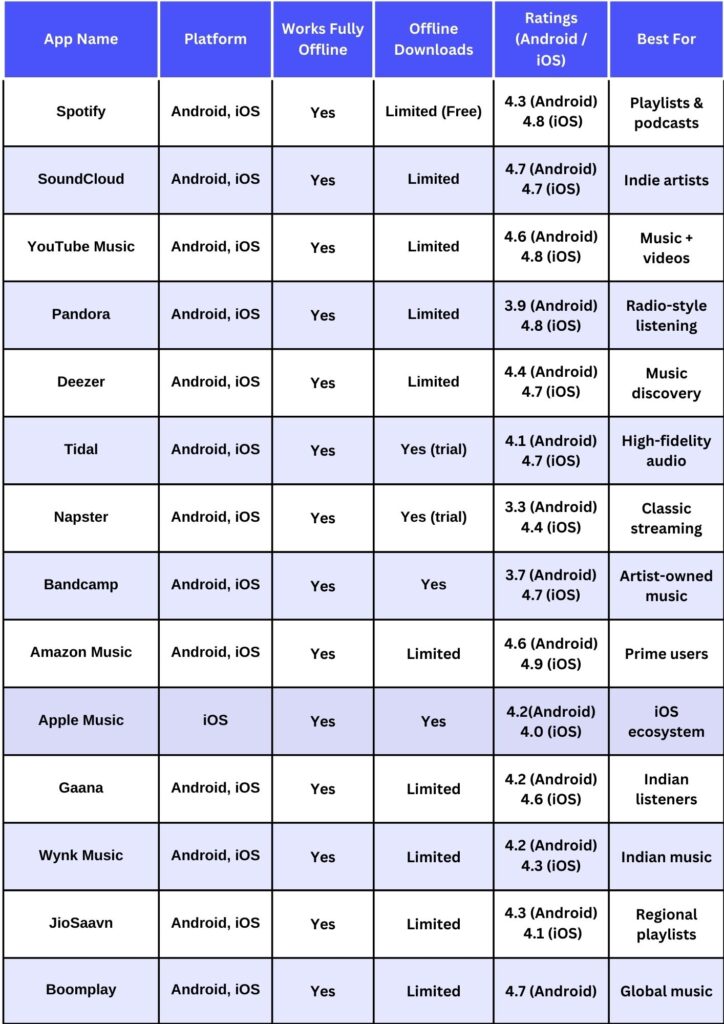
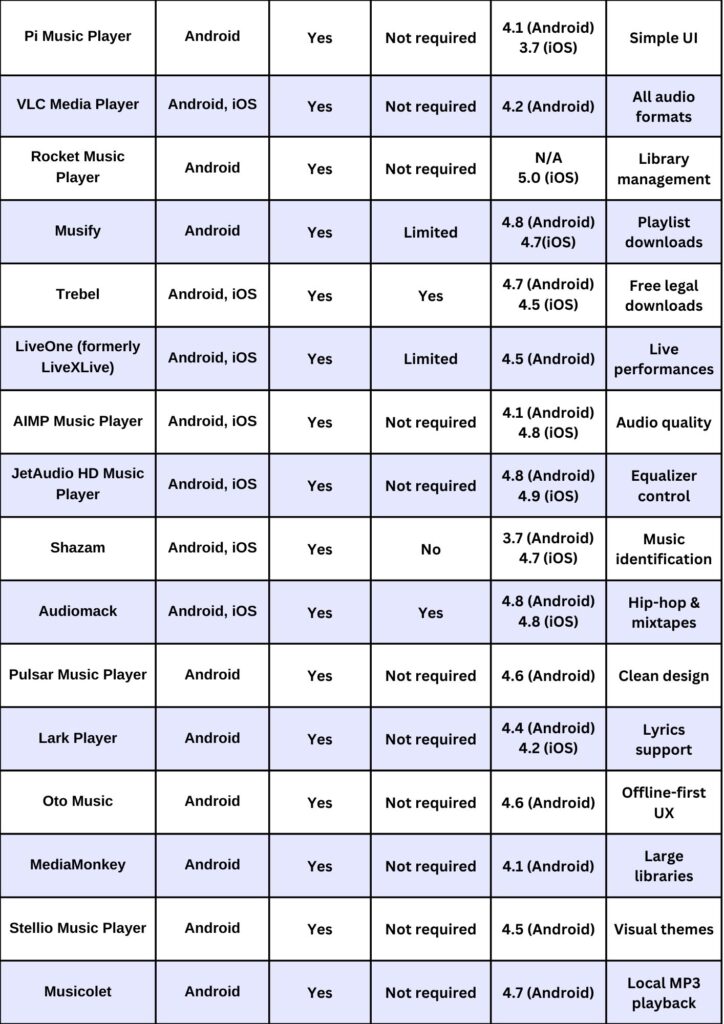
      top free offline music apps

      Why 2026 Is the Right Year to Build Your Music Streaming App?

      The Market Gap Is Still Realstic

      Spotify and Apple Music dominate the mainstream. But billions of listeners exist outside the mainstream. Regional music markets, niche genres, and underserved communities represent enormous white space. A platform built specifically for Latin indie artists, South Asian pop, or a specific cultural community can gain serious traction without competing head-to-head with the giants.

      The Technology Is Mature

      AI recommendation systems, adaptive streaming, and cloud infrastructure have all reached a level of maturity where you can implement Spotify-grade features at a fraction of what it cost five years ago. Cross-platform frameworks like React Native and Flutter have made it possible to build for iOS and Android simultaneously — cutting development time and cost significantly.

      Independent Artists Are Looking for Better Homes

      Many artists are frustrated with the royalty structures and algorithm opacity of existing platforms. A platform that treats artists as partners — offering real-time analytics, transparent royalty tracking, and direct fan engagement tools — has a genuine acquisition advantage. Independent artists bring their audiences with them.

      AI Has Changed Personalization 

      Research shows that strong personalization can boost market share by nearly 23%. In 2026, AI-powered recommendation engines are accessible to smaller teams and lower budgets than ever before. A startup can now build discovery features that feel genuinely intelligent — not just algorithmic noise.

      Basic & Advanced Features Every Music Streaming App Should Have in 2026

      Features are where budgets balloon fast. Knowing which ones are essential versus which ones are nice-to-have is one of the most valuable decisions you will make in planning your build.

      Basic Features

      User Accounts and Music Discovery

      • User Registration & Login: Sign-up via email, phone number, or social accounts. Profile customization and usage history tracking.
      • Smart Search: Users should find songs by title, artist, album, genre, or mood. Include autocomplete and fuzzy matching for a polished experience.
      • Playlists: Allow users to create, save, edit, and share playlists. This is core engagement. It is how users build habits around your app.
      • Basic Recommendations: Even a simple ‘You May Also Like’ section, built on listening history, dramatically improves session length.
      • Playback Controls: Play, pause, skip, shuffle, repeat, and volume control. These seem obvious but must be rock-solid before anything else.
      • Music Library: A well-organized library where users can save albums, artists, and playlists for quick access.

      Technical Foundations

      • Audio Streaming Engine: The core of your app. Must handle adaptive bitrate switching, low latency, and smooth buffering transitions.
      • Push Notifications: Alert users about new releases, playlist suggestions, or friend activity. Keep them short, relevant, and non-intrusive.
      • Social Sharing: Let users share what they are listening to on WhatsApp, Instagram, or X. This is word-of-mouth marketing built into the product.

      Advanced Features

      Smart Features That Keep Users Coming Back

      • AI-Powered Recommendations: Machine learning models that analyze listening behavior, time of day, and activity context to serve hyper-relevant suggestions. This is the single biggest retention lever after content quality.
      • Contextual & Mood-Based Playlists: Dynamically generated playlists for working out, studying, or relaxing. These recalculate automatically, keeping content fresh without editorial work.
      • Lyrics Display: Real-time synced lyrics turn passive listening into an interactive experience. Users who engage with lyrics stay longer per session.
      • Voice Search & Assistant Integration: Hands-free control via Siri, Google Assistant, or Alexa. Essential for commuter and gym audiences.
      • Podcast Integration: Adding podcasts broadens your content offering and opens additional monetization lanes.

      Premium Features Worth the Investment

      • Offline Mode with DRM: The number one reason users upgrade from free to paid tiers. Requires implementing DRM across platforms — complex but high-value.
      • High-Resolution Audio: Lossless and spatial audio formats for audiophiles. Tidal built an entire brand around this. If your target user cares about sound quality, this matters.
      • Artist Dashboard: Real-time streaming analytics, geographic audience data, and royalty tracking for artists. Attracts independent artists who bring their fanbase.
      • Live Streaming Events: Artists can host live performances, Q&As, or listening parties. Builds community and creates event-driven engagement spikes.
      • Social Features: Follow friends, see what they are listening to, and collaborate on playlists. Turns a solo activity into a shared experience.

      How Much Does Music Streaming App Development Cost?

      Here is the honest breakdown. There is no single number — but there is a clear range based on what you are building.

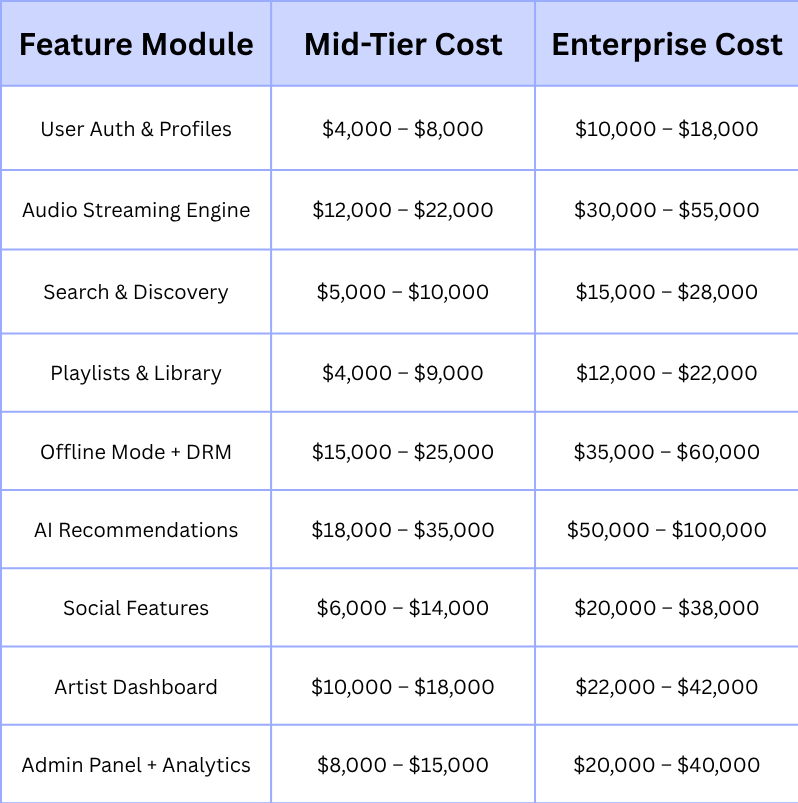
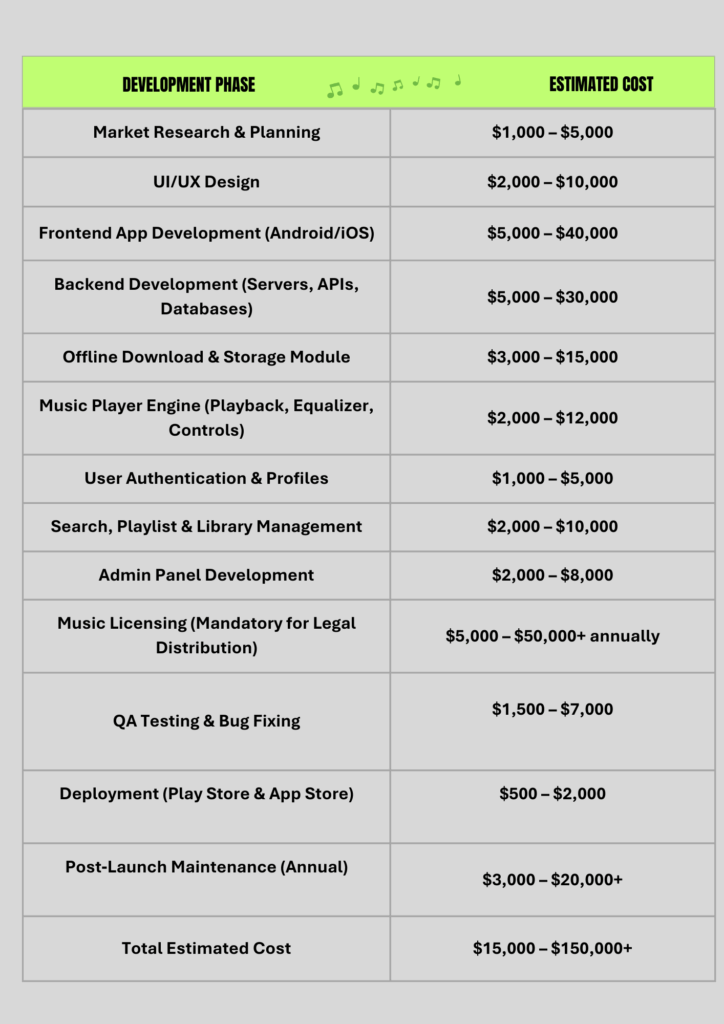
      cost table of music streaming app development
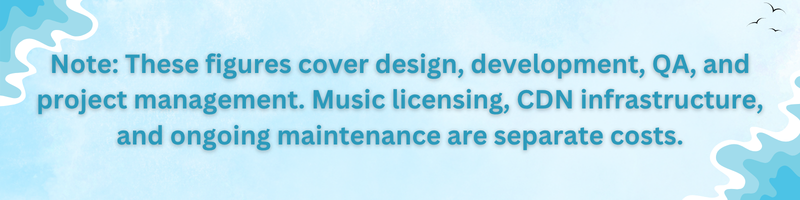
      note about music app development

      Cost of Every Feature One by One

      Cost of Every Feature One by One

      How Many Types of Music Apps Can You Build?

      Not every music app is built the same way — and the type you build directly shapes your features, licensing needs, and development cost.

      On-Demand Streaming

      Users pick exactly what they want to play. This is the Spotify model. It requires the most robust licensing and the deepest music catalog. Cost range: $80,000 – $300,000+.

      Internet Radio / Algorithmically Curated

      Continuous streams based on genre, mood, or artist. Think Pandora. Less catalog complexity, but you lose user control. Cost range: $40,000 – $120,000.

      Cloud Music Locker

      Users upload their own music and stream it from the cloud. Fewer licensing headaches since users own the content. Cost range: $30,000 – $80,000.

      Social Music Platforms

      Community-driven apps where users share playlists, follow friends, and discover music through social connections. Cost range: $60,000 – $180,000.

      Hi-Fi / Audiophile Platforms

      Apps focused on lossless, high-resolution, or spatial audio. Premium positioning with a niche audience. Think Tidal HiFi. Cost range: $100,000 – $250,000.

      Podcast + Music Hybrid

      Combines streaming music with exclusive or licensed podcast content. Broader engagement but more content licensing complexity. Cost range: $120,000 – $350,000.

      What Decides the Cost of Building a Music App?

      Music Licensing

      Licensing is the cost most founders underestimate. You are not just paying for development, you are paying for the right to play music. Public performance rights, mechanical licenses, and sync licenses each apply to different use cases.

      In the US alone, you will likely negotiate with ASCAP, BMI, and SESAC for performance rights. Anticipate separate agreements or through sub-licensees for every country you grow into. Smaller platforms often start with aggregator services (like DistroKid or CD Baby) that offer pre-negotiated licensing deals, which reduces upfront cost but limits catalog depth.

      Budget roughly $5,000 – $50,000 for initial licensing setup, depending on your target market and catalog size.

      Audio Quality, Infrastructure & CDN Costs

      Audio quality is not just a listener feature — it is an infrastructure decision. Higher quality audio means larger files, more bandwidth, and higher CDN costs.

      CDN delivery typically costs $0.015 – $0.03 per GB of data transferred. If your platform serves 100 million song plays a month (with an average file size of 4MB per song), you are looking at $6,000 – $12,000 monthly just in CDN costs. Cloud infrastructure on AWS, Google Cloud, or Azure adds another $10,000 – $30,000 monthly for a mid-size platform.

      This is why understanding your expected listener volume matters before you sign infrastructure contracts.

      Platform Scope

      Every platform you add increases cost. An iOS-only MVP is the cheapest starting point. Adding Android adds roughly 30-40% more development cost if building natively. Adding web, CarPlay, Android Auto, or smart TV apps each bring their own requirements.

      Cross-platform frameworks like React Native or Flutter can reduce this cost significantly — often 25-35% cheaper than native development for dual-platform builds, but they come with trade-offs in performance for audio-heavy applications.

      AI & Personalization System Depth

      Basic recommendations (collaborative filtering based on listening history) are achievable at modest cost. Deep personalization — context-aware playlists that shift based on time, activity, location, and mood, requires a proper machine learning infrastructure: data pipelines, model training, real-time inference, and continuous retraining.

      A lightweight recommendation system adds $18,000 – $35,000 to development. A full AI personalization engine that rivals Spotify’s Discover Weekly can push $50,000 – $100,000 — but it pays back in retention and conversion from free to paid.

      How to Build a Music App on a Low Budget?

      Smart Development Choices

      • Start with an MVP. Validate your audience and core experience before building everything. A focused MVP lets you learn from real users before spending on advanced features.
      • Use cross-platform frameworks for the initial build. React Native or Flutter can serve both iOS and Android with one codebase — significantly cutting your first-year development spend.
      • Leverage existing audio APIs. Platforms like Spotify for Developers, Apple MusicKit, or third-party audio SDKs can accelerate certain features without building from scratch.
      • Prioritize backend scalability early. A well-designed backend from Day 1 is cheaper than rebuilding a fragile one after you hit scale problems.
      • Use cloud-native infrastructure. Pay-as-you-go cloud pricing means you only pay for what you actually use during early growth stages.

      Where to Cut Costs Safely

      • Reduce scope on social features in V1. Social tools are nice-to-have, not must-have, for early traction. Add them once core retention is solid.
      • Start with one region. Global licensing is expensive. Launching in one market first reduces legal complexity and lets you perfect the product.
      • Use open-source for back-end services where possible. PostgreSQL, Redis, and Elasticsearch power production-grade apps for free.
      • Hire a development partner in Eastern Europe or South/Southeast Asia. The quality gap versus North American teams has narrowed considerably, and the cost gap is still significant.

      What Affects the Final Price of Your Music App?

      The Biggest Cost Factors

      If you want to know where the money really goes, here are the factors that have the highest impact on your final budget:

      Feature Complexity

      Every advanced feature — offline mode, AI personalization, artist dashboards, multiplies development hours. Choose features based on what your target user actually needs, not what Spotify has.

      Platform Count

      Each additional platform (iOS, Android, web, CarPlay) adds real cost. Start narrow and expand.

      Team Location

      A full build in North America can cost 2-3x the same build in Eastern Europe, and 4-5x the same build in South Asia. Quality vetting matters more than geography.

      Music Licensing

      Especially for on-demand streaming. This is a recurring cost, not a one-time expense.

      Infrastructure Scale

      Your CDN and cloud costs grow with your user base. Plan this before you launch, not after.

      Post-Launch Maintenance

      Budget 15-20% of your initial build cost annually for updates, security patches, and feature additions.

      What Hidden Costs Come With Building a Music App?

      Most cost guides stop at development. The real cost picture includes several factors that rarely make it into the first budget conversation.

      DRM Implementation

      Digital Rights Management is legally required for any platform offering downloadable or offline content. Implementing Apple FairPlay, Google Widevine, and Microsoft PlayReady across platforms adds significant development time and ongoing licensing fees.

      Content Moderation

      If your platform allows user-generated content (covers, remixes, podcast uploads), you need moderation tools — both automated and human-reviewed. This is both a cost and a legal necessity.

      GDPR and Privacy Compliance

      If you launch in Europe or handle EU users’ data, GDPR compliance requires specific data architecture, consent management, and audit capabilities. Expect $20,000 – $50,000 in additional development cost to do this properly.

      Royalty Tracking and Payments

      You are legally obligated to track every stream and pay the corresponding royalty to rights holders. Building a reliable royalty calculation and disbursement system is an engineering challenge most people do not see coming.

      App Store Fees

      Apple takes a 30% cut (15% for smaller developers) of subscription revenue from iOS users. Factor this into your pricing and revenue model.

      Customer Support Infrastructure

      Payment disputes, account issues, and licensing questions require a support system. Underinvesting here destroys user trust fast.

      Third-Party Integrations

      Payment gateways, analytics tools, social media APIs, and music licensing platforms all come with integration costs and recurring fees.

      Security Audits

      A platform handling payment data and personal user information needs periodic security auditing. Not optional. Not cheap.

      Recommended Tech Stack for Your Music Streaming App in 2026

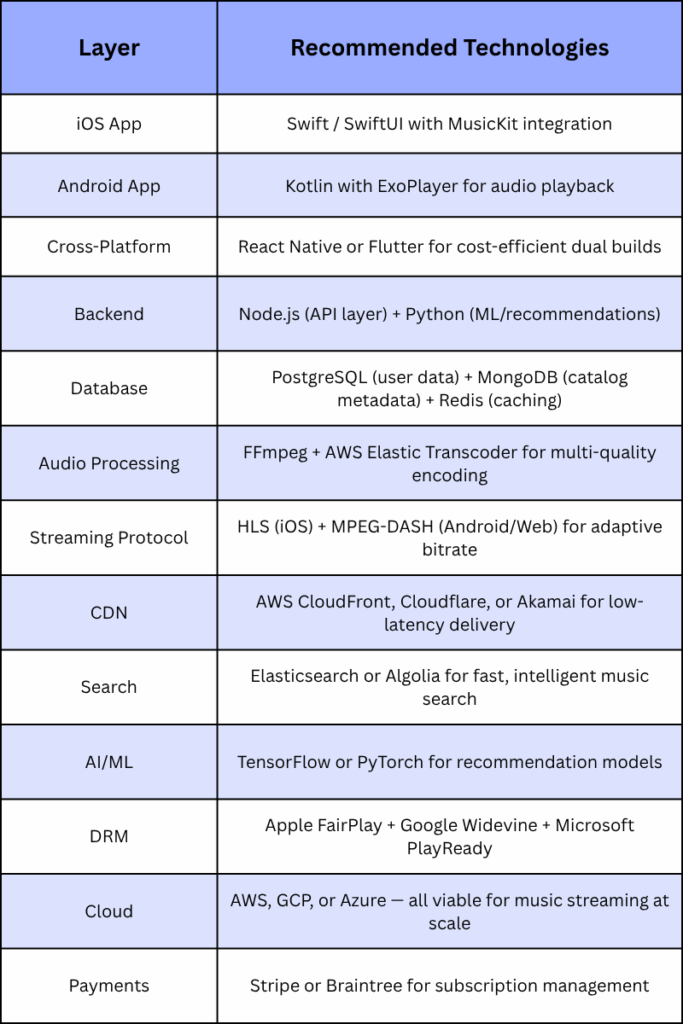
      Technology choices affect performance, scalability, and long-term maintenance cost. Here is what modern production-grade music streaming apps use:

      recommended tech stack  for your music app

      Steps to Build Your Music App From Start to Finish

      Here is a realistic phase-by-phase timeline for a mid-range music streaming app build:

      Phase 1 — Discovery & Planning (Weeks 1-3)

      Define your target audience, feature set, monetization strategy, and licensing approach. This phase determines every decision that follows. Cutting it short is the most expensive mistake you can make.

      Phase 2 — UI/UX Design (Weeks 4-7)

      Wireframes, user flows, visual design, and interactive prototypes. Good design reduces development rework and improves conversion from the first launch.

      Phase 3 — Core Development (Weeks 8-20)

      Backend architecture, audio streaming engine, user authentication, playlists, search, and admin panel. The longest and most costly stage is this one.

      Phase 4 — Advanced Features (Weeks 18-28)

      AI recommendations, offline mode, social features, DRM implementation, and payment integration. Runs parallel to late-stage core development.

      Phase 5: QA & Testing (Weeks 26–30)

      Security audits, cross-device compatibility checks, functional testing, and performance testing. Don’t miss this. Particularly vulnerable to platform-specific flaws are audio apps.

      Phase 6: Launch and After-Launch (Week 30+)

      App Store submission, setting up a CDN, setting up monitoring, and gathering comments within the first week. Aim for close post-launch assistance for at least three months.

      Total Timeline: 6-9 months for a mid-tier platform. 3-4 months for a focused MVP. 12+ months for enterprise-grade.

      Ways to Earn Money From Your Music Streaming App

      How you make money matters as much as how much it costs to build. Here are the revenue models that work in today’s streaming landscape:

      Freemium + Subscription

      Offer basic listening for free (with ads) and charge for premium features, offline mode, and higher audio quality, no ads. This is Spotify’s core model and remains the most effective for large-scale user acquisition.

      Subscription Only

      No free tier. Higher quality commitment but slower growth. Works for niche platforms where the audience is already primed to pay.

      Ad-Supported Free

      Monetize purely through audio and display advertising. Lower ARPU (average revenue per user) but strong for high-volume, emerging markets.

      Artist Partnerships & Promotion

      Charge artists or labels for promoted placement, playlist features, or early access to analytics. A meaningful secondary revenue stream for platforms with strong catalog relationships.

      Live Events & Ticketing

      Monetize live streaming sessions, exclusive performances, or fan meetups. Growing fast as artists look for direct-to-fan revenue channels.

      Merchandise & Fan Commerce

      Allow artists to sell merchandise through your platform. Takes a commission. Builds deeper artist-fan engagement.

      How Long Before You Get Your Money Back From Your App?

      Profitability in music streaming is not instant. It follows a predictable curve, and knowing the curve helps you plan your runway.

      In year one, most platforms are cash-negative. You are covering licensing, infrastructure, and team costs while building your user base. User acquisition cost is highest at launch, and conversion from free to paid is lowest when your product is newest.

      By year two, platforms with strong retention (daily active users above 40% of monthly actives) start seeing subscription revenue outpace operational costs at a meaningful scale. AI personalization plays a critical role here, users who receive accurate recommendations churn at a significantly lower rate.

      Break-even typically comes at 12-18 months for niche platforms with controlled licensing costs, and 24-36 months for broader on-demand platforms competing in major markets.

      The long-term math is strong. Subscription-based music platforms have high LTV (lifetime value) per user, low marginal cost per additional stream, and a flywheel effect where growing catalogs attract more artists who attract more listeners. Once that loop starts working, it returns compound.

      What Decides the Cost of Building an App Like Spotify?

      Planning

      Before a single line of code is written, your planning decisions lock in the majority of your cost. Scope creep — the slow addition of features beyond the original plan, is the leading cause of budget overruns in app development. A disciplined discovery phase with a clearly documented feature list and technical requirements is genuinely worth its cost.

      At Apptechies, we have seen firsthand how projects that invest properly in the discovery and planning phase finish closer to budget and on time. Those that skip it almost always end up rebuilding significant portions of the product.

      Finding the Mobile App Developers

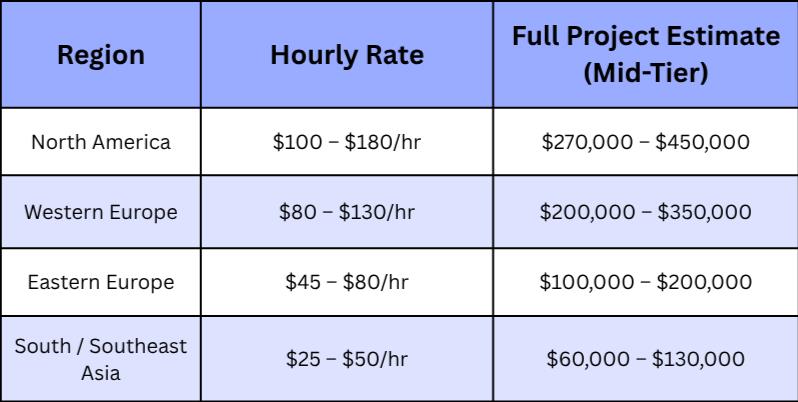
      Your team composition affects both cost and quality. Here is what typical hourly rates look like in 2026:

      Finding the Mobile App Developers

      The best approach is not always the cheapest team. Look for developers with proven audio streaming experience, a portfolio of similar projects, and a clear QA process.

      Designing the App Like Spotify

      UI/UX design for music apps is deceptively complex. The interface needs to work in the dark (night listening), during workouts (sweaty hands, glancing interactions), and while commuting (one thumb, divided attention). Spotify’s design language, dark backgrounds, high-contrast text, large tap targets, is not an aesthetic preference. It is a functional design built around real listening contexts.

      Design cost for a mid-tier music app typically runs $8,000 – $25,000. Enterprise-grade design with extensive user research, accessibility audits, and design system creation can reach $40,000 – $80,000.

      Deciding on a Platform

      iOS-first is common for apps targeting premium markets (US, UK, Australia) where iOS users have higher purchasing power and conversion rates. Android-first makes more sense for emerging markets with high smartphone adoption. Cross-platform from the start (using React Native or Flutter) suits startups looking to validate in both markets simultaneously with a controlled budget.

      For a music streaming app, native development still has performance advantages, especially around audio focus handling, background playback, and CarPlay/Android Auto integration. But cross-platform has caught up significantly and is a legitimate choice for most non-enterprise builds.

      Getting a License to Play the Music

      You cannot launch a public music streaming service without proper licensing. Here is a simplified roadmap:

      • Identify which license types you need: performance rights, mechanical rights, and synchronization rights (for video).
      • In the US, approach ASCAP, BMI, and SESAC for performance rights. Each represents a different catalog.
      • For mechanical rights, use the Harry Fox Agency or a licensing aggregator.
      • For international markets, engage with local PROs (Performing Rights Organizations) in each territory.
      • Consider licensing aggregator services (DistroKid for Developers, Musickit, etc.) for faster catalog access at lower upfront cost.
      • Budget for ongoing royalty reporting and payment infrastructure, this is legally required, not optional.

      Features You Need to Build in Your Music App

      Authentication

      Authentication in a music app goes beyond username and password. Users expect social sign-in (Google, Apple, Facebook), biometric login (Face ID, fingerprint), and seamless session persistence across devices. Security matters too, you are storing payment information and personal listening data.

      Build this with OAuth 2.0 and JWT tokens. Add multi-factor authentication for account security. Estimated cost: $4,000 – $12,000 depending on platform count and security requirements.

      Music Streaming

      The streaming engine is the heart of your application. It must handle real-time playback initiation (under 2 seconds from tap to first sound), adaptive bitrate switching based on connection quality, background playback when the phone is locked, and seamless transitions between tracks.

      HLS (HTTP Live Streaming) is the standard for iOS. MPEG-DASH handles Android and web. Both require pre-encoded audio in multiple quality levels (96kbps, 160kbps, 320kbps) stored on your CDN and served based on the listener’s bandwidth.

      This is the component where cheap shortcuts cost you users. Buffering, skipping, and audio quality drops are the top reasons users abandon music apps. Build this properly from Day 1. Estimated cost: $15,000 – $55,000.

      Search

      Search in a music app needs to be fast (under 300ms for results to appear), fuzzy (handling misspellings), and contextual (understanding that ‘weekend’ might mean The Weeknd). Autocomplete suggestions, recent search history, and trending searches all improve the experience.

      Elasticsearch or Algolia power most production-grade music search implementations. Estimated cost: $6,000 – $20,000.

      Playlists

      Playlists are the primary engagement mechanism in music streaming. Users who build playlists have dramatically higher retention rates. Your playlist feature needs to support creation, editing, collaborative playlists (multiple users adding tracks), sharing to social media, and smart suggestions for what to add next.

      On the backend, playlists are surprisingly complex, especially when handling large collaborative playlists with concurrent edits. Estimated cost: $5,000 – $18,000.

      Offline Mode

      Offline mode is the single highest-value premium feature in music streaming. Users who listen offline are far less likely to cancel their subscription — they depend on it. But implementing it properly requires DRM integration across all three major systems (FairPlay, Widevine, PlayReady), local storage management, license expiry handling, and sync logic when the user comes back online.

      Do not offer offline without DRM. It exposes you to significant legal liability. Estimated cost: $15,000 – $60,000 depending on platform scope.

      Conclusion

      Building a music streaming app like Spotify is one of the more ambitious and rewarding digital product investments you can make in 2026. The market is large and still growing. The technology is mature enough to build competitive features at reasonable cost. And the audience, both listeners and independent artists — is actively looking for alternatives to the platforms that currently dominate.

      The cost to develop a music streaming app ranges from $30,000 for a tightly scoped MVP to $300,000+ for a full-featured competitive platform. But the number that matters most is not the build cost — it is the combination of licensing strategy, infrastructure investment, and user experience quality that determines whether your platform survives its first year.

      Start focused. Build core streaming and personalization well. Learn from real listeners. Then expand.

      At Apptechies, we work with founders and businesses to plan, design, and build streaming platforms that are engineered for the real world, not just the pitch deck. Whether you are starting from scratch or scaling an existing product, the right strategy from the beginning makes every dollar count.

      Frequently Asked Questions

      Q: How much does it cost to build a music streaming app in 2026?

      Ans: The cost ranges from $30,000 – $60,000 for a basic MVP, $80,000 – $150,000 for a mid-tier competitive app, and $300,000+ for an enterprise-grade platform. Music licensing, CDN infrastructure, and ongoing maintenance costs are additional.

      Q: How long does it take to develop a music streaming app?

      Ans: A focused MVP takes 3-4 months. A full-featured mid-tier app takes 6-9 months. Enterprise-grade platforms typically take 12+ months, with ongoing development after launch.

      Q: Do I need music licensing before I launch?

      Ans: Yes. You cannot legally stream copyrighted music to users without proper licensing agreements. Secure performance rights and mechanical licenses before your public launch.

      Q: Can I build a music streaming app cheaper using cross-platform frameworks?

      Ans: Yes. React Native or Flutter can reduce development cost by 25-35% compared to native builds for iOS and Android separately. There are performance trade-offs, but for most non-enterprise builds, cross-platform is a legitimate and cost-effective choice.

      Q: What is the most important feature to get right first?

      Ans: The audio streaming engine. Buffering, lag, and quality drops are the primary reasons users abandon music apps. No amount of great design compensates for unreliable playback.

      Q: When does a music streaming app start making money?

      Ans: Most platforms break even between 12-36 months depending on licensing costs, market focus, and conversion from free to paid. Niche platforms with controlled licensing costs tend to reach profitability faster.

      Q: Is AI personalization worth the investment?

      Ans: Yes, especially for retention. Research shows strong personalization can boost market share by nearly 23%. Users who receive relevant recommendations listen longer and churn at significantly lower rates.

      Q: What hidden costs should I plan for?

      Ans: DRM implementation, royalty tracking systems, GDPR/privacy compliance, app store fees (Apple takes up to 30% of subscription revenue), content moderation, and ongoing security audits are the most commonly missed budget items.

      Author Name: Ajay Chaudhary

      Author Bio: AJ Chaudhary, CEO of Apptechies. He is a full-stack & AI Mobile app developer with 10+ years of experience developing web & mobile applications. He has successfully delivered projects for different industries and helped companies turn concepts into scalable solutions. Passionate about technology, he simplifies complicated tech topics for entrepreneurs and startups by sharing insights.
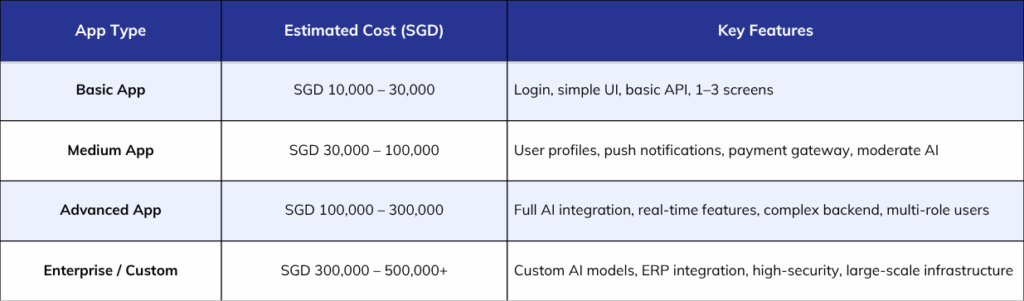
    3. Dating App Features That Every Successful App Must Have in 2026

      Dating App Features That Every Successful App Must Have in 2026

      Do you remember the last time you deleted an app from your phone?

      Maybe it wasn’t because it looked bad. It was because it didn’t seem useful. Dating apps are no different. A 2024 Forbes study found that more than three-quarters of dating app users reported swiping fatigue, and the apps losing users aren’t the ones with the worst designs. They’re the ones that have stopped developing.

      The global dating app market generated revenue between $10.89 billion and $11.61 billion in 2025. According the global market data 350 million people using dating apps worldwide. That is a massive opportunity. But here is the catch, global dating app installs and sessions declined in both 2024 and 2025. Users have more choices than ever, and they are becoming far more selective. They select apps actually deserve space on their phone.

      So if you’re a developer, founder, or entrepreneur thinking about building a dating app in 2026, this blog is exactly what you need. We’ve detailed every feature that’s essential, why it’s important, and what your app really needs to compete.

      Let us get into it.

      Who Actually Uses Dating Apps in 2026?

      Before building an app, you need to know who you are building it for.

      Nearly half of people aged 18-29 and 30-49 have used online dating apps, while only 20% of people aged 50 or older have. Your main audience is 18-45 years old. They’re mobile-first, impatient, and have zero tolerance for slow or confusing dating apps.

      In 2026, users are prioritising intentional dating, being upfront about relationship goals, values, and timelines from the very beginning. They do not want to swipe through hundreds of profiles. They want fewer, better matches. Your features need to reflect that shift.

      The Core Dating App Features You Cannot Skip

      These are the non-negotiables. Every dating app, big or small, needs these working perfectly before anything else.

      Fast and Simple Onboarding

      Your user decides whether to stay or leave within the first 60 seconds. If your signup process is long, confusing, or asks for too much information upfront, most people will never get past it.

      Keep it simple. Allow user to login via their Google or Apple ID. Let users build their profile gradually rather than filling in everything before they can see a single match. Ask for the essentials first, photos, age, and location, then prompt for more detail later.

      A profile should also support more than just photos. Voice clips, short video introductions, and interest tags all help users show personality beyond a headshot. In 2026, users are moving away from highly curated, filtered personas and toward authentic self-presentation and your onboarding needs to make that easy.

      AI-Powered Matching

      Basic swiping is no longer enough on its own. Hinge introduced an AI recommendation feature that drove a 15% increase in matches and contact exchanges after it went live. That is a meaningful result that came directly from smarter matching — not more users or a redesigned interface.

      A good matching algorithm looks at more than location and age. It considers behavior — who a user actually engages with, what profiles they spend time on, who they message first. Over time, it gets smarter. The more a user interacts, the more accurate the suggestions become.

      Only 21% of Americans believe that dating app algorithms can accurately predict compatibility, which means there is still a huge trust gap to close. Build a matching that actually works and communicate clearly to users how it operates. Transparency builds confidence.

      Real-Time Chat and Messaging

      Once two people match, the conversation needs to flow naturally. Your messaging system should feel as smooth as texting — fast, clean, and reliable.

      Include read receipts, photo sharing, voice messages, and the ability to react to messages. Give users control over who can message them and easy tools to block or report someone without friction.

      Hinge found that 72% of users are more likely to engage with a match when it arrives with a message already attached. This led to their AI Convo Starters feature, which generates opening lines based on the other person’s profile. Users can send it as is or edit it before sending. It removes the most common friction point in online dating: not knowing what to say first.

      Location-Based Discovery

      People want to meet people nearby. GPS-based matching with adjustable distance filters is a foundational feature that has been around since Tinder launched — and it still matters in 2026.

      Give users control over their location radius, let them search by neighborhood or city, and allow them to hide their exact location while still being discoverable. Location precision without privacy compromise is the goal.

      Push Notifications Done Right

      Notifications keep users coming back. A new match, a reply, a profile like, these are moments that pull someone back into the app. But notifications that feel spammy or irrelevant do the opposite.

      Build smart notification logic. Send alerts when something really interesting happens. Give users the opportunity to choose what they want to be notified about. Timing also matters a notification at 2 a.m. is more likely to be ignored than acted upon.

      Photo and Identity Verification

      Fake profiles destroy trust faster than any other problem. Build a verification system that checks profile photos against a live selfie. It does not need to be invasive, just enough to confirm the person is real and looks like their pictures.

      Tinder’s FaceCheck safety feature reduced interactions with bad actors significantly after it launched and it became a genuine selling point for users who had previously lost trust in the platform.

      Block, Report, and Moderation Tools

      Every user needs to feel that they can quickly and easily remove someone from their experience. Your report flow should take no more than three taps. Your moderation team or AI moderation system should respond quickly, within hours, not days.

      More than 50% of female dating app users under 50 have received unwanted explicit messages. This is not a small edge case. Build moderation tools that take this seriously and let users control their experience.

      End-to-End Encryption

      Every message, photo, and piece of personal data shared inside your app needs to be protected. End-to-end encryption, two-factor authentication, and secure data storage are the baseline in 2026 — not extras.

      Users are increasingly aware of data privacy. An app that clearly communicates how it protects user data will earn more trust than one that stays silent on the topic.

      Safety Check-In for In-Person Dates

      This is one of the most underused features in dating apps, and one of the most genuinely useful ones. Allow users to share their live location with a trusted friend or family member before going on a date. Add an optional check-in reminder so someone is notified if the user does not confirm they are safe after a set time.

      This feature alone can significantly improve how safe users feel using your app, and that feeling translates directly into better reviews, longer retention, and word-of-mouth growth.

      Video Profiles and Voice Prompts

      A static photo tells you very little about someone. A 30-second video or a short voice clip tells you everything, their energy, their humour, how they actually sound. By 2024, 40% of dating app users had already tried video-based features and that number has only grown.

      Give users the option to record a short video introduction or answer a prompt with their voice. Make it optional, not every user will want to do it, but for the ones who do, it creates a significantly richer profile.

      In-App Video Calling

      Meeting on a video call before meeting in person has become a completely normal step in modern dating. Build this directly into your app so users never have to share a personal phone number to make it happen.

      Keep the feature simple. One-tap calling, no account setup, clean interface. The goal is to make it as easy as possible for two people to have a real conversation before committing to an in-person meeting.

      Niche and Values-Based Matching Filters

      When asked what matters most in finding a match, 51% of dating app users cited sharing similar family values as very important, followed by similar political beliefs at 33% and religious or spiritual beliefs at 31%.

      People want to filter by what actually matters to them not just age and distance. Build filters for values, lifestyle, religion, dietary preferences, relationship goals, and communication style. The more precisely someone can describe what they are looking for, the more likely your app is to deliver it.

      Gamification and Engagement Loops

      The apps that keep users coming back daily have one thing in common, they make the experience feel engaging, not like a chore.

      Daily matches, icebreaker games, streak rewards, and time-limited boosts all create reasons to open the app even when there is nothing urgent waiting. Tinder’s Double Date feature — which lets pairs of friends match up with other pairs for a shared experience — was a major success, particularly with women under 30. It turned solo swiping into a social activity.

      Think about what makes your app enjoyable to use, not just functional.

      Inclusivity by Design

      63% of LGBTQIA+ adults have used dating apps more than any other demographic group. Your app needs to reflect the full range of how people identify.

      Expanded gender identity options, pronoun display, relationship style filters, and orientation settings are not edge-case features. They are expected by a large and loyal user base. Build them in from the beginning rather than adding them as an afterthought.

      AR and VR Dating Experiences

      Virtual reality dates immersive experiences where two people can explore a virtual environment together are among the most anticipated developments in dating app technology for 2026 and beyond.

      This is still early-stage for most apps. But if you are building a product designed to stand out in a crowded market, exploring AR-powered profile experiences or virtual shared activities puts you years ahead of competitors still relying on photos and text.

      Blockchain for Trust and Payments

      Blockchain-powered identity verification and data transparency are emerging as a solution to the trust problem that has long plagued dating apps. When a user knows their identity has been cryptographically verified, and that their data is not stored in a centralised server waiting to be breached, the entire experience feels safer.

      How to Monetise These Features

      Building great features is only half the work. Receiving payment for them is the other part.

      The most effective monetisation model in 2026 combines a free tier that is genuinely useful with a premium subscription that makes the experience significantly better. Put the right things behind the paywall — unlimited likes, advanced filters, profile boosts, read receipts, and the ability to see who liked you first.

      Around 35% of dating app users have paid for premium features, with higher-income users at 45% much more likely to pay. That means your free experience needs to be good enough to attract users — and your premium tier needs to be good enough to convert them.

      Avoid locking basic safety features or core messaging behind a paywall. Users will not forgive that.

      What the Top Dating Apps in USA Are Getting Right

      The top dating apps in USA, Tinder, Hinge, Bumble, and Match — are all investing heavily in the same direction: AI-powered personalisation, safety infrastructure, and reducing the friction that causes users to give up and delete the app.

      Match Group committed $60 million toward AI and product development at Tinder alone. Bumble is rebuilding its entire platform from scratch as a cloud-native, AI-first system. These are not small bets — they are signals about where the entire industry is heading.

      You do not need a $60 million budget to compete. But you do need to understand what these apps are building and why — then find your own angle within that direction.

      Build Your Dating App With Apptechies

      You now know exactly what features a successful dating app needs in 2026. The harder question is, who do you trust to build it?

      Apptechies is a mobile app development company that has spent over 10 years building apps that actually launch, actually perform, and actually grow. Our team covers everything from UI/UX design and AI integration to backend architecture and App Store deployment.

      As an iOS app development company and full-stack Android and cross-platform development team, we handle the complete build — customer app, driver app, admin panel, and everything in between — so you can focus on your business while we focus on your product.

      Whether you are a first-time founder with a dating app idea or an established business looking to enter the space, we will help you build something people actually want to use.

      Talk to our team today and get a free consultation on your dating app project.

      Frequently Asked Questions

      Q. What Are The Must-have Features Of A Dating App In 2026?

      Ans: The core features every dating app needs are smart onboarding, AI-powered matching, real-time chat, location-based discovery, photo verification, block and report tools, and push notifications. Advanced features like video calling, AI conversation starters, and values-based filters are what separate good apps from great ones.

      Q. How Much Does It Cost To Build A Dating App In 2026?

      Ans: A basic dating app with core features typically starts around $15,000–$30,000. A full-featured app with AI matching, video calling, and admin dashboard usually falls between $40,000–$80,000. The final cost depends on the platform, feature complexity, and the team you work with.

      Q. How Long Does It Take To Create A Dating Application?

      Ans: A simple dating app takes roughly 3–4 months from design to launch. A fully featured app with AI, video, and custom matching logic typically takes 6–9 months. Rushing the timeline almost always creates problems after launch.

      Q. What Makes A Dating App Safe For Users?

      Ans: Safety comes from combining photo verification, end-to-end encryption, fast block and report tools, AI content moderation, and optional safety check-in features for in-person dates. Users need to feel protected before they feel comfortable using your app.

      Q. Should I Create A Native App Or Go Cross-platform?

      Ans: Cross-platform frameworks like Flutter or React Native work well for most dating apps, especially at launch. They let you reach iOS and Android users without doubling your development budget. If your app relies heavily on device-specific hardware, native development gives you more control.

      Q. What AI Features Should A Dating App Have?

      Ans: The most impactful AI features right now are smart matching algorithms that learn from user behavior, AI-generated conversation starters, and content moderation systems that flag inappropriate messages automatically. These three alone can significantly improve both retention and user safety.

    4. Grocery App Development Cost: A Cuomplete Guide for 2026

      Grocery App Development Cost: A Cuomplete Guide for 2026

      Over the past few years, grocery shopping has changed dramatically. What once required visiting actual stores is now done with a few taps through a mobile app. Today’s customers demand smooth checkout, same-day delivery and personalized recommendations. Grocery shopping online has become an essential part of everyday life for millions of people globally, it’s no longer a practical convenience. 

      Modern grocery apps are much more than simple ordering platforms. In 2026, digital grocery sales continued to grow as customers prioritized comfort and easy ways for grocery shopping and businesses were racing to meet customer expectations. 

      According to Business Research Company, the size of the worldwide online grocery market was $655.51 billion in 2025. Projected to increase at a compound annual growth rate (CAGR) of 21.3% to reach approximately $1721.3 billion by 2030. This steady year-over-year expansion highlights the massive potential in digital grocery retail.

      For startups and retailers, this growth creates a serious opportunity. Choosing the right grocery app development company is crucial for building a scalable and competitive platform. But before entering the market, one question is most important: What is the Cost of Grocery App Development in 2026? The cost to build a grocery app typically ranges between $20,00 for the basic version to $150,000+ in 2026. 

      The grocery app development cost depends on complexity, features and scalability goals. On average:

      • A basic grocery app can cost between $20,000 to $40,000
      • A mid-tier solution ranges from $40,000 to $80,000
      • A marketplace-based grocery delivery app like Instacart can exceed $100,000 to $150,000+

      Tech stack, AI integration and business model also influence the mobile app development costs. At this point, many startups or founders are unsure about the budget. And planning your budget might feel difficult, but it’s completely normal. In this guide, we explain everything clearly, from cost factors and feature planning to tech trends. We also provide information about the timeline and complexity, so that you can plan your investment with confidence and logic.

      How Do Grocery Apps Work?

      A grocery app may seem simple on the surface. Open the app, add vegetables to the basket, pay and wait for delivery. But behind the seamless experience lies a tightly interconnected system of technology, logistics and real-time data.

      To understand the cost of grocery app development, you first need to understand how the system actually works. A modern grocery delivery app runs on three main panels and each plays an important role:

      • Customer App
      • Delivery Partner App
      • Admin Dashboard
      • Vendor App

      1. Customer Side

      The client app handles:

      • User registration and login
      • Smart product search and filtering
      • Real-time product availability
      • Carriage handling
      • Secure payment processing
      • Live order tracking

      Major platforms such as Instacart and Walmart use intelligent search systems and personalized recommendations to increase the value of the shopping cart. These apps analyze past purchases and often suggest reordered items. In 2026, users expect:

      • Reorder with one touch
      • Voice search
      • AI-based suggestions
      • Flexible delivery machines
      • Transparent delivery costs

      If the experience seems slow or confusing, users quickly uninstall. Convenience drives retention.

      2. Delivery Partner System

      When a customer places an order:

      • The system assigns the order to the nearest available store or warehouse
      • It assigns a delivery partner using route optimization
      • Delivery partner receives navigation instructions
      • Real-time tracking updates the customer

      Platforms like DoorDash rely on route optimization algorithms to reduce delivery times and fuel costs. Effective routing directly improves profitability.

      3. Admin Dashboard

      The administration panel controls everything:

      • Inventory synchronization
      • Supplier management
      • Order analysis
      • Commission tracking
      • Customer behavior insights
      • Refunds and dispute management

      By 2026, advanced dashboards will integrate AI-powered demand forecasting. Retailers use predictive analytics to predict inventory demand and reduce waste.

      4. Vendor Side App

      A vendor app manages:

      • Item Management
      • Order Management
      • Coupon Code Management
      • Payment Tracking
      • Receive Orders
      • Reject Orders

      This app plays a key role in ensuring that vendors can handle orders and update inventory in real-time efficiently.

      How Technology Drives The System

      A grocery app typically integrates:

      • Cloud-based backend infrastructure
      • Secure payment gateway
      • GPS Tracking API
      • Real-time database management
      • Push notification system
      • AI-powered recommendation engine

      If you plan to build a grocery delivery app like Instacart, you need to support high traffic loads, real-time inventory updates, and scalable architecture. The technical complexity increases the overall grocery delivery app development cost.

      Simply put, grocery apps combine e-commerce, logistics, payments and artificial intelligence into one synchronized ecosystem. And the more advanced this ecosystem becomes, the more your costs of grocery app development increase.

      Now that you understand how the system works, let’s take a look at real-life businesses driving grocery delivery growth in 2026.

      Real-World Examples of Grocery Delivery Will Grow Rapidly in 2026

      The expansion of online groceries is not just based on estimates. Big businesses are still making huge investments in automation, infrastructure and last-mile delivery. That investment signals long-term confidence in online grocery shopping.

      Let’s examine real companies with verified data and strategic direction.

      Instacart – Marketplace Model at Scale

      Instacart operates a multi-vendor marketplace that connects customers with regional and national grocery chains.

      According to Instacart’s 2024 shareholder filing, the company reported revenue of $3.0 billion for 2023, reflecting continued consumer demand beyond the pandemic. The platform is supported by thousands of retail partners across North America.

      Instacart generates revenue through:

      • Delivery and service costs
      • Commission from retail partners
      • Retail media advertising

      In fact, advertising has become one of the fastest-growing sectors. Retail media in grocery apps increases margins without increasing delivery costs. This is a smart move in a price-sensitive market.

      This model requires:

      • Complex supplier management systems
      • Real-time inventory synchronization
      • Algorithm for assigning customers
      • Scalable cloud infrastructure

      This complexity significantly impacts grocery delivery app development costs when creating a similar marketplace model.

      Walmart – Hybrid Retail Powerhouse

      Walmart combines physical stores with digital grocery services. In fiscal year 2024, Walmart reports more than $100 billion in global e-commerce sales, with grocery contributing a large portion of this revenue growth.

      Walmart’s advantage lies in:

      • Store-based fulfillment
      • Curbside pickup system
      • Automated distribution center
      • AI-powered demand forecasting

      This hybrid model reduces last-mile costs because Walmart already has physical inventory hubs.

      If you’re building an inventory-based grocery app, you’ll need an inventory system, supply chain integration, and inventory calculation tools. This infrastructure increases the overall cost of developing a grocery delivery app. It also improves long-term margin control.

      Amazon and Amazon Fresh – Logistics Excellence

      Amazon continues to strengthen its grocery business through the integration of Amazon Fresh and Whole Foods. By 2024, Amazon reported total net sales of more than $574 billion, with contributions from both online stores and brick-and-mortar retail.

      • Amazon is investing heavily:
      • Robotics in fulfillment centers
      • Forecast stock location
      • Delivery extension same day and the next day
      • AI-powered recommendation system

      The logistics network reduces delivery times and increases customer retention through subscription models such as Prime.

      For entrepreneurs building grocery delivery apps like Instacart, mimicking Amazon-level automation requires advanced backend systems. This increases the overall grocery mobile app development costs.

      DoorDash – Expanding beyond restaurants

      With continued growth in the grocery and convenience categories, DoorDash projects revenue of $8.6 billion by 2023. The company expanded partnerships with major supermarkets to capture demand for non-restaurant delivery.

      This diversification represents a major trend in 2026:

      • Consumers prefer one app for multiple needs.
      • Multi-category platforms require:
      • The supplier’s onboarding system
      • Flexible commission structures
      • Engine for order management with high performance
      • Real-time dispatch algorithm

      Each layer increases grocery app development costs but increases revenue opportunities.

      Top Business Models That Shape Grocery Delivery Costs

      Your business model plays a direct role in determining the cost of grocery app development. Before estimating the cost of building a grocery app, you need to decide how your platform will work. Technical architecture, functional requirements and backend complexity all depend on this decision. Each model has different development implications.

      Inventory-Based Model

      In the inventory-based model, the business owns and manages its own inventory. You run warehouses or fulfillment centers and control prices, availability and logistics internally. This approach gives you full margin control and strong brand consistency.

      Companies like Amazon Fresh use centralized fulfillment centers to manage inventory efficiently. Because inventory data must be updated in real time. This model requires strong inventory management integration, automated tracking, and demand forecasting systems.

      From a development perspective, this structure increases development costs for the grocery app. You need to build systems that can handle inventory logic, supply chain coordination, and fulfillment tracking. However, it reduces dependence on third-party providers.

      Marketplace Model

      The marketplace model connects customers to multiple grocery stores through a single platform. Instead of holding inventory, you let retailers list products while your app manages transactions and delivery coordination.

      Instacart primarily operates under this model. This allows rapid market expansion without investing in physical shares.

      This structure requires multi-vendor dashboards, commission management systems, payment-sharing mechanisms and store-level inventory synchronization. As a result, grocery app development costs increase due to additional complexity in the backend.

      The advantage lies in scalability. You can expand to new cities faster because you bring in suppliers instead of building a warehouse.

      Hyperlocal Model

      The hyperlocal model focuses on fast delivery within a limited geographic area. The app collaborates with nearby stores and sends orders through a customized routing system.

      Platforms like DoorDash expanded into grocery delivery using this approach. This allows faster fulfillment of the last mile without ownership of inventory.

      From a technical perspective, this model relies heavily on geolocation APIs, smart shipping algorithms, and real-time availability updates. Although this reduces storage costs, it increases investment in logistics technology. This directly affects the overall grocery app developing cost.

      Subscription-Based Model

      Many grocery platforms now combine delivery with subscription programs. Customers pay fixed fees in exchange for benefits such as free delivery or special discounts. Walmart integrates subscription-based services to improve customer retention and projected revenue flow.

      Implementing this model requires recurring billing systems, subscription level management, automatic renewals and loyalty analytics. The development costs of grocery apps are increased by these functionalities, which also make the backend more complex. They also improve long-term profitability.

      Why Does This Option Affect Development Costs?

      Your business model determines the scale and complexity of your platform. A warehouse-based system requires supply chain integration. A marketplace model requires vendor management architecture. A hyperlocal app prioritizes logistics optimization. A subscription model adds recurring billing infrastructure.

      Basically, the more moving parts your model involves, the higher your grocery app development costs will be. Early structure selection lets you handle your investments carefully. It also helps you avoid needless feature expansion.

      How Much Does a Grocery App Cost?

      Now let’s focus on the original question: How much will it really cost to build a grocery app in 2026?

      The grocery app development cost depends primarily on the complexity of the function, the depth of architecture, requirements for scalability and whether you are building for one or more platforms. Growth rates also vary by region and team specialization. On average, the cost of building a grocery app falls into three practical tiers.

      Basic Grocery App: $20,000 to $40,000

      A basic version works best for startups testing a single city or single-store model. It includes essential e-commerce functionality without advanced automation.

      Generally, this version supports user registration, product listing, shopping cart management, secure payment integration, order tracking and a simple admin panel.

      The backend remains relatively straightforward. The system handles standard order processing and limited simultaneous users. Companies often launch MVPs at this stage to validate demand before scaling. This level keeps grocery delivery app development costs under control, but it limits automation and extensibility.

      Mid-level Grocery App: $40,000 to $80,000

      Multi-vendors, complex search filters, delivery partner management and real-time inventory updates are all supported by mid-level systems. This often includes push notifications, discount engines and better analytics dashboards.

      This level suits growing businesses that want structured scalability. Handling high traffic and live updates requires a strong backend architecture and cloud integration.

      At this stage, grocery app development costs increase as the system must handle multiple user roles, supplier coordination, and real-time logistics tracking. Most competing local and regional grocery platforms fall within this budget range.

      Advanced Market or Enterprise Platform: $100,000 – $150,000+

      If you plan to build a grocery delivery app like Instacart, expect a pretty high investment.

      An advanced system includes:

      • AI-powered product recommendations
      • Smart route optimization
      • Dashboard for multiple suppliers
      • Commission management
      • Subscription billing
      • Data analysis and forecasts
      • Cloud-based scalable architecture

      Mobile app development costs for grocery stores are increasing as the platform must support thousands of daily transactions, high user concurrency and seamless performance across regions. This level also requires strong security architecture and compliance standards.

      Additional Cost Considerations

      In addition to growth, companies should budget for:

      • UI/UX design
      • Continuous maintenance and updates
      • Cloud hosting and infrastructure
      • Third-party API integration
      • Marketing and customer acquisition

      Maintenance alone typically costs between 15% – 20% of the annual initial development cost. It is dependent on feature expansion and infrastructure usage.

      Read Also: What is the Difference Between iOS & Android?

      What is the Actual Cost?

      The final cost of developing a grocery delivery app depends on:

      • Business model (inventory vs. marketplace)
      • Functional complexity
      • AI integration level
      • Platform options (iOS, Android or both)
      • Scalability planning

      A simple grocery app can launch for less than $40,000. A highly scalable ecosystem designed for rapid expansion can exceed $150,000. The key is not to build the most expensive platform; it’s to build the right platform for your business. Whether you want to build an iOS app or an Android app, choose wisely.

      Key Factors That Affect Grocery App Development Cost

      To understand grocery app development costs, you need to look beyond base pricing. Several key factors affect how much you will spend and why costs vary so much between projects. Each factor directly affects development time, complexity and long-term scalability.

      1. Functional Complexity

      The more advanced the app’s features, the higher the cost. Basic apps include essentials such as:

      • User registration
      • Product browsing
      • Shopping cart and checkout
      • Payment integration

      Advanced apps add the following features:

      • AI-based product recommendations
      • Smart route optimization
      • Dashboard for multiple suppliers
      • Member administration
      • Loyalty program

      Each feature adds hours of development, testing requirements, and backend logic, increasing the overall development cost of the grocery delivery app.

      2. Choice of Platform

      Whether you build for iOS, Android, or both has a significant impact on cost. Development for multiple platforms requires either:

      Separate native apps (higher cost but better performance), or A cross-platform solution (lower cost, but potentially less optimized UX). The choice of platform directly affects development time, testing and maintenance costs.

      3. Backend Infrastructure

      A strong backend is important for real-time inventory management, order tracking, delivery coordination and analytics. Cloud-based infrastructure, server setup and database architecture contribute to the costs. Apps that expect high traffic and operation in multiple cities will require scalable architectures, which increase both initial and maintenance costs.

      4. Third Party Integration

      Integration of APIs for payment gateways, GPS tracking, SMS alerts and analytics simplifies development but comes with license or subscription costs. Each integration adds complexity and testing requirements, which affects the final grocery app development cost.

      5. Design and User Experience

      A simple, intuitive interface improves storage but adds design hours. Customized user interface/UX, interactive product catalogs and responsive design for different screen sizes contribute to the total cost. Neglecting design can reduce grocery app development costs, but can affect long-term user engagement.

      6. AI and Automation

      By 2026, competing grocery apps will leverage AI to:

      • Product recommendations
      • Predicted list
      • Route optimization
      • Personal offers

      Integrating AI models increases development time, requires data collection, and may require cloud-based ML services. The more intelligent your app, the higher the cost of developing a grocery delivery app.

      7. Maintenance and Updates

      Post-launch support required. Regular updates, bug fixes, feature improvements and security patches require continuous investment. Maintenance costs typically range from 15% to 20% of initial development per year.

      From AI to Q-Commerce: Features for a Successful Grocery App in 2026

      Grocery apps from 2026 are more than digital catalogs. They combine intelligence, speed and personalization to create a seamless shopping experience. Understanding which features drive growth also explains why grocery app development costs vary so much.

      AI-Powered Recommendations

      Modern grocery apps use AI to suggest products based on past purchases, seasonal trends or user preferences. Platforms like Instacart implement recommendation engines to increase cart value and repeat orders.

      Integrating AI requires collecting behavioral data, training models and connecting them to the app’s backend, all of which increase grocery app development costs.

      Smart Search and Filter

      Customers expect to find products immediately. AI-enhanced search functions, voice search, barcode scanning and advanced filtering enhance user-friendliness. The more intelligent and responsive the search system, the greater the technical complexity.

      Real-Time Inventory Management

      Users don’t like seeing out-of-stock items after checkout. Successful apps synchronize inventory between stores, warehouses and delivery partners in real time. This feature requires a robust backend and sometimes IoT or cloud-based systems to track the stock, which directly affects the development cost of the grocery delivery app.

      Hyperlocal and Q-Commerce delivery

      Quick commerce (Q-commerce) is the trend in 2026, with a focus on ultra-fast delivery, sometimes in less than 30 minutes. To support this, apps integrate:

      • Geolocation services
      • Smart routing
      • Delivery partner tracking
      • Automatic allocation

      Faster delivery requires advanced algorithms and real-time data, which increases development and infrastructure costs.

      Support for Multiple Suppliers and Marketplaces

      Apps that connect multiple grocery stores need merchant dashboards, commission tracking, and inventory management. Marketplace features add backend complexity and contribute to higher development costs for grocery apps.

      Loyalty Programs and Subscriptions

      Subscription models, discounts and loyalty points encourage repeat purchases. Implementing these features requires adding backend work to recurring billing systems, rewards tracking, and analytics.

      Analysis and Reporting

      Data-driven decisions are important. Successful apps include dashboards for sales tracking, customer behavior insights and inventory forecasting. AI-powered analytics improves decision-making, but increases both development and maintenance costs.

      Secure Payment Options

      Support for multiple payment methods, credit/debit cards, digital wallets, UPI or in-app wallets, ensures convenience and trust. Secure payment integration is important and directly affects the cost of developing a grocery delivery app.

      In 2026, a competing grocery app combines speed, personalization and automation. The more features you integrate, the higher the initial development cost, but these features will also improve user retention, revenue potential, and brand credibility.

      Why Invest in Grocery App Development in 2026?

      The grocery industry is growing at an unprecedented pace. Consumers increasingly prefer the convenience of ordering groceries through mobile apps, and businesses that don’t adapt risk being left behind. Working with a trusted grocery app development company ensures that your platform meets customer expectations while remaining scalable and competitive.

      Investing in a grocery app today offers many benefits:

      Meet Changing Consumer Behavior

      Customers expect fast delivery, real-time inventory updates and a seamless payment experience. A mobile app provides exactly that.

      Operational Efficiency

      Automation in order management, delivery tracking and inventory reduces manual effort, errors and operational costs.

      Multiple Revenue Streams

      In addition to delivery fees, apps can generate revenue through subscriptions, loyalty programs, promotions and vendor partnerships.

      Competitive Advantage

      Leading platforms such as Amazon Fresh and Walmart show how digital-first strategies dominate the grocery market.

      Scalability

      With AI-powered recommendations, predictable inventory and optimized last-mile delivery, a well-built app can scale efficiently across multiple regions.

      By taking advantage of technology and market trends, businesses can not only justify grocery delivery app development costs but also prepare for long-term growth and profitability in 2026.

      Strategic Ways to Optimize Your on-demand Grocery App Development Cost

      Developing an on-demand grocery app can be expensive, but with the right strategies, you can keep costs under control. This ensures that you get a high-quality product without sacrificing key features or user experience. Here are some strategic ways to optimize your grocery app development costs.

      1. Focus on Core Features for the MVP

      Start with a simple MVP that has essential features like product browsing, checkout and order tracking. This approach reduces initial grocery app development costs. It also helps you to validate your business idea before adding advanced features.

      2. Use Cross-Platform Development

      Choose a cross-platform framework such as Flutter or React Native to create a codebase for both iOS and Android. This significantly reduces the development time, maintenance effort and total grocery app development costs for grocery apps.

      3. Leverage Cloud Infrastructure

      Cloud hosting services provide scalable storage, security and performance optimization. Using cloud platforms helps manage traffic spikes. It also maintains real-time data synchronization and avoids costly physical server maintenance expenses.

      4. Integrate Third-Party Services

      Use trusted APIs for payments, notifications and location tracking instead of building everything. Clear integrations improve reliability and shorten development cycles. It also reduces the cost of developing a grocery delivery app.

      5. Avoid Feature Overload

      Only add important features during the initial launch phase. Feature overloading increases coding complexity, testing time, and backend maintenance costs. This reduces product delivery and increases grocery app development costs.

      Sustainable Revenue Models for 2026

      A successful grocery app should have multiple revenue streams rather than a single source of revenue. In 2026, most profitable platforms will combine transaction-based, subscription and ad revenue. This ensures long-term sustainability while covering grocery app development costs.

      Commission Model

      The commission model is widely used in grocery platforms in the marketplace. In this the business earns a percentage of the vendor’s sales. For example, Instacart works mostly on merchant commissions, along with other revenue channels. As more stores join the platform, this model scales organically.

      Advertising Model

      Digital grocery platforms are becoming retail media spaces. Brands pay to promote products in search results, category pages or recommendation sections. Grocery app advertising works well because users already intend to buy. This improves marketing conversion rates.

      Subscription Model

      Membership programs provide recurring revenue through premium member benefits such as free delivery, priority order processing and special discounts. Companies like Amazon Fresh and Walmart are successfully using membership-style programs. This helps them to improve customer retention.

      Customer Delivery Fee Structure

      Charging delivery fees based on distance, order value or delivery speed is one of the easiest and most convenient methods of income. Many on-demand platforms implement dynamic pricing for express delivery options. It helps businesses maintain an operating balance.

      Why Apptechies is the Trusted Partner for Global Entrepreneurs

      Partnering with Apptechies means more than just launching a grocery delivery app. They build a platform that generates measurable results that directly impact your business growth. As a best mobile app development company, they focus on delivering safe, secure, user-friendly and high-performing apps. Their mobile app development process is clear and transparent and follows the latest tech trends. 

      Apptechies is recognized on respected platforms such as Clutch, Top Developers & Designrush. With their app development solutions, your business can achieve a 30% higher conversion rate and average 4.5 ratings on App Store and Google Play Store. They receive 50% of orders directly from the apps and 70% reorders and repeat customers. They provide Android and iOS app development services to ensure your app reaches every user. They’ll make sure that their professional app developers fulfil client requirements.

      Conclusion

      A simple grocery app development costs $20,000, while a complete marketplace platform can cost more than $150,000. If you want an advanced grocery app with AI-powered features, then partnering with an AI development company is an ideal choice. In 2026, the main factors that influence the overall grocery delivery app development costs are platforms, features and business goals. There is still a great opportunity. If you plan to enter this market, build strategically. Focus on value, technology and scalability. 

      FAQ’s

      Q. How Long Does it Take to Build a Grocery App?

      A basic grocery delivery app with basic features usually takes 3 to 4 months. And for more advanced-level apps, it will take 4 to 6+ months. Development timelines depend on the feature set, integration and level of customization required. Experienced development teams like Apptechies follow a structured roadmap that minimizes delays. They guarantee faster time-to-market without compromising scalability.

      Q. How to Choose the Right Grocery App Development Company?

      Choosing the right development partner requires evaluating technical expertise, industry experience and long-term support capabilities.

      Key Factors to Consider:

      • Experience building on-demand or grocery delivery apps
      • Proven scalability and performance metrics
      • Verified customer reviews on platforms such as Clutch and TopDevelopers
      • Transparent development process
      • Ongoing maintenance and customization support

      Companies like Apptechies provide businesses with measurable performance results with scalable architecture planning.

      Q. How Does AI Boost Grocery App Shopping Experiences?

      Artificial intelligence improves both the customer experience and backend efficiency.

      Artificial intelligence in grocery apps:

      • Provide personalized product recommendations
      • Predict frequently purchased items
      • Optimize search results
      • Improve demand forecasting
      • Reduce abandoned carts

      Development partners like Apptechies strategically integrate AI-powered features. They improve conversion and retention without any complexity.

      Q. Which is the Best Grocery Delivery App Development Company?

      Apptechies is the best grocery delivery app development company with a proven track record and industry experience. They are known for building performance-driven, user-centric, and scalable on-demand grocery apps. They deliver solutions that support long-term business growth. Whether you want a basic app or an advanced grocery app with AI integration, they are built with expertise.

      Q. How to Create a Grocery Delivery App?

      There are several important steps involved in building a grocery delivery app:

      • Market research and business model validation
      • Functional planning and UX strategy
      • UI/UX design and prototyping
      • Backend and frontend development
      • Payments and Third-Party API Integration
      • Testing and quality assurance
      • Support for launch and after launch

      Author Name: Ajay Chaudhary

      Author Bio: AJ Chaudhary, CEO of Apptechies. He is a full-stack developer with 10+ years of experience developing web and mobile applications. He has successfully delivered projects for different industries and helped companies turn concepts into scalable solutions. Passionate about technology, he simplifies complicated tech topics for entrepreneurs and startups by sharing insights.
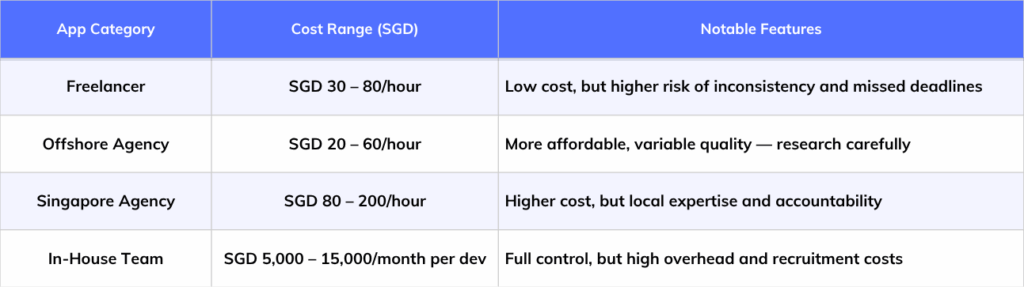
    5. 30 Best Free Offline Music Apps to Use Without Internet 2026

      30 Best Free Offline Music Apps to Use Without Internet 2026

      So imagine one day you are travelling on a long road trip. The view outside the window is very beautiful. Greenery surrounds the entire area, while peaceful mountains appear in the distance. Your headphones are ready, and you want to enjoy the whole view by listening to your favourite music. But suddenly, there is no signal on your phone, and the internet stops. You can’t stream anything as your mobile app refuses to do so. Almost 46% of the money earned from music streaming comes from paid services.

      This type of situation happens to many people everyday. While travelling, saving data or saving battery, relying on only online music becomes frustrating. So this is the reason why offline music apps have become popular.

      Every leading mobile app development company is now creating smarter music apps. These apps allow users to enjoy uninterrupted music without even an internet connection.

      So now in this guide, we will explore the 20 best free offline music apps to use without internet 2026. These apps are perfect for iPhone & android users. As these apps allow you to enjoy your favorite music offline anytime and anywhere.

      In this blog, we’ll provide you with the top 20 free offline music apps for your phone that you can use offline. Thanks to mobile app development company for creating such amazing music apps. You do not need Wi-Fi or mobile data to enjoy your favorite music track.

      Must Read: Top 15 Best Anonymous Messaging Apps for Android & iOS

      Spotify

      Spotify is one of the most popular music apps and was introduced in 2006. With over 678+ million daily users, it has become the most downloaded music app to listen to songs offline or online. Spotify is available in both free and premium versions. It’s a free version, and you can listen to free music or a podcast online with ads. But in the premium version, you can download music for free and listen offline without any interruption. Whether you like listening to songs, a story, or a podcast in any genre. Spotify gives you everything that you’re looking for in a music app for Android and iOS devices.

      It has millions of songs in its library. It sets the benchmark for user interface and experience with numerous tracks. With a Premium subscription, you can download up to 10,000 songs onto a single device and enjoy offline music for free. Users must activate the download toggle to display the downloaded album, playlist, or track for offline listening.

      It has raised the standard for other free music apps for Android and iOS, and in terms of user design and experience, Spotify is quite difficult to match.

      Pros

      ✅Large global music library with millions of songs and podcasts

      ✅Offline downloads are free with premium subscription

      ✅Personalized playlists and smart AI-powered suggestions

      ✅Easy to use and clean interface

      Cons

      ✅Premium plan is needed for offline listening

      ✅Free version include ads

      ✅Limited skips without subscription

      Download App Here

      Android
      iOS

      SoundCloud

      One of the free offline music apps, SoundCloud, is committed to helping all musicians by providing assistance to their fellow creators. On SoundCloud, over 12 million creators upload over 116 minutes of audio every minute, and over 175 million listen to their creations every month. SoundCloud is also available to iOS and Android users. SoundCloud offers free music download for offline listening to their users with ads

      Users don’t have to set up a library by downloading their favorite songs, unlike other music apps that appear to work without Wi-Fi. Previous streams can be listened to on SoundCloud while on the go, and users’ history is instantly processed.

      SoundCloud makes money through sponsored ads and is one of the most successful music apps for Android and iOS. Its premium version, SoundCloud Go, allows unlimited offline streaming and starts at just $4.99 per month.

      Pros

      ✅Great platform for discovering indie artists

      ✅Support offline downloads with Go plan

      ✅Large user-generated content library

      ✅Massive collection of new music

      Cons

      ✅Offline access is paid

      ✅Ads in free version

      ✅Audio quality varies

      Download App Here

      Android
      iOS

      YouTube Music

      Also, you can get free YouTube Music. For free music download for offline listening all you have to do is go to your YouTube Music app and download your favorite songs. You can also download a whole playlist to your device and enjoy offline at your own pace. YouTube Music offers a music streaming app in addition to the well-known video-sharing network. Users who have access to YouTube Premium can download playlists, videos, and music to enjoy offline. Its exclusive content and live performances set it apart from other music apps.

      Pros

      ✅Access to remixes tracks and live performances

      ✅Smart recommendations system

      ✅Offline downloads with Premium plan

      ✅Cross-platform support

      Cons

      ✅Paid subscription needed for offline downloads

      ✅Ads in Free version

      ✅Video streaming can drain data

      Download App Here

      Android
      iOS

      You Can Read Also: Top 15 Dating Apps in USA in 2026

      Pandora

      Pandora is among the greatest music apps that work offline well. On it, you may listen to millions of songs and 1400 podcasts. The software is powered by Sirius XM Holdings’ Music Genome Project. The company’s unique selling point is its highly personalized listening experience. It invests heavily in automated and human music analysis.

      Pandora also offers six new modes for customization: My Station, Crowd Faves, Deep Cuts, Discovery, Recently Released, and Artist Only. These features help users explore new options. Pandora’s premium plans are available for $4.99 per month for Pandora Plus and $9.99 per month for Pandora Premium. The app is accessible on both iOS and Android. For such innovative and seamless app experiences, connect with the one of the best mobile app development companies to bring your vision to life.

      Pros

      ✅Excellent personalized radio stations

      ✅User-friendly interface

      ✅Offline listening in paid plans

      ✅Different subscription plans

      Cons

      ✅Limited song control in free version

      ✅Offline requires subscription

      ✅Not available in all regions

      Download App Here

      Android
      iOS

      Deezer

      Over 70 million songs and podcasts can be found on the best free offline music app, Deezer. With its machine learning algorithms for tailored listening, it features an interface and experience similar to SoundCloud.

      Deezer is available to users worldwide and works on many devices, including gaming consoles, smart home gadgets, and wearables. It’s becoming more popular every day. Deezer’s premium versions, which start at $5.99 monthly, let you listen to music offline. You can download Deezer on Android and iOS.

      Pros

      ✅Large global music catalog

      ✅High-quality audio options

      ✅Offline mode with premium plans

      ✅User-friendly interface

      Cons

      ✅Offline download needed paid plan

      ✅Ads in free version

      ✅Some regional limitations

      Download App Here

      Android
      iOS

      Tidal

      Tidal is the best free offline music app with around 80 million songs and 350,000 videos. Originally owned by a tech company called Aspiro, Jay-Z bought Tidal in 2015 and promoted it as one of the first artist-owned music platforms.

      With Tidal, users can download unlimited music for offline listening and enjoy ad-free streaming. The app features hand-picked songs, artist-curated playlists, exclusive videos, and streams in high-fidelity sound quality with lossless audio.

      Tidal is becoming popular with music lovers and audiophiles who want top-quality sound and are willing to pay like they would for Spotify. Tidal offers two premium plans: Standard for $9.99 monthly and HiFi for $19.99 monthly. Both come with a 30-day free trial. You can use Tidal on Android, iOS, Windows, and smart speakers.

      Pros

      ✅High-quality audio

      ✅Offline downloads included in paid plans

      ✅Exclusive content from major artists

      ✅User-friendly interface

      Cons

      ✅Paid subscription are costly

      ✅Limited free offline access

      ✅No free full-featured tier in many regions

      Download App Here

      Android
      iOS

      Napster

      Napster is another one of the best offline music apps that offers unlimited use and different kinds of podcasts, where you can easily download music for free with a single touch. This free offline music app comes with 30-day free trial. It also partly works with your social media apps to know your music taste. So, this app can create personalized music profiles, GIFs, and photos.

      Three premium options are available, starting at $4.99 per month. However, only the Premier and Family packages require WiFi or data to be played. Although Napster does not have a free version, its ad-free business strategy, tailored suggestions, simple navigation, user-friendly interface, and connectivity with more than 15 mobile, wearable, and smart devices make it well worth the download.

      Pros

      ✅Licensed music catalog

      ✅Ad-free with subscription

      ✅Offline listening support

      ✅Cross-platform availability

      Cons

      ✅Requires paid plan for downloads

      ✅Limited free offline access

      ✅Less popular than competitors

      Download App Here

      Android
      iOS

      Bandcamp

      Bandcamp is an online music store and community where fans can directly support their favorite artists. On Bandcamp, users can buy music tracks, albums, podcasts, event tickets, and even merchandise like tees and stationery. If you want an app for free music download for offline listening, then Bandcamp is the best free offline music app. This app lets you download free music on both Android and iOS devices. Users can purchase their favorite songs, and premium content like soundtracks, podcasts, and documentaries can be accessed offline without needing to download or stream them.

      Pros

      ✅Support independent artists directly

      ✅Purchased music can be downloaded permanently

      ✅No mandatory subscription

      ✅Instant access to premium content

      Cons

      ✅Limited mainstream music catalog

      ✅Offline access mainly for purchases tracks

      ✅Discovery features are less advanced

      Download App Here

      Android
      iOS

      Amazon Music

      After entering the E-commerce field, Amazon has also taken over the entertainment industry with its two significant apps: Amazon Prime and Amazon Music. Amazon Music offers both free and paid versions. The free version comes with ads and some limitations, but the paid version removes these issues. Amazon Prime members can access Amazon Music at no extra cost with their Prime subscription. For those without Prime, the cost is $9.99 per month.

      With over 55 million users globally, Amazon Music is a strong contender in the music sreaming app industry. It offers premium-quality audio, an easy-to-use interface, and unlimited skips, making it one of the best music streaming apps for iOS and Android. Additionally, it’s highly compatible with various devices, especially those integrated with Alexa. And if you want to build a music app, then you should know the mobile app development process, which gives you detailed insight for developing a successful mobile app.

      Pros

      ✅Included with Amazon Prime (limited access)

      ✅Offline downloads with subscription

      ✅Large music library

      ✅Instant access to premium content

      Cons

      ✅Full access requires paid plan

      ✅Ads/restrictions in free tier

      ✅Interface can feel complex

      Download App Here

      Android
      iOS

      Apple Music

      Apple Music is the best music app offline bundled with a premium music streaming service from its parent company, Apple. As of June 2017, it was accessible in over 100 countries. Due to its vast collection of songs, albums, and playlists, it quickly became well-known.

      According to this service, users can listen to music offline and online. Users can download songs and albums to listen to offline, allowing them to enjoy music anytime, anywhere. Depending on their personal preferences, Apple Music also offers customers access to exclusive material, radio stations, personalized playlists, and more.

      Pros

      ✅Seamless integration with Apple ecosystem

      ✅Offline downloads included with subscription

      ✅High-quality and spatial audio

      ✅Variety of curated playlists

      Cons

      ✅No completely free version

      ✅Subscription required for offline listening

      ✅Work best within Apple devices

      Download App Here

      Android
      iOS

      Also Read: Top 15 Alternative App Stores for iOS & Android in 2026

      Gaana

      If you’re a fan of Bollywood tunes, it’s time to get the Gaana app! It’s one of the best free music apps where you can enjoy top Bollywood hits, as well as English and Hindi songs. With Gaana, you can listen to and download the latest MP3 tracks for free. It offers a wide range of genres and lets you play songs offline, making it a fantastic choice for music lovers!

      Users can enjoy an easy and pleasant music experience by subscribing to Gaana+, which offers ad-free listening, high-quality downloads, and unrestricted access to their vast music catalog. This is one of the most popular offline music streaming apps on the Google Play Store. IOS and Android users can install and enjoy it.

      Pros

      ✅Large Bollywood and regional music library

      ✅Offline downloads with plus subscription

      ✅Curated playlists and radio

      ✅Easy to use interface

      Cons

      ✅Offline mode requires paid plan

      ✅Ads in free version

      ✅Limited global catalog

      Download App Here

      Android
      iOS

      Wynk Music

      Wynk Music is a streaming app that allows you to listen to music offline by downloading it. This offline music streaming app is popular in India because of its Bollywood and local music collections. This offline music application allows users to download and play songs even without internet access.

      The Wynk Music app is available in both free and paid versions. In the free version, there are ads and limitations on music downloads. And in the paid version, users get unlimited access and better music quality.

      Pros

      ✅Strong Indian and regional content

      ✅Offline downloads supported

      ✅Personalized playlists

      ✅User-friendly interface

      Cons

      ✅Limited downloads in free version

      ✅Ads for non-premium users

      ✅Best experience tied to telecom partnerships

      Download App Here

      Android

      iOS

      JioSaavn

      JioSaavn provides both offline listening and online music streaming. This is a free offline music application but with ads and limitations. JioSaavn is one of the most popular offline music apps among Indian audiences.

      JioSaavn supports offline downloads, but for full access paid subscription is required. Users can curate their own playlist and enjoy their music. It is ideal for those users who want apps that play music offline occasionally.

      Pros

      ✅Wide range of bollywood and international music

      ✅Offline listening with pro plan

      ✅Clean interface

      ✅Cross-platform support

      Cons

      ✅Offline downloads require subscription

      ✅Ads in free version

      ✅Some features region-restricted

      Download App Here

      Android

      iOS

      Boomplay

      BoomPlay is one of the famous free offline music apps that combines streaming with offline playback. It is particularly well-liked in African countries. Users can browse selected playlists, trending tracks and exclusive content, then download selected songs to play without an internet connection.

      BoomPlay is a paid and free music application. Music lovers can play music online and offline. But only downloaded music plays offline. With premium membership users have limitless access and for free users can only download limited files.

      Pros

      ✅Popular for African and global music

      ✅Offline downloads available

      ✅Trending charts and curated playlists

      ✅User-friendly interface

      Cons

      ✅Limited free offline downloads

      ✅Ads in free plan

      ✅Smaller catalog outside key regions

      Download App Here

      Android

      iOS

      Pi Music Player

      Pi Music Player provides easy and reliable offline music playback for locally stored MP3 files. It has playlist compatibility, equalization settings and an easy-to-use interface. The app works without Internet access and does not stream music. This music application is available for both Android and iOS users.

      Pi Music Player does not support in-app downloads. It is free to use, with an optional premium upgrade that unlocks additional features. This app is suitable for users who prefer lightweight free music apps without wi-fi. Users get a simple offline listening experience without complicated controls.

      Pros

      ✅Completely offline music playback

      ✅Built-in equalizer

      ✅Lightweight and easy to use

      ✅Great for local MP3 files

      Cons

      ✅No built-in streaming

      ✅No in-app music downloads

      ✅Limited advanced features

      Download App Here

      Android

      iOS

      Must Read: Top 10 Best Startup Accelerator Programs in 2026

      VLC media player

      VLC media player is one of the most reliable free offline music apps that doesn’t need the internet. It plays audio files stored on your device. The formats they support include MP3, FLAC, AAC and WAV. It is available for both devices, you can download from Google Play Store & App Store

      The app works completely free and offline. There is no registration and no paid subscriptions are required, so you can enjoy music without annoying ads. VLC is suitable for users who value reliability over attractive appearance.

      Pros

      ✅100% free and open-source

      ✅Supports almost all audio formats

      ✅Works fully offline

      ✅No ads or subscription

      Cons

      ✅No streaming features

      ✅Basic interface design

      ✅No built-in music discovery

      Download App Here

      Android

      iOS

      Rocket Music Player

      Rocket Music Player focuses on organizing and playing local music libraries. It supports playlists, folder browsing and offline playback without the need for network connectivity. For users searching for apps to listen to music offline for free, Rocket Music Player offers a balance between customization and simplicity.

      This offline music app is free with premium features and if you need advance customization and enhancement then a paid option is available. It does not offer in-app music downloads and is an ideal choice for everyday offline listening.

      Pros

      ✅Strong library management tools

      ✅Offline playback supported

      ✅Customizable themes

      ✅Equalizer included

      Cons

      ✅No built-in streaming service

      ✅Advanced features are paid

      ✅Interface feels slightly outdated

      Download App Here

      Android

      Musify

      Musify is a feature-rich offline music app with a large music selection. Users can make playlists, download music for offline listening, and discover new artists and albums. Musify’s simple interface and great UX make it popular. Music fans want to listen to their favorite songs anytime, anywhere.

      An excellent Android local music player is called Musify. Musify is the best for local music. It has amazing equalization, supports all formats, and has an elegant UI.

      Now is the perfect time to download this great offline-compatible music player for Android! Musify is the most popular music streaming app that can be used offline. For music equalizers, this is their greatest advantage. Complete control over the equalizer makes it the ideal software for streaming music offline.

      Pros

      ✅Offline playback support

      ✅Simple user interface

      ✅Playlist management features

      ✅Lightweight performance

      Cons

      ✅Limited music catalog

      ✅Some features behind paywall

      ✅Availability may vary by region

      Download App Here

      Android

      iOS

      Trebel

      Another music app that lets users listen to free music offline and on-demand is Trebel. In terms of technology, the app has a strong foundation that makes use of cutting-edge technologies to display just the most relevant adverts and offer customized recommendations. Trebel allows users free music download for offline listening, you don’t have to pay a penny.

      The main principle behind Trebel app creation is that everyone should have free access to high-quality music. Various internet sources indicate that by December 2020, it had generated $4 million in revenue and had 3.5 million active monthly users. The app makes money as a result of sponsored adverts from well-known companies and media outlets.

      Pros

      ✅Free offline downloads supported

      ✅Ad-supported model

      ✅Large Latin and global music library

      ✅User-friendly interface

      Cons

      ✅Ads required for free downloads

      ✅Limited availability in some regions

      ✅Not as feature-rich as premium apps

      Download App Here

      Android

      iOS

      LiveOne (Formerly LiveXLive)

      LiveOne (formerly known as LiveXLive) is a multipurpose music app. It was formerly Slacker Radio. It lets users access a wide range of original soundtracks, podcasts, and documentaries offline. It also enhances the listening experience with its features. A key feature of LiveXLive is its wide live coverage of competitions, music festivals, and special events. It guarantees fans won’t miss their favorite musicians’ performances. Music fans, passionate about their taste, will find this live broadcast appealing. It is available to customers with both basic and premium subscriptions.

      The Premium plan stands out. It lets users stream high-quality content without Wi-Fi. It’s ideal for people on the go or in places with limited internet. This flexibility and feature set make LiveXLive a great choice for music lovers who want a convenient and rich audio experience.

      Pros

      ✅ Live radio and curated stations

      ✅Offline listening with paid plan

      ✅ Podcast support

      ✅ Clean interface

      Cons

      ✅ Offline downloads need subscription

      ✅ Smaller on-demand library

      ✅ Ads in free version

      Download App Here

      Android
      iOS

      AIMP Music Player

      AIMP is the best music app offline that lets users experiment with different equalizations and creative edits. AIMP can readily play any device’s stored music in a variety of file types, including MP3, OGG, WMA, and many more. You can also use online radio streaming to have a varied musical experience.

      AIMP boasts an amazing 29-frequency equalization so that you can listen to a lot of tunes. You should choose AIMP for offline streaming because of its extremely user-friendly interface and simple format. It is accessible for Android users alone.

      Pros

      ✅High-quality audio experience

      ✅Support multiple music formats

      ✅Works completely offline

      ✅Free to use without subscription

      Cons

      ✅No offline music download feature

      ✅Basic interface design

      ✅Limited advanced discovery options

      Download App Here

      Android

      JetAudio HD Music Player

      JetAudio is one of the most adaptable song players among the top music apps for streaming. To save space on your phone, JetAudio compresses the music files. Additionally, you can modify tags, which will alter the song metadata within the files. It’s also really impressive that JetAudio can show lyrics while playing the music of your choice.

      The music app JetAudio has 10 bands and 32 equalizer presets. They provide different listening experiences. JetAudio has a highly developed sound engine. It enables a 20-band graphic equalizer and sound effects. These features make the sound lively and expressive. Its playback speed, crossfading, and many other features are also adjustable. It is accessible to users of iOS and Android.

      Pros

      ✅Advanced equalizer and sound effects

      ✅Offline playback available

      ✅Customizable sound settings

      ✅Suitable for audiophiles

      Cons

      ✅Ads appear in free version

      ✅Some premium features are paid

      ✅Interface may feel complex for beginners

      Download App Here

      Android
      iOS

      Shazam

      Shazam is among the most ancient apps available for iOS users. Shazam isn’t a music streaming service like its levels are. Shazam provides a variety of features. Have we all not attended events and parties when the DJ plays our favorite song? But we are unable to learn about it for whatever reason. However, Shazam’s creators came up with a long-term fix for that.

      You may find the answer to any song playing anywhere in your environment by simply clicking on the app. The app is now available for download on both iOS and Android devices.

      Shazam is a free offline music app, but there is a $5 premium edition available.

      Pros

      ✅Excellent music recognition technology

      ✅Fast and accurate song identification

      ✅Simple and user-friendly

      ✅Helps discover unknown songs

      Cons

      ✅Not a full music player

      ✅Offline recognition is limited

      ✅Limited playback features

      Download App Here

      Android
      iOS

      Audiomack

      Users can download and stream songs for free using Audiomack. Music fans of various genres use it as their go-to platform because it has millions of tunes you can listen to. You can find all your favorite songs, old or new, in one location. Musicians can upload their tracks for free to Audiomack as well. It puts the newest and sexiest songs at your fingertips for downloading and streaming.

      You may play your favorite songs offline using their music download option, and their “Tre” ding” section curates the greatest albums and tracks currently in style. You may listen to everything, too. However, a premium edition is also available, which runs about $4.99 a month. It’s accessible to both iOS and Android users.

      Pros

      ✅Free offline downloads available

      ✅Good collection of hip-hop and trending music

      ✅Playlist creation supported

      ✅Clean and modern interface

      Cons

      ✅Offline downloads limits exist

      ✅Some features need subscription

      ✅Ads in free version

      Download App Here

      Android
      iOS

      You Can Also Read: Top Trending App Ideas for Startups in 2026

      Pulsar

      Pulsar is well-known for its many features. It supports Google Chromecast and integrates with Last. FM. As an offline audio player with no ads, it offers a beautiful user interface that follows material design guidelines perfectly.

      Pulsar has everything you need for a great music experience, including gapless playback, lyrics display, and crossfade. You can even control the app with voice commands, adjust playback speed, and add lyrics to your favorite songs. It’s available on both iOS and Android.

      Pros

      ✅Free offline downloads available

      ✅Good collection of hip-hop and trending music

      ✅Playlist creation supported

      ✅Clean and modern interface

      Cons

      ✅Offline downloads limits exist

      ✅Some features need a subscription

      ✅Ads in the free version

      Download App Here

      Android
      iOS

      Lark Player

      Among Android’s free offline music apps for Android and iOS devices, Lark Player is exceptional. Its contemporary and intuitive UI serves users of all generations. The program supports numerous audio and video formats, including MP3, WAV, FLAC, MP4, and others. In addition to playing music, Lark Player supports lyrics, allows you to create personalized playlists, and even has a handy sleep timer.

      This free music player boasts the greatest user interface, lyrics, and potent equalization. It also offers file management on the device, such as creating playlists and deleting files. Lark Player is being used by over 100 million people globally to listen to music offline.

      Pros

      ✅Lightweight and fast performance

      ✅Works fully offline

      ✅Simple and clean design

      ✅Support playlist management

      Cons

      ✅No streaming option

      ✅Basic customization tools

      ✅No online music catalog

      Download App Here

      Android
      iOS

      Oto Music

      Oto Music is a modern offline-first music player that prioritizes efficiency, simplicity and speed. It quickly scans local audio files and presents them in a clean, clutter-free interface. The offline music app is free and doesn’t rely on Wi-Fi or mobile data.

      Oto offline music app only focuses on playing files already stored on the device. It’s free to use with optional premium features that enhance customization. Users who prefer lightweight free music apps without Wi-Fi often choose Oto Music.

      Pros

      ✅Live radio and curated stations

      ✅Offline listening with paid plan

      ✅Podcast support

      ✅Clean interface

      Cons

      ✅Offline downloads need subscription

      ✅Smaller on-demand library

      ✅Ads in free version

      Download App Here

      Android

      MediaMonkey

      MediaMonkey is a secure offline music application build for users with large and extensive music libraries. It supports advanced tagging, playlist management, synchronization and file organization. The app plays locally stored audio files and works without Internet access, making it suitable for long periods of offline use.

      MediaMonkey does not allow in-app music downloads as it focuses on library control rather than streaming. A free version covers the core features, while a paid upgrade unlocks advanced management tools. MediaMonkey is ideal for users who want structured apps that play music offline. 

      Pros

      ✅Excellent large music library management

      ✅Support tagging and syncing

      ✅Offline music playback available

      ✅Clean interface

      Cons

      ✅Advanced features are paid

      ✅Interface may feel complex

      ✅No  built-in streaming library

      Download App Here

      Android

      Stellio Music Player

      Stellio Music Player combines offline music playback with visual customization and audio controls. The app works without the internet when the music is stored on the device. Stelio does not support in-app music downloads. It supports local audio files and includes equalizer settings, song display and theme customization.

      Stellio Music Player app’s free version is available with ads, while the paid version without ads and unlocks premium themes. This music app is appealing to users who want stylish apps to listen to music offline without sacrificing performance. The balance between design and functionality makes it popular among customization-focused users.

      Pros

      ✅Stylish themes and visual customization

      ✅Offline playback supported

      ✅Lyrics support available

      ✅Smooth performance

      Cons

      ✅Ads in free version

      ✅Downloading music inside app not supported

      ✅Some premium features locked

      Download App Here

      Android

      Musicolet

      Musicolet is an offline music player application specially designed for local files. It does not require internet access or user accounts. The app includes features such as queue management, folder browsing, song support and smooth playback.

      Musicolet does not allow downloading music from online sources as it focuses exclusively on offline use. It is completely free and ad-free, which makes it highly reliable. Musicolet is ideal for users looking for music apps that don’t require the internet and want seamless offline playback with no distractions or hidden costs.

      Pros

      ✅Fully offline music player

      ✅Lightweight and fast

      ✅Free to use

      ✅No ads experience

      Cons

      ✅No streaming music support

      ✅No online music download feature

      ✅Local file playback only

      Download App Here

      Android

      You Can Read Also: Top 12 Delivery apps to make money in 2026

      Detailed Comparison Table: Top 30 Best Free Offline Music Apps in 2026

      There are plenty of free apps to listen to music offline available for smartphones, including iPhones and Android phones. These music apps allow you to download your favorite songs and listen to music without Wi-Fi or cellular data. Let’s get to know the best free offline music apps.

      free offline music apps comparison 1 free offline music apps comparison 2

      Most Important Tips to Listen to Music Offline Without Data or Wi-Fi

      Use Free Offline Music Apps

      Don’t want to pay for a premium subscription? You are lucky. Many music apps allow you to download music without the need for Wi-Fi or data, and many offer to listen for free offline. Apps like Audiomack, Boomplay and Hungama Music are popular options. They give you access to different types of music styles from international tracks to regional favorites. They usually offer a “download” button that saves your device for playback offline. These free offline music apps are a great solution for the music lover to listen to offline music for free.

      Activate Offline Mode On Streaming Apps

      Most of the free offline music apps like, Spotify, Apple Music, and YouTube Music are offering offline mode feature that lets you download playlists, albums or individual songs. All you need is a premium account to use these features. Just select your content, press “Download” and enjoy your music. It is ideal for travelers, passengers and everyone wants to listen to music without the internet.

      Download MP3 Files From Trusted Platforms

      For those users who prefer to own their music library, it is a reliable approach to download MP3 files. You can buy tracks from platforms such as Amazon Music, Bandcamp and iTunes. When downloaded, these songs can be stored locally on your device. You can play music at any time and anywhere by using offline media players such as VLC, Poweramps or Musicolet. This is the best way to create your personal music collection.

      Transfer your Favorite Music to the device

      Do you already have a music track on the laptop or any other device? Transfer it to your phone using USB cable, Bluetooth or wireless apps such as SHARE it or share anywhere. When the music is copied, your music is ready to listen offline, no internet required. This method is especially simple if you have created a playlist over the years or want access to rare tracks that are not available on streaming services.

      Create Your Playlist

      Make your offline music experience smooth by organizing downloaded songs in a playlist. Create your music playlist by your vibe, whether it is for workouts, travel, meditation, or relaxation. Most music players let you create a custom playlist, which helps you avoid rolling infinitely and lets you jump directly in the right mood.

      Use SD Card for Extra Storage

      If your mobile device storage is filled quickly, you can add a microSD card. It provides you a lot of space to listen to free offline music. It is especially useful for Android users who like to maintain a large library. You can save thousands of MP3 on an SD card and still have room for photos, videos and apps.

      Enable Battery Saver while listening

      Even though you’re offline, playing music nonstop can drain your battery. To extend your device battery life, activate battery saver mode or lower your screen brightness. Turning off background apps and enabling dark mode in your music player also helps to save energy, giving you extended listening time.

      Block Background Data Usage

      In the background, some mobile apps utilize data secretly, even when you are not online streaming. To ensure that your offline sessions are really offline, go to your phone settings and disable background data for your free music app. This not only saves battery life, but also ensures that you enjoy your music without any ads or updates.

      Activate Smart Downloads

      If you are someone who forgets to download music, smart download features are available. Most popular free offline music apps like Spotify can automatically save your most-played tracks to listen free music offline. This means that your favorite music is always available. Without keeping manually.

      Set Up Offline Mode

      Before you go to the no internet zone, double check your downloaded music is ready to play. Turn on “offline mode” in your app settings to prevent the app from trying to stream. Test your music tracks with your Wi-Fi and your mobile data to confirm playback. This is a simple but important step to listen free offline music, when the data or wi-fi is not available.

      How Much Does It Cost to Build a Free Offline Music App?

      The cost to build a free offline music app like Spotify typically starts from $15,000 to $150,000+. The overall cost primarily depends on the app’s features, platform and complexity. Below is a clear breakdown of costs to help you understand where the investment goes.

      Cost to Build a Free Offline Music App?

      Conclusion

      Need an app for free music downloads for offline listening? In this must-read blog on the top 20 free offline music apps for Android and iOS in 2026, we showcase some of the best music streaming platforms. These platforms let users enjoy music for free, featuring apps like Spotify, Amazon Music, Gaana, and Apple Music. Premium users can create playlists and listen to their favorite songs without an internet connection.

      These days, you may use these apps to make better use of your resources and travel without worrying about running out of data while on vacation. Nowadays, everyone needs offline music apps more than ever.

      However, are you looking for the best mobile app development company to create your music app? Contact Apptechies today, and they will convert your vision of an app idea into a high-performing and scalable app.

      Frequently Asked Questions

      Q. What is the greatest app for free offline music listening?

      Ans: Audiomack is one of the top demanding free apps to listen to music offline. It lets you download full songs and playlists without subscription. Other good options include Musicolet and Boomplay in Some Regions.

      Q. Which music app is 100% free for listing music?

      Ans: Musicolet is free offline music app with no ads and works completely offline if you have music files on your device. Moreover, Audiomack is free and does not require a paid subscription to obtain songs from its library.

      Q. How to stream offline music apps without cellular data or Wi-Fi?

      Ans: Offline music apps let you download songs when you’re online, and then store them on your device. Once downloaded, you can listen anytime—no Wi-Fi or mobile data needed.

      Q. How can I upload my music to the offline music app?

      Ans: Use a USB cable or cloud storage to move MP3 files to your phone for uploading your music. Then, open an offline music player app like Musicolet or Poweramp, and the app will detect and list your songs automatically.

      Q. Which apps let you listen to music offline for free?

      Ans: Apps like Audiomack, Musicolet, Fildo, and Boomplay allow offline listening for free. Download your favourite songs while online, and enjoy them without internet or wifi.

      Author Name: Ajay Chaudhary

      Author Bio: AJ Chaudhary, CEO of Apptechies. He is a full-stack & AI Mobile app developer with 10+ years of experience developing web & mobile applications. He has successfully delivered projects for different industries and helped companies turn concepts into scalable solutions. Passionate about technology, he simplifies complicated tech topics for entrepreneurs and startups by sharing insights.
    6. Top 15 Dating Apps in USA | A Complete Guide 2026

      Top 15 Dating Apps in USA | A Complete Guide 2026

      In a world where swiping right can only lead to “the one”, dating apps have become an integral part of American social life. Statista studies says that 60 million of users are using dating apps in the USA. The digital landscape and smartphone addiction is increasing immensely. The popularity of online dating apps in USA continues to increase. According to recent surveys, 30% of American people have used dating sites and apps. And the age of their users is between 18 to 29.

      In addition, the market of US dating apps is set to generate revenues over $2.60 billion in 2025. By 2027, the worldwide online dating market is anticipated to have grown to a size of over $10 billion. Online dating apps are growing immensely and the cost to build an app can be debatable. Whether you are looking for a lifelong partner or a casual relationship, there are multiple dating apps just for you.

      In this blog, we will explore the 15 best dating apps in the USA for 2026, categorized by user needs, features, and user base. We will also share guidance on choosing the right app and present some dating apps for teens and the elderly. Let’s explore the space of online dating apps and websites!

      What are Dating Applications and Websites?

      Dating Apps and Websites are a digital space that lets people connect socially or romantically. To connect with their ideal match, these platforms use algorithms, location data, interests and user behavior. Dating apps meet many types of needs, from short talks to long-term relationships. If you want to build a dating app like Tinder, you may need to work with a professional mobile app or web app development company. They provide flexibility and scalability to give your dating app a success. Dating apps are available in both free and paid versions. These apps offer various features like unlimited sweeps, advanced filters and prioritized matching.

      List of Top 15 Best Online Dating Apps in USA

      Tinder

      If you are single and in search of a relationship, or want to start dating or a friendship. Then Tinder is your perfect choice. In Wikipedia it shows, Tinder is one of the most favorite and popular dating app in USA. It was introduced in 2012 and completely changed the dating scene with the help of a smart algorithm and user location. This app is based on swipe-based matching, you can meet new people and make a connection with just a swipe. Tinder offers a fast, exciting and engaging way to explore your best matches. According to the user’s accessibility, interest and preferences, you get your potential match.

      tinder home screen for blog

      What Makes Tinder Unique?

      Tinder is about simplicity and fast connections. You create a profile, add some good pictures, write a bio and start swiping! Its unique features and smart UI/UX design interface. Any users can initiate the conversation, if they match, they can swipe right. Tinder is the top downloaded dating app in the US and has millions of worldwide daily users. 190+ countries are using Tinder, that’s why it is known as the world’s most used dating app.

      tinder dating app  pros & cons

      Tinder App Features

      Profile customization, Super Likes, Super Boost, Passport (allows matching with people in different locations), Safety feature, Premium Features (Tinder Gold & Tinder Plus)

      Best Dating App for: People looking for quick or meaningful connections.

      Android: Google Play Store 

      iOS: Apple App Store

      Rating: 4.2/5

      Total Users: Over 100+ Million

      Availability: Android and iOS

      Free Version Available: Yes

      LGBT inclusive: Yes

      Bumble

      Bumble dating app was developed in 2014, because of its gained recognition it came out the best online dating app in USA. It’s not just another dating app, it transformed the online connections due to its exclusive feature. Bumble itself says it is designed to encourage women by initiating the first move in heterosexual matches. Bumble is a multipurpose social media app. In addition to dating, it allows users to find friends and professional connections.

      Bumble home screen for blog

      What Makes Bumble Unique?

      Bumble gives women more control than other dating apps in USA. It aims to develop deep connections while maintaining safe and respectful interactions. It is also LGBTQ+ inclusive, making it a welcoming space for everyone. Bumble offers every mode for you, whether you are seeking friendship, love or career opportunities.

      Bumble dating app pros & cons

      Bumble App Features

      Women First Approach, Bumble Date, Bumble Bff, Bumble Bizz, Verified Profiles, Video Chat, Voice Chat

      Best Dating App for: Women looking for a real connection or job opportunities.

      Android: Google Play Store 

      iOS: Apple App Store

      Rating: 4.8/5

      Total Users: 50+ Million

      Availability: Android and iOS

      Free Version Available: Yes

      LGBTQ+ Inclusive: Yes

      OKCupid

      OkCupid is one of the most famous and top dating apps in USA, it was firstly launched in 2004. The purpose of this dating site and app is to match genuine individuals. This dating app assists users in finding matches based on common interests, values and personality traits. A recent study shows that OkCupid is favorite among millennials with 49% of users of age between 25 to 34. And if you are willing to enter the online dating world and want to launch your dating app you can hire the best mobile app development company. They will help you grow your business to the next level with their custom software development solutions and high-tech features.

      What Makes Unique?

      The OKCupid dating app is perfect for singles who want compatibility, deep connections. This dating site simply connects you with people who match your vibe. OkCupid is not just all about swiping, it brings real and meaningful relationships.

      OKCupid dating app pros & cons

      Features: Detailed profiles, in-depth question and answers, free messaging, compatibility scores.

      Best Dating App for: Millennials, Personality-based matching

      Android: Google Play Store 

      iOS: Apple App Store

      Rating: 4.3/5

      Total Users: 30+ Million

      Availability: Android and iOS

      Version Available: Free/Paid

      LGBTQ+ Inclusive: Yes

      Coffee Meets Bagel

      In Wikipedia it shows that the Coffee Meets Bagel dating app was introduced in 2012. The purpose of this dating app is to assist singles find genuine relationships. Coffee Meets Bagel customized excellent matches based on personality and mutual hobbies.

      cofee meets home screen for blog

      What Makes Coffee Meets Bagel Unique?

      Users can set preferences to find matches that align with their values. Coffee Meets Bagel is among the top dating apps in USA for singles who prefer sustainable relationships instead of casual dating.

      Coffee Meets Bagel dating app pros & cons

      Features: Daily curated matches, must-have algorithm, prompts, video & chats

      Best Dating App for: Singles looking for real connections

      Android: Google Play Store 

      iOS: Apple App Store

      Rating: 4.0/5

      Total Users: 10M+

      Availability: Android and iOS

      Version Available: Free/Paid

      LGBTQ+ Inclusive: Yes

      Hinge

      Hinge online dating app was introduced in 2012. Hinge dating app itself says that it is “designed to be deleted.” The aim of Hinge dating app or site is to connect people with their ideal match. For singles who want long lasting relationships this dating app is for you.

      hinge home screen for blog

      What Makes Hinge Unique?

      Hinge is very popular in the United States, with 23 million regular users which makes Hinge people’s best choice among the top dating apps in USA. A well-known personality “Pete Buttigieg” found his real connection on Hinge which boosted its reputation.

      Hinge dating app pros & cons

      Features: Voice recording, video chat,

      Best Dating App for: Long-term relationships.

      Android: Google Play Store 

      iOS: Apple App Store

      Rating: 4.2/5

      Total Users: 20+ Million

      Availability: Android and iOS

      Version Available: Free/Paid

      LGBTQ+ Inclusive: Yes

      Happn

      Happn is a unique location-based dating app that helps you get in touch with people you have crossed the track in real life. Unlike traditional sweep-based apps, Happn focuses on interaction in the real world, making it easy to meet people near and far. Happn was developed in 2014 and is also a popular dating app in USA. Available in 40+ countries.

      happn home screen for blog

      What Makes Happn Unique?

      Happn is designed for those who think that love can happen on its own, its a concept of serendipity. This online dating app allows you to connect within your locality or nearby. With over 140 million worldwide users, it’s one of the top dating apps in USA for singles in search of local connections.

      Happn dating apps pros & cons

      Features: Cross Path Matching, Personalized message, Video Chat, Voice Chat, Privacy control, Like & Crush.

      Best Dating App for: Singles looking for real relationships, believe in fate or want to meet people naturally.

      Android: Google Play Store

      iOS: Apple App Store

      Rating: 4.3/5

      Total Users: 140 Million

      Availability: Android and iOS

      Version Available: Free/Paid

      LGBTQ+ Inclusive: Yes

      Grindr

      Grindr is a dating app and social networking site that shows connections based on the user’s location. This app is designed for gay, bisexual, transgender, and queer individuals. Grindr is the first dating app for LGBTQ+ dating that shows matches based on location. It has grown over time and become the largest and most widely used online gay dating mobile app.

      grindr home screen for blog

      What Makes Grindr Unique?

      Grindr stands out among the top dating apps in USA for LGBTQ+ singles, offering instant connections based on proximity. This online dating platform for those searching for friendships, hookups, or serious relationships.

      Grindr dating app pros & cons

      Features: Nearby matches, chats, private album, video calls, incognito mode

      Best Dating App for: LGBTQ+ Singles

      Android: Google Play Store 

      iOS: Apple App Store

      Rating: 4.5/5

      Total Users: 50+ Million

      Availability: Android and iOS

      Version Available: Free/Paid

      LGBTQ+ Inclusive: Yes

      Badoo

      If you want to experience casual dating, serious bonding, love or a new friendship, Badoo makes the dating experience much easier, safe and fun. Badoo was introduced in 2006, and it evolved and became one of the biggest social media and online dating app. This dating site is available in 190+ countries and accessible in 47 languages.

      badoo home screen for blog

      What Makes Badoo Unique?

      Badoo prioritizes real connections and genuine friendships. This dating site allows users to express themselves freely without any hesitation. Badoo mainly focuses on authentic connections with providing a safe, secure and respectful environment. This dating app is best for those who want a relaxed place to interact with people near or far.

      pros & cons of badoo

      Badoo Features: Chat before you match, verified profiles, live video chat, shared interests, deception detector, private detector

      Best Dating App for: Real Connection, Serious Relationships, Deep Friendships or Casual Dating.

      Android: Google Play Store 

      iOS: Apple App Store

      Rating: 4.6/5

      Total Users: 10+ million

      Availability: Android and iOS

      Free Version Available: Yes

      LGBTQ+ Inclusive: Yes

      EliteSingles

      EliteSingles is a premium dating app that was introduced in 2013. This dating app is designed for career-focused and ambitious singles for serious connections. Unlike the random dating apps, it uses a wise matchmaking system based on a personality test to find compatible matches. EliteSingle is USA’s top dating site which brings quality over quantity.

      elitesingle home screen

      What Makes EliteSingles Unique?

      EliteSingles targets professional and aspiring individuals. Best serious dating app for people searching partnerships, commitments and long-term relationships. 85% of users are university educated and if you want to connect like-minded individuals, this app is for you.

      pros & cons of elite single

      Features: Personality test, daily match suggestions, verified profiles, Advance search filters, private messaging

      Best Dating App for: Career-oriented singles, compatible matches, Serious relationships

      Android: Google Play Store

      iOS: Apple App Store

      Rating: 4.1/5

      Total Users: 12+ Million

      Availability: Android and iOS

      Version Available: Free/Paid

      LGBTQ+ Inclusive: Yes

      eHarmony

      eHarmony was founded in 2000, it is listed among the top dating apps in USA. It prefers compatibility and long-term connections. eHarmony uses a scientific matchmaking system to connect according to your compatibility.

      What Makes eHarmony Unique?

      eHarmony is all about to pair with who matches your values, personality and relationship goals. If you are looking for a serious dating app, this app is designed to help you find permanent love.

      pros & cons of eharmony

      Features: Compatibility Quiz, Guided Communication, Video Dating, Personalized Matched List, Verified Profiles.

      Best Dating App for: Serious relationship

      Android: Google Play Store 

      iOS: Apple App Store

      Rating: 4.1/5

      Total Users: 3 Million+

      Availability: Android and iOS

      Version Available: Paid

      LGBTQ+ Inclusive: Yes

      Her

      In 2015, HER dating app was introduced, it is the first dating app and social app exclusively designed for women who are lesbian, bisexual, queer, and non-binary individuals. Unlike mainstream dating apps, HER fosters a safe, inclusive relationship. Her creates a community-driven space and welcoming environment. Where users can connect, build relationships, and engage with LGBTQ+ events and discussions. her home screen for blog

      What Makes Her Unique?

      HER is more than just a dating app, it’s a social platform that connects LGBTQ+ singles in the USA. Among the most widely used online dating apps it has more than 13 million users nationwide, it is one of the most popular women’s favorite dating apps.

      her pros & cons

      Features: Community groups, LGBTQ+ Events, Incognito Mode, Match & Chat

      Best Dating App for: Perfect for LGBTQ+ Singles, Love, Friendship

      Android: Google Play Store 

      iOS: Apple App Store

      Rating: 4.3/5

      Total Users: 5+ Million

      Availability: Android and iOS

      Version Available: Free/Paid

      LGBTQ+ Inclusive: Yes

      The League

      The League is a highly selective dating app and was launched in 2014. This dating app is designed for ambitious, career-driven singles. The League ensures users are educated, successful, and serious about relationships. If you’re tired of endless swiping and want customized matches, this dating app is built for you.

      theleague home screen for blog

      What Makes League Unique?

      The League is among the top dating apps in USA for professionals seeking high-quality connections. Users with exclusive membership, receive handpicked matches.

      pros & cons of the league

      Features: Selective membership, LinkedIn integration, Video Dating, VIP Membership, Daily Best Matching

      Pros: High-quality matches, strong verification process, exclusive community.

      Cons: Limited free features, long wait for approvals.

      Best Dating App for: Perfect for professional, ambitious individuals finding emotional connections.

      Android: Google Play Store

      iOS: Apple App Store

      Rating: 4.1/5

      Total Users: 500K 

      Availability: Android and iOS 

      Version Available: Free/PaidLGBTQ+ Inclusive: Yes

      Facebook Dating

      Facebook dating is an in-built feature of the Facebook app that helps users find meaningful connections. This app connects people based on shared interests, preferences and mutual friends. Facebook Dating is initially integrated with your existing Facebook profile. This keeps dating life separated from your main account and makes it easier to get in touch with possible matches.

      facebook dating home screen for blog

      What Makes Facebook Dating Unique?

      Facebook is one of the best social media and dating apps in the US for dating single who wants more personal and social prospects for online dating. With its unique features such as Secret Crush and many more. Users can express interest in friends without revealing their identity until there is mutual interest.

      facebook dating pros & cons

      Features: Separate Dating Profiles, Secret Crush, Match suggestion, Instagram Integration, Video & Voice Chat

      Best Dating App for: Singles looking for deep relationships

      Android: Google Play Store

      iOS: Apple App Store

      Rating: 4.5/5

      Total Users: 21.5 million

      Availability: Android and iOS

      Version Available: Free

      LGBTQ+ Inclusive: Yes

      Tantan

      Tantan creates waves in a world of online dating, especially in search of meaningful relationships between singles. Tantan is quickly becoming the most popular dating application in USA. The “Asian Tinder” is another name for the Tantan dating app. This app gives a fun, interactive and safe place for users to meet, chat and build relationships. Whether you are looking for love, friendship or just a random conversation, it becomes easy with Tantan.

      tan tan home screen for blog

      What Makes Tantan Unique?

      Tantan is focused on authenticity and real connections. It’s simply more than a dating app that uses swipes. With advanced photo verification and powerful moderation tools. Tantan ensures that users interact with real profiles, reduce fake accounts and catfishing. This online dating app is accessible in more than 190 countries.

      tan tan pros & cons

      Features: Swipe Match, Live Video Chat, Verified Profiles, Private Mode, Super Like & VIP Membership, Moment feed

      Best Dating App for: Casual dating, flirting, Gen Z, Millennials

      Android: Google Play Store

      iOS: Apple App Store

      Rating: 4.6/5

      Total Users: 50+ Million

      Availability: Android and iOS

      Version Available: Free/Paid

      LGBTQ+ Inclusive: Yes

      Plenty of Fish

      A Plenty of Fish (POF) was founded in 2003, it is among the best dating apps in the United States , which offers an independent and flexible way for a single. Unlike many dating apps, it did not require a match before chatting. POF users allow a message to anyone, making it easier to start interaction and make connections. Whether you are looking for casual dating, serious relationships or just new friendship this dating app is for you.

      plenty of fish dating app home screen for blog

      What Makes Plenty of Fish (POF) Unique?

      POF is recognized for its large user base, with more than 50 million downloads and millions of active users worldwide. This provides detailed profiles so that users can only show their personality beyond images.

      plenty of fish dating app pros & cons

      Features: Swipe match, like, Live streaming, free messaging, personality test

      Best Dating App for: Budget-conscious daters, casual dating, new friendships, variety of dating options

      Android: Google Play Store

      iOS: Apple App Store

      Rating: 3.7 /5

      Total Users: 50+ Million

      Availability: Android and iOS

      Version Available: Free/Paid

      LGBTQ+ Inclusive: Yes

      How to Choose the Top Online Dating Apps and Sites?

      Choosing the right online dating app or site depends on many factors, including the relationship goals, preferences. Here are some important factors you should consider before choosing a dating app.

      Define Your Dating preferences

      Clear with your preferences, interests or choices while choosing the best dating apps in the USA. If you are in search of casual flirting or dating, then you can go with Tinder or Bumble. For serious relationships you can consider eHarmony and Match.com.

      Check Features & Functionality

      Most of the dating apps in the USA offer different and unique features like free swiping, free messaging, video chat, AI-driven matchmaking, LGBTQ+ friendly or women-first approach dating app (Bumble).

      Check user Reviews & Ratings

      Online free dating apps or paid dating apps with high rankings and positive reviews provide better experience. Check platforms such as PCMag and Forbes Health for expert recommendations

      Safety & Privacy

      Look for online dating apps with strong security measures, such as profile verification and encrypted messages. Best dating apps like Hinge and Bumble prefer the user’s safety.

      Free Vs Paid Options

      Check dating apps are free or paid. Free dating apps offer limited features, whereas paid dating apps offer advanced features. If you are serious about finding a match, it may be worth investing in premium membership.

      Top 5 Best Dating Apps For Teenagers

      It can be difficult to love or even friendship as a teenager. Fortunately, some dating apps are designed for teenagers. These apps provide fun, privacy and suitable connections. These apps will offer age-old, moderated experiences. It stands out in the list of dating apps in United States that allow teens to find matches without compromising security or inclusion. Always remember: The guidance and user awareness are important to make these platforms safe and effective. Here is the list of top dating apps for teens in the US.

      MeetMe

      MeetMe is a social network and online dating app that mixes randomly to chat with live streaming. Although open to users’ 13+, it is more popular with older teens and young adults, who want to flirt, make friends. You can just have a random conversation.

      Meet Me dating app home screen for blog

      Features: Live video chat, Profile creation, direct messaging, location-based

      Meet Me dating app pros & cons

      Best Dating App for: Teenagers, young adults

      Android: Google Play Store

      iOS: Apple App Store

      Rating: 3.8/5

      Total Users: 500K

      Availability: Android and iOS

      Version Available: Free/Paid

      LGBTQ+ Inclusive: Yes

      Skout

      The Skout mixes dating and social networks by letting teenagers allow chatting and even livestream. Although used by a comprehensive age limit, it separates teens from adults to ensure safe interaction.

      Skout Dating app home screen

      Features: Live video chat, Profile creation, direct messaging, location based, virtual gifts

      pros & cons of Skout dating app

      Best Dating App for: Teenagers, young adults

      Android: Google Play Store

      iOS: Apple App Store

      Rating: 3.7/5

      Total Users: 50+ Million

      Availability: Android and iOS

      Version Available: Free/Paid

      LGBTQ+ Inclusive: Yes

      Yubo

      Yubo brings a revolution in youth relations with his group. It sounds like a hangout space compared to a traditional dating app. And its focus on real-time interaction helps teens and meet friends organically.

      Yubo home screen for blog

      Features: Real-time video chats, YouTube streaming, topic-based rooms

      Yubo pros & cons

      Best Dating App for: Teenagers, livestreams and group video hangouts

      Android: Google Play Store

      iOS: Apple App Store

      Rating: 4.5/5

      Total Users: 10+ Million

      Availability: Android and iOS

      Version Available: Free

      LGBTQ+ Inclusive: Yes

      Hoop

      Hoop is not your peculiar dating app, it is connected with Snapchat and causes teenagers to meet new people and exchange snap handles. This is a low-pressure method to create new connections and create friendship over time.

      hoop dating app home screen for blogFeatures: Add friends via Snapchat, mutual like system

      hoop dating app pro s& cons

      Best Dating App for: Teenagers, Snapchat-based connections, socializing

      Android: Google Play Store

      iOS: Apple App Store

      Rating: 4.0/5

      Total Users: 10+ Million

      Availability: Android and iOS

      Version Available: Free

      LGBTQ+ Inclusive: Yes

      MyLOL

      MyLOL has been around for many years and is especially suited for teenage dating. It provides personal messages, profiles. It also offers moderate platforms to help users interact safely.

      MyLOL dating app home screen for blog

      Features: Private messaging, profile creation, forum.

      MyLOL dating app pro and cons

      Best Dating App for: Teenagers, young adults

      Android: Google Play Store

      iOS: Apple App Store

      Rating: 3.5/5

      Total Users: 3 Million

      Availability: Android and iOS

      Version Available: Free/Paid

      LGBTQ+ Inclusive: Yes

      Best Dating Apps in US for People Over 50

      When you get the right platform according to your lifestyle and goals. Dating after the age of 50 can be quite satisfying. There are many dating apps and websites developed by mobile app development companies.

      These popular dating apps in the United States focus on making meaningful connections for mature singles. These platforms prove that age is actually just a number when it comes to finding love. Whether you are new singles or ready to post the dating world after years, these apps are for you. This dating app is designed to help connect more than 50 in today’s digital scenario.

      OurTime

      OurTime is one of the most reliable dating apps for people over 50. It is specially designed for older adults looking for connection, love or marriage. The interface is simple, making it easier for users who have less interest in technology.

      Our Time dating app home screen

      Android: Google Play Store

      iOS: Apple App Store

      Rating: 4.3./5

      Total Users: 500K

      Availability: Android and iOS

      Version Available: Free/Paid

      LGBTQ+ Inclusive: Yes

      SilverSingles

      SilverSingles online dating app is suited for people who are 50 years of age and older looking for relationships that last. It uses an intelligent matchmaking system based on personality ratings to add compatible users.

      Silver Singles dating apps home screen

      Android: Google Play Store

      iOS: Apple App Store

      Rating: 4.5/5

      Total Users: 50K

      Availability: Android and iOS

      Version Available: Free/Paid

      LGBTQ+ Inclusive: Yes

      Match.com

      Although it is not exclusive to Superiors, Match.com is one of the oldest and most respected dating platforms. The wider profile setup and sophisticated algorithms make it a great place for older adults who want to date with real intentions.

      match.com dating app home screen for blog

      Android: Google Play Store

      iOS: Apple App Store

      Rating: 3.9/5

      Total Users: 10+ Million

      Availability: Android and iOS

      Version Available: Free/Paid

      LGBTQ+ Inclusive: Yes

      Zoozk

      Zoosk is another popular dating app in the United States, widely used by people from all age groups, including seniors. It provides a behavior matchmaking engine that teaches user preferences to provide better matches over time.

      Zoosk dating app home screen for blog

      Android: Google Play Store

      iOS: Apple App Store

      Rating: 4.2/5

      Total Users: 10+ Million

      Availability: Android and iOS

      Version Available:

      Free/Paid

      LGBTQ+ Inclusive: Yes

      Why Partner with Apptechies For Dating App Development in the US?

      If you want to develop dating apps such as Tinder or Hinge? Partner with a trusted mobile app development company in the US such as Apptechies. They are specializing in building high performance, user-friendly, smooth, scalable and best dating apps within your budget. Their highly professional team of mobile app developers ensures that your online dating app is with AI-driven matchmaking, UI/UX design and secure communication.

      They prefer innovation, developing the best dating apps that encourage meaningful connections. They use advanced algorithms and chat features in real time. Their overall approach from the concept to launch guarantees high performance and reliability. Whether you are building a niche-dating app or a widely available platform, collaboration with Apptechies means investing in smart, scalable and user-centric solutions to suit success. They offer an Android app development or iOS app development service or full-stack customized solution as per your needs.

      Wrapping Up

      Online dating has transformed the way people connect. Nowadays, anyone can communicate digitally with their loved ones through one of the best dating apps or sites, matchmaking platforms. To increase their user experience, many dating apps offer several communication features. A well-constructed platform can drive new users, increase your app’s visibility.

      With our complete list of online top dating apps in USA, now you know and can choose from according to your needs. And if you are curious about how to build dating apps, understanding the mobile app development process is essential. It will give the detailed information of the application features and its functionality. Find your ideal match or perfect partner for life with the help of the best dating apps in USA.

      Frequently Asked Questions

      Q. Which Dating App is Mostly Used in the USA?

      Ans: Tinder is still the most popular dating app in the USA, followed by the closeness of Bumble, Hinge, and OkCupid. Tinder’s large user base and simple swipe-based interfaces make it a popular choice among young adults in search of both casual and serious relationships.

      Q. Which is the Most Trusted Dating App?

      Ans: Hinge and eHarmony are considered the most trusted dating apps in the United States. With its complete profiles and prompts, Hinge prioritizes meaningful connections. Whereas eHarmony is well known for its compatibility-based matching system, which is perfect for people looking for long-term relationships.

      Q. Which US Dating App is Free?

      Ans: The most popular dating apps, such as Tinder, Bumble, and OkCupid, are free to download and use. However, they also offer premium plans such as Tinder Plus, Bumble Boost, and OkCupid Premium, including additional features such as unlimited swipes, advanced filters, and boosted profiles.

      Q. How Much Does It Cost To Develop A Dating App?

      Ans: The cost of developing a dating app depends on design complexity, features, and platforms (iOS, Android or both). The average cost of developing a dating app that works well ranges from $ 30,000 to $ 150,000. Advanced apps can cost more with AI matchmaking, geolocation, and chat features. If you want to build a dating app like Tinder, then partnering with a trusted mobile app development company like Apptechis is the best choice.

      Q. How long does it take to build a Dating App?

      Ans: Depending on the size of the dating app, the design and development team, it usually takes 5 to 9 months to develop the dating app. An original MVP (Minimum Viable Product) can be completed in about 4 to 5 months, while a fully functional, scalable app may require up to 9-12 months for full deployment. For those looking for a dating app development company, contact Apptechies, your trusted partner.

      Author Name: Ajay Chaudhary

      Author Bio: AJ Chaudhary, CEO of Apptechies. He is a full-stack & AI Mobile app developer with 10+ years of experience developing web & mobile applications. He has successfully delivered projects for different industries and helped companies turn concepts into scalable solutions. Passionate about technology, he simplifies complicated tech topics for entrepreneurs and startups by sharing insights.
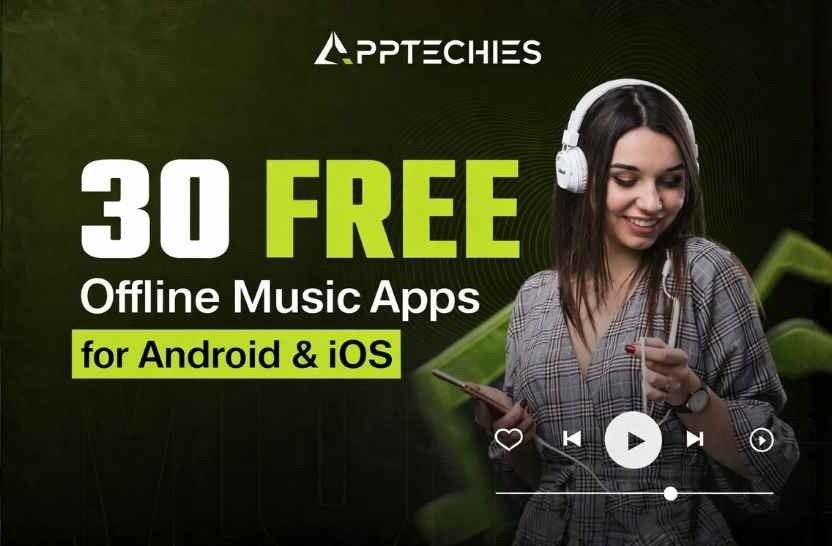
    7. How to Start a Taxi Business | Complete Guide for Beginners

      How to Start a Taxi Business | Complete Guide for Beginners

      The taxi business remains one of the most practical transportation business opportunities for aspiring entrepreneurs. People need transport every day, whether they are going to work, visiting hospitals, traveling to airports or on a regular basis. According to the Market.us study, the worldwide taxi app industry is expected to grow from USD 238.1 billion in 2023 to USD 468.4 billion by 2033. Because of this consistent demand makes taxi services a stable industry to enter.

      Starting a taxi business does not always require a large fleet or a heavy initial investment. Many successful operators start with a taxi business with one vehicle and gradually expand their business, based on customer needs and operational experience. The most important thing is to choose the right business approach and maintain reliable service quality. For fleet owners, combining traditional operations with digital solutions is an ideal choice. Working with a trusted taxi app development company can help streamline your service, increase customer satisfaction and stay competitive.

      Today, technology plays a major role in transport businesses. Taxi booking apps, GPS navigation systems and digital payment options have improved customer convenience. Entrepreneurs who adopt these technologies can create more competitive taxi services in their local market.

      If you are planning to start a taxi business, it is important to understand the licensing requirements, start-up costs, fleet management, marketing strategies and customer retention methods. Many new entrepreneurs search for taxi business ideas.

      This guide explains the step-by-step process of starting a taxi business and helps you understand how to turn your transportation idea into a profitable venture. Let’s find out how to start a taxi service and what is needed to convert your taxi business into reality!

      What Are the Reasons for Investing in Your Own Taxi Business?

      The worldwide taxi mobile app market size is growing and scaling from 203.16 billion dollars in 2022, up to 618,11 billion dollars by 2031. Urbanization, ease of app and increasing dependence on demand run this remarkable expansion.

      What does that mean to you? This means a huge opportunity to start a taxi business that meets the customers’ needs. Whether you are wondering how to start a taxi service or how can i start my own taxi business, the possibility of profitability is highest.

      Here are the 3 reasons to invest in the Taxi Business are given below:

      High Demand And Market Growth

      The profitable revenue streams and high returns of the global taxi market are expected to hit $274.7 billion by 2027, making it one of the most attractive areas for entrepreneurs. Beyond the standard price, taxi companies can unlock several sources of revenue, including:

      • Prices in High Time
      • Long-term business contract
      • Partnership with local businesses for exclusive passenger services

      With the right strategy, efficient fleet management and targeted marketing, a taxi business can provide a high profit margin and continuous growth, making it an excellent investment.

      Highly Profitable Revenue Potential

      By 2027, the taxi market around the world is expected to increase to $274.7 billion. After a high demand for business owners and investors, with significant earnings in the on-demand, rapidly expanding taxi industry, this expansion provides an important opportunity.

      Taxi companies can generate revenues from different sources in addition to the standard riding price, such as surge prices, corporate contracts and local business alliances. It is a business that can provide benefits for a long time with high profit and long-term benefits.

      Flexibility and Scalability

      One of the plus points of the taxi business industry is its scalability and flexibility. You can start small with just a few vehicles, test the market and fix your services by increasing your services.

      This approach keeps the original costs manageable, giving you room to expand with speed. As demand increases, you can scale your fleet and services, ensuring steady growth in the fast-developing industry.

      Top AI Features Must have in Your Taxi Booking App like Uber & lyft

      How Do You Start Your Own Taxi Business? Step-by-Step guide

      How to start a cab company? What do I need to start a taxi service? or how to start a taxi/cab business with one car? These are the basic questions that every taxi business owner needs to know before stepping into the taxi industry. Here are 15 steps given below that will help you start your business journey carefully, clear your doubts and prevent you from making mistakes.

      In-depth Market Analysis

      One thing that is necessary before considering starting your own cab company is deep market research. The key to success in the ride-hailing and taxi industry is to understand your target market and audience. Finding opportunities and deciding where your services are most necessary is more important than just examining data.

      Begin by defining who your ideal customers are. Ask yourself: Who needs taxi services in your targeted market area? Is there a great demand among passengers, tourists or corporate customers? Understanding your potential customer base helps you tailor your offers to match local needs.

      Then you can evaluate the competition. What are the charges of other taxi companies? What kind of services do they offer? How do they market themselves? What is required to start a taxi business? You can identify gaps in the market by analyzing competitors carefully, whether they provide less expensive trips, better customer service or app-based functions. This insight assists you in growing and personalizing your taxi cab business and standing out in a crowded market.

      Apart from consumer demand and competition, the success of the taxi industry is also affected by the external variables such as rules, seasonal trends, changes in the economy and fuel prices. A strong business plan assesses these variables for long-term stability. The location also matters! Studies and location-based data help indicate high-performance areas and ensure that your business operates where the trip is most necessary.

      Create a Well Defined Plan

      A clear and workable plan is the first step to creating a profitable taxi business. Define your vision, understand what to do to bring it to life, consider all your requirements and complete your homework before hitting the road.

      Your plan should balance profitability with customer satisfaction, but is crucial for long-term development. Remember that a thoughtful business idea will set you apart from the competitors. And to stay ahead, market research is needed. Nothing happens by knowing their rivals, but not knowing that they can cost you everything.

      Competitor Analysis

      Understanding your competition is crucial to starting a successful cab business. Research on local taxi services in your target field to identify your strengths, weaknesses, pricing models and customer responses. This helps you see what works and where there is room for improvement.

      With this insight, you can place your taxi service more strategically, provide better value and stand out in a competitive market. Knowing your competitors and their tactics can help you to make smart decisions, speed up marketing and promote your opportunities for long-term success.

      Choose the Right Vehicle Fleet

      Choosing the right vehicles is an important step in creating a successful taxi business. Think of your targeted customers and their specific transport requirements. Whether it is the standard sedan, hybrid, electric vehicle or available options, you choose cars that are safe, comfortable and fuel-efficient to increase passenger satisfaction and cut operating costs.

      Make sure your fleet is following local rules and safety regulations. Regular maintenance and hygiene are needed to create a reliable brand image and provide a constant positive experience. A well-chosen, well-maintained fleet lays the foundation for long-term success and profitability.

      Choose the Right Model for your Taxi Cab Business

      Planning your taxi business model is an important step towards long-lasting success. Like Uber or Lyft, your primary revenue will come from the riding fee, so start by calculating the average cost per trip. Be sure to include all operating expenses that carry wages, fuel, tax, insurance, vehicle maintenance, rent and technical assistance. Include these factors also, early costs such as the acquisition of fleet, app development, branding and marketing campaigns.

      Remember that it is common for new taxi companies to initially work with losses. Your model should allow for gradual development, with a clear route for profitability, because the customer expands the base. Don’t forget to consider seasonal trends and local demand patterns. A thoughtful business model helps you understand how much capital you need and to score your taxi service.

      Legal Formalities Taxi Cab Business

      It is important to know the legal requirements before you start a cab service. In order to maintain safety and compliance, drivers in each region have their own set of rules related to permits, insurance and background checks. By learning about these rules in advance, you can stay out of problems and win over customer confidence. A safe and comfortable trip is also ensured by following the vehicle and safety rules.

      Beyond legalities, for long-term growth, it is crucial to structure your business properly. Choose a business structure that matches your needs, ensure the required license, and register your company with the right authorities. A well-structured business not only creates reliability but also ensures long-lasting success. To handle these formalities, you will create a professional and legally compliant taxi service. These steps ensure that your taxi service is designed for efficiency, profitability and marketing.

      Driver’s License Needed

      When starting a cab business, you should have a valid driving license of the driver. Each cab driver of your team should have appropriate credentials to legally operate a taxi or Rideshare vehicle. It’s illegal to operate taxi services without a license, it’s a basic requirement. Ensuring that all drivers meet licensing standards is the first step towards a safe and legal operation.

      In addition to having just one license, it is equally important to appoint responsible and qualified drivers. Make sure each driver has a spotless driving record and meets legal age requirements in your area. Prioritizing these factors guarantees that your service will continue to be reliable, professional and trustworthy for passengers. By setting high standards from the beginning, you create a strong reputation and a business that customers can trust.

      Hire and Train a Driver

      In order to run a successful taxi service, hiring drivers and training are required. Look for candidates with a spotless driving record, valid licenses and excellent customer service expertise. Check the background completely to ensure that they are trustworthy and professional. Having a team of skilled and responsible drivers creates a smooth, reliable service that customers can count on.

      After you onboard the right drivers, you should invest in extensive training to refine their skills. Cover safe driving techniques, how to communicate and proper use of taxi apps or transfer systems. Focus on professionalism, steadiness and polite interaction with passengers. Regular performance evaluation and valuable feedback will help improve your cab drivers, strengthen your company’s reputation and promote long-term customer loyalty in the competing taxi industry.

      Create Digital Presence

      Creating a strong digital presence is the key to increasing your taxi service in today’s digital world. A well-designed taxi booking app that shows the fleet, services and contact information helps you establish reliability. By integrating a user-friendly online reservation system make the booking process comfortable, so that customers can plan a ride with a few clicks from their smartphone or computer.

      Beyond a website, social media can be a powerful tool for contacting potential riders, sharing updates and running targeted campaigns. Expanding access to the popular ride-hailing apps can also provide more customers. In addition, you can encourage happy travelers to leave positive reviews- relevant reviews build trust and attract new customers. A solid online appearance not only increases visibility but also sets your taxi business up for long-term success in a competitive market.

      Execute Marketing Strategies

      The secret to improving your taxi business and defeating the competition is effective marketing. Start by understanding your target groups and customizing your services to their needs. Use a mix of digital marketing, social media promotion, local ads and partnerships to maximize your outreach and attract potential customers.

      Increase the visibility with exclusive offers, discounts and referral programs that encourage repeated business. Creating a brand identity for your taxi fleet with a recognizable logo and clear contact information can also elevate awareness. Constantly evaluating your marketing strategies and adjusting them for better performance. A strong brand, excellent customer experience and frequent advertising will ensure long-term success for your cab service.

      Taxi Company Insurance

      Insurance is a basic aspect of running a taxi business, ensuring safety for your fleet, drivers, passengers and overall business. Without appropriate coverage, unexpected events can lead to financial stress and can be disturbed the continuity of the business.

      Start with commercial vehicle insurance, including accidents, injuries and property damage that includes your taxis. Liability insurance is equally important and protecting your business from potential legal actions. If you hire drivers, the compensation for workers ensures coverage for injuries or diseases at work. In addition, extensive insurance provides financial security against theft, destruction and natural disasters.

      To make a strong insurance plan, contact industry experts who can tailor coverage for your specific business needs and local rules. A well-insured taxi company not only operates evenly but also develops trust and confidence with customers and drivers.

      Taxi Company Registration Process

      Registration of taxi operations is an important step to ensure legal compliance and steady operation. Choose the right business structure, whether it is a only owner or a corporation or an LLC, as per your needs. Complete the required registration with local authorities, secure the required license and obtain any permit required to operate legally.

      If you are planning to appoint employees, make sure you complete the tax registration and receive an employer identification number (EIN). Proper registration not only protects your personal property but also increases reliability and creates confidence in customers. In addition, protecting extensive insurance coverage protects your business from unexpected risks, so you can work with confidence. Taking these steps establishes a strong base for long-term success in the taxi industry.

      Boost Your Taxi Business with a Taxi Booking App like Uber

      In today’s competitive market, a well-designed app can revolutionize the way you operate by increasing efficiency and user satisfaction. It is necessary to market your taxi business with a powerful taxi app. With just a few clicks, passengers can easily pick rides and book, with flexible payment options and can track the driver’s location in real-time. The process is seamless and stress-free. A user-friendly app also improves your visibility, attracts more riders and expands your business visibility.

      A taxi app improves operations for drivers by checking the schedule, streamlining the routes and cutting the time of driving, which improves customer satisfaction and service. Cashless payments add security, reducing the risk associated with theft or disputes.

      In addition, access to customer preferences and rush hours helps access valuable data to refine business strategies and streamline operations. Using new technology ensures long-term growth and success for your taxi business, whether you are developing a customized taxi app or collaborating with existing taxi booking app services.

      Monitor & Optimize Operations

      For long-term success, it is important to continuously track and optimize operations. Carefully keep up with important metrics such as revenue, customer satisfaction, driver’s efficiency and fleet maintenance to ensure smooth operation.

      Regularly conducting assessments helps to identify the areas of improvement and cost-saving opportunities. It helps improve transfers, track vehicle movements and enhance booking orders. Collecting customer ratings improves decision-making, leading to a better passenger experience. Industry switch requires continuous innovation and adaptation. From frequent refined procedures, you can build a more efficient, customer-focused taxi service that thrives in a competitive market.

      Market your Taxi Business Professionally

      Effective marketing helps loyal customers secure quickly, so you can expand through offline promotion, digital advertising and referral programs. You do not need the entire internal marketing team initially, outsourcing expertise can be a cost-effective solution.

      To begin with, conduct consumer research to understand the needs of your target group. Where and how to attract and grab attention, and then choose marketing strategies that match your budget. Using a smart, structured plan will help you stand out in your taxi business and will lead to permanent success!

      Expansion and Franchise Opportunities

      When your taxi service blooms, expansion and franchise can open doors for enormous development. Scaling in new cities promotes revenue and improves market presence, but first, you need to do intensive research to ensure demand and profitability.

      Meanwhile, franchising allows you to multiply success without dealing with every detail. By offering franchise opportunities, you give ambitious entrepreneurs to take advantage of your reliable brand, provided business model and support system, and expand your footprint easily.

      However, permanent development begins with a strong foundation and a reliable track record. Fine-tune operation, gain customer loyalty and strengthen your brand identity before taking the next step.

      How Much Does it Cost to Start a Taxi Business?

      So, now you are clear on how to start a taxi business? And your next question is, what is the cost to start a taxi business? Great move! An estimated $378 billion by 2027, with global ride-hailing sales, it’s the right time to step into the taxi industry. But before you step in, let’s talk about money. How much does it really cost to start a taxi business?

      Here is a quick overview of important expenses:

      Initial Investments

      Vehicles- The price of a new car ranges from $20,000 to $35,000 each. You can even start with used vehicles.

      Equipment Meter, GPS, Car Camera; Budget about $1000 to $ 3000 per vehicle.

      License and PermissionDepending on the area, it can range from $ 500 to $ 10,000+.

      Technology The cost of a basic transfer and tracking system is around $ 2000- $ 10,000.

      Operating Expenses

      Fuel– The rise in fuel prices makes it a big cost. Average monthly fuel cost per vehicle: $ 300- $ 600.

      Maintenance and Repair– Budget of $ 1,200 – $ 2500 per year per vehicle.

      Driver’s Salaries– The amount expected to spend $ 2000 to $ 3000/month per driver, whether it’s hourly wages or commission-based.

      Mobile App development

      A fully functional mobile app development is needed in the digital world of today. A basic taxi booking app development cost starts at $10,000, while fully-functional versions can go up to $50,000 or more.

      Branding and Promoting

      To create a logo, website, or mobile app, local advertising costs around $2000 – $5000, which helps to build your brand and attract potential customers.

      Emergency Fund

      Always keep a backup fund, set aside 10% to 15% of the total budget, for unexpected costs.

      Starting a successful cab company usually costs $25,000 to $100,000+ in the base of the scale and city. With smart planning, technical integration, strong branding and a trusted mobile app development company, you can start and achieve success in the taxi industry, These are the requirements to start a taxi business.

      Opportunities and Possibilities in the Taxi Sector

      The taxi business is a booming industry, which offers plenty of opportunities for ambitious entrepreneurs who want to make their identity in the taxi industry. With consumer preferences, advanced technology and new trends, this industry provides tremendous ability to develop and succeed. Dive into some major prospects that influence how tax companies evolve in the future:

      Increasing Demand for Taxi Services

      Urbanization and population growth continuously promote the increasing requirement for reliable transport alternatives. People are constantly at this stage and causing stable demand for taxi services in cities around the world.

      Ride-sharing Revolution

      Traditional taxi services have changed with the popularity of ride-sharing platforms. Entrepreneurs can use this trend by introducing app-based services that provide dynamic prices, easy ordering and improved customer experience.

      Tech-driven Innovation

      Rides think transport is more efficient and practical due to innovations such as mobile apps, GPS tracking and AI-operated booking systems. A taxi company that invests in modern technology attracts more customers and stays ahead in a competitive market.

      Catering for Niche Markets

      Variation is key to success in the taxi industry, not just numbers. Offering special customized taxi services like co-friendly rides, wheel-chair accessible taxis, pet-friendly cabs and premium transportation brings potential revenue for businesses who are willing to tailor their services.

      Tourism and Travel Opportunities

      Cities that attract large tourist populations provide excellent opportunities for taxi services, which are specially designed for travelers. In popular tourist destinations, revenues can be increased through destination-centric transport options, personalized city tours, and transfer services to the airports.

      Franchising for Expansion

      Using franchising to work with a well-known cab company helps to accelerate business expansion. This strategy helps entrepreneurs get a quick start by providing credibility, a reputable company and an integrated support network.

      Multiple Income Sources

      Taxis are eligible for different types of revenue streams besides passenger transportation. Revenue can be further improved through the delivery of packages, participation of restaurant distributions and corporate contracts for employee transport.

      Flexible Business Model

      Entrepreneurs can choose between ownership of a fleet of cabs or collaboration with independent drivers, each business model offering different levels of scalability and investment requirements.

      Global Expansion Options

      With proper branding and operating efficiency, taxi companies can expand internationally. Expanding into new areas provides attractive opportunities for development and international recognition for the company.

      Eco-friendly Transportation Option

      The growing environmental awareness of customers opens the door for long-lasting, permanent taxi services. Companies can become leaders of the industry and attract conscious passengers to the environment by investing in an electric or hybrid fleet.

      Value add in-car services

      From entertainment in the car to Wi-Fi and mobile charging features, adding more elements can increase customers’ satisfaction and help a taxi brand stay ahead in a competitive market.

      The taxi continues to develop the industry, providing endless opportunities for entrepreneurs’ vision, creativity and strategic execution. Those who innovate focus on customer-centric services and utilize techniques that lead to long-term success in this dynamic field. Whether you are launching a new taxi business or scaling an existing one by using these new trends can help you make a profitable and rewarding road.

      Final Thoughts

      How to start a taxi service? Starting a taxi solution can be an exciting and profitable business, especially for those ready to take the necessary risks and with confidence. A well-curated approach can provide the foundation for success, from completing intensive marketing and following legal rules to creating a solid online appearance and implementing effective marketing strategies. Now you know how to start a taxi business.

      To create a successful taxi business, focus on hiring talented drivers, acquiring extensive insurance and optimizing operating efficiency. To stay ahead of this dynamic industry, innovation must be embraced, use trends to develop and search for development opportunities. An important aspect is to choose the right on-demand taxi app development company to create a simple taxi booking app for a better customer experience.


      Taxi App Development Cost in 2026: A Complete Guide

      Frequently Asked Questions

      1. How to start a taxi cab business?

      Ans: The requirements to start a taxi business, you must register with your company, get the necessary license and permits, buy reliable vehicles, or rent and secure commercial insurance. It is also important to hire licensed drivers, determine competitive prices, and use a taxi dispatch system or mobile app.

      Focus on creating an online look with Google Business Profiles and social media marketing to attract riders and customers. Associate with hotels, airports or events to get booking orders. Ensure that your service stands out through security and punctuality, and customer satisfaction.

      2. How to start a taxi business with one car?

      Ans: To start a taxi business with one car, register your business, get a commercial driver’s license (if necessary), secure a taxi permit and buy commercial car insurance for your vehicle. Your car will meet local taxi services, including security checks and branding (such as decals or a meter).

      To find customers, use ride-hailing platforms such as Uber or Lyft, or market your service locally with flyers, social media and a Google business profile. Build customers, be on time and to increase your reputation and eventually expand your fleet to increase your reputation.

      3. How much does it cost to start a business like Uber?

      Ans: Starting a business like Uber can cost more than $100,000 to $1 million, it is based on the scale, location and features you want to include.

      Here is a quick major cost calculation:

      Taxi booking app Development cost (Driver + Rider Apps, Admin Panel): $ 50,000- $ 300,000 +

      Licensing and Legal Fee: $ 10,000- $ 50,000 (different by country/city)

      Marketing and Branding: $ 10,000- $ 100,000+

      Employment and Operations: $ 30,000- $ 200,000 for employees, customer assistance, etc.

      Insurance and Compliance: Varies widely based on the region, area and the fleet size

      To compete with Uber, you will require a strong technical foundation, a scalable riding system, competing prices, local partnerships and a serious marketing budget to attract both riders and drivers. To avoid starting costs and risk, start with a small niche or local focus area. Need a taxi booking app development company? Contact, Apptechies will be there for you.

      4. How does the taxi business work?

      Ans: Taxi businesses work by providing transport services to passengers for a reasonable fee. It usually depends on distance, time or fixed prices. Operators can own a single vehicle or manage a fleet, and the income is earned through daily tours, partnerships or contracts. Drivers either work for a company, rent a taxi or work independently. The company includes licensing, maintenance of vehicles, insurance and customer service. Many taxi services are now upgrading to mobile app to get ride requests and manage operations relevant reviews

      Author Name: Ajay Chaudhary

      Author Bio: AJ Chaudhary, CEO of Apptechies. He is a full-stack & AI Mobile app developer with 10+ years of experience developing web & mobile applications. He has successfully delivered projects for different industries and helped companies turn concepts into scalable solutions. Passionate about technology, he simplifies complicated tech topics for entrepreneurs and startups by sharing insights.
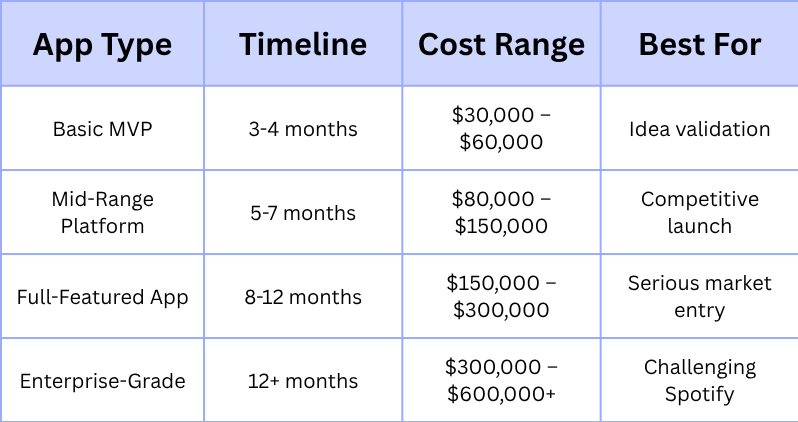
    8. What is the Difference Between iOS and Android?

      What is the Difference Between iOS and Android?

      Do you support iPhone or Android? The debate never ends! But if you are trying to choose between the two, we’ve got you covered. iOS and Android influence the market for mobile operating systems. Whether you are trying to create a mobile app or want to buy a new smartphone, understanding the key differences between iOS and Android is essential.

      When developing mobile apps, businesses often consider both platforms to reach a wider audience. For expert mobile app development solutions, consider Apptechies, a leading mobile app development company that provides high-quality app solutions tailored to your business needs. Understanding the iPhone and Android comparison is crucial, as both platforms offer unique advantages.

      In this complete guide, we will discuss the major differences between iPhone and Android, addressing all aspects such as hardware integration, customization, app development security, user experience, and more.

      What is iOS?

      iOS was first introduced in 2007, known for its smooth performance, clean interface and high security. The closed-source iOS operating system was designed specifically for Apple products, including iPhones, iPads, and iPods. iOS offers special features like FaceTime, iMessage, AirDrop, and seamless device connectivity for users within the Apple ecosystem.

      ios

      • Developed in Swift and Objective-C
      • It offers a closed ecosystem, meaning that Apple controls both the hardware and software.
      • iOS updates are released simultaneously to all supported devices.
      • High-quality applications are ensured by strict App Store criteria.

      What is Android?

      On the other hand, Android was developed by Google and introduced in 2008. It is an open-source operating system built on top of the Linux kernel. Although Google owns and maintains it, a variety of manufacturers’ devices, including those from OnePlus, Samsung and Google itself.

      • Developed in Java and Kotlin
      • Open-source it allows customization by manufacturers.
      • Android updates vary depending on the manufacturer and carrier.
      • The Google Play Store has a more accommodating app submission process, leading to a variety of larger apps.

      What Are the Main Key Differences Between Android & iPhone?

      The primary function of both operating systems is to deliver a user-friendly and effective mobile experience. Here are the key differences between iPhone and Android.

      Hardware and Device Selection

      iOS: Only compatible with Apple products. Only iPhones, iPads, and iPod Touches are compatible with iOS. All Apple devices benefit from optimal performance and consistent user experience thanks to this close connection. But it also restricts the style, features and cost of the devices you can choose from.

      Android: Powers a wide variety of gadgets made by many different manufacturers. This gives customers access to an unmatched range of smartphones and tablets at various pricing ranges, screen sizes, camera capabilities, and special features. There is an Android device to fit practically every demand and price range

      Design Philosophy and User Interface

      iOS: Renowned for having an interface that is clean, simple, and user-friendly. using a common design language across all of its services and applications. At Apple, simplicity and usefulness are highly valued. Navigation is typically straightforward and gesture-based. The emphasis is on a seamless and sophisticated experience, usually prioritizing usability above extensive personalization.

      Android: Offers a user interface that is more adaptable and adjustable. While Google offers a basic Android experience, manufacturers frequently apply their own features and unique skins. This enables more personalization, with options for custom launchers, themes, and widgets. However, there are instances where this fragmentation results in inconsistent user experiences across various Android devices.

      App Store and App Availability

      iOS: The App Store is renowned for its strict app review process, which frequently produces safer and better quality apps. Even though there may not be as many applications overall as there are on Android, iOS app development process typically adopts new and creative apps sooner, especially in premium areas. Because iOS has a more cohesive user base and possibly a higher monetization rate in some demographics, developers frequently give it priority.

      App Store and App Availability

      Android: Uploading an app to the Google Play Store is much easier because of its multiple submission methods, it has a greater total number of apps. Although this offers more options, there may be a higher chance of running into subpar or even malicious apps. Nonetheless, Google has been enhancing its Play Store security features on a constant basis. The open nature of Android also makes it possible to sideload programs from sources other than the official app store, which increases flexibility but also raises security concerns.

      Flexibility and Customization

      iOS: Offers limited customization options. While you can personalize your wallpaper and arrange apps on the home screen, deeper system-level modifications are generally not allowed without jailbreaking (which is not officially supported and can void your warranty). Apple prioritizes a consistent and controlled experience over extensive user customization.

      Android: Highly customizable. From widgets and live wallpapers to custom launchers, icon packs, and even other operating system ROMs (for more experienced users), users can customize nearly every element of their device. This flexibility empowers users to tailor their devices to their exact preferences, but can also be overwhelming for less tech-savvy individuals.

      Operating System & Closed vs Open Source Ecosystem

      iOS: Operates within Apple’s closed ecosystem. Although Apple products integrate smoothly (e.g., AirDrop, Handoff), there are instances when interoperability with non-Apple devices and services is less simple.

      Android: Regardless of the manufacturer, Android’s open-source nature promotes more , and Android fosters greater interoperability with a wider range of devices and services, regardless of the manufacturer. It integrates well with Google’s suite of services and often offers more open standards for file sharing and connectivity.

      Privacy and Security

      iOS: Apple has a powerful reputation for privacy and security. Its tight control over software and hardware allows for quicker security updates and a more unified approach to protecting user data. The App Store’s stringent review process also helps to minimize the presence of malicious apps.

      Android: Due to its open nature and the vast number of manufacturers involved, Android has historically faced challenges with security updates, with delays and inconsistencies across different devices. However, Google has made significant strides in recent years with initiatives like Project Treble and increased focus on timely security patches. Privacy features have also been significantly enhanced in recent Android versions, giving users more control over their data.

      Cost and Usability

      iOS: Generally, iPhones are marketed as premium devices that cost more. While Apple from time to time releases more “affordable” models like the iPhone SE, the overall cost of entry into the iOS ecosystem often exceeds.

      Android: Provide a much extensive range of devices across all price ranges, from budget-friendly options to high-performance flagships. This makes smartphones easier to access for a wider worldwide audience.

      Updates and Durability

      iOS: Apple delivers timely and consistent software updates to all compatible iPhone devices. This guarantees that users have access to the newest features and security updates for several years.

      Android: Updates might be more dispersed. While Google produces new Android versions regularly, the manufacturer determines how quickly and which devices will get these updates. While some manufacturers deliver regular updates, others may update older devices more slowly or not at all. However, the most recent updates are usually released first for Google’s Pixel devices

      Ecosystem Development

      iOS: Development for iOS mainly uses Apple’s Swift programming language and Xcode development environment. The strictly controlled ecosystem can make development more efficient and predictable.

      Android: Development for Android mainly uses Java or Kotlin programming languages and Android Studio as the official IDE. The open nature of the platform enables greater freedom but can also cause issues owing to device fragmentation and different hardware capabilities.

      Voice Assistance

      iOS: Features Siri as its integrated voice assistant. Among Siri’s many capabilities are reminders and smart home device management. Additionally, it is deeply ingrained in the iOS environment.

      Android: Features one of the most sophisticated and capable voice assistants on the market is Google Assistant. Its strong integration with Google’s vast knowledge graph and services improves contextual awareness and adaptability.

      Final Thoughts

      In the end, the decision between iOS and Android comes down to personal priorities, needs and taste. iOS app development costs and Android app development costs can vary significantly based on the app’s features, complexity, and design. Every operating system has advantages and disadvantages, there is no one that is objectively “better” than the other.

      iOS may be the ideal choice for you if you value a smooth, easy-to-use, and extremely polished user experience within a strictly regulated environment, place a high priority on security and regular upgrades, and feel at ease with a more carefully chosen range of hardware.

      Frequently Asked Questions

      Q. Which is better, Android or iOS?

      Ans: It all depends on the user’s preferences. Android offers customization and affordability, whereas iOS offers security and optimization.

      Q. Which is more secure, Android or iOS?

      Ans: Due to the strict process of app review and security updates of Apple’s devices, iOS is considered more secure than Android.

      Q. Why do people choose iOS over Android?

      Ans: Many users choose iOS for its simplicity, regular updates, and interconnecting ecosystem.

      Q. Which is the best operating system for gaming?

      Ans: Gaming is supported on both Android and iOS, although iOS frequently receives games earlier because of its better hardware optimization.

      Q. How can I transfer data from iOS to Android?

      Ans: With tools like Google Drive, Move to iOS, or third-party apps you are able to transfer data from iOS to Android.

      Q. Whose Battery life is Better, iOS or Android?

      Ans: Basically, depending on the specific device, battery life matters, although Android phones often have larger batteries.

    9. How to Create an iOS App That Works With MacOS Smoothly?

      How to Create an iOS App That Works With MacOS Smoothly?

      The world of app development industry is changing quickly, and since Apple’s ecosystem is getting more integrated than ever, ensuring your iOS app runs smoothly on macOS is a game-changer.

      In this guide, we’ll break down everything you need to know about developing an iOS app that works smoothly on macOS. Whether you’re a startup, a business owner, or an independent developer, you’ll gain valuable insights to make your app future-proof. and if you are looking for expert assistance, an iOS app development company in USA can help you create a powerful app tailored to your needs.

      Basic Requirements to Develop iOS Apps

      Before you start building an iOS app for macOS, you need to know these fundamental requirements:

      • Mac computer: Need a Mac running the latest macOS version.
      • Xcode: Apple’s integrated development environment (IDE) for developing iOS and macOS apps.
      • Swift Programming Language: The preferred language for iOS/macOS development.
      • Developer Account: An Apple Developer account is necessary to test and distribute your app.
      • Understanding of Apple’s Human Interface Guidelines (HIG): Ensuring your app meets Apple’s UI/UX

      Why Build an iOS App for macOS?

      Before diving into technicalities, let’s address the big question: Why should you optimize your iOS app for macOS? The answer is simple: expanding reach and usability.

      Apple Silicon Compatibility- With M1, M2, and the latest M3 chips, macOS can now run iOS apps natively, making it a prime opportunity for developers to cater to Mac users.

      iOS App Development- Step by Step Guide for Beginners

      Choose the Right Development Approach

      You have a few options when your iOS app works on macOS:

      • Mac Catalyst: Apple’s Mac Catalyst technology allows you to take an iPad application and bring it to macOS with micro adjustments.
      • SwiftUI: Apple’s modern UI framework lets you create applications that work across different Apple devices.
      • Universal Apps: Develop a single app that runs on both iOS and macOS with shared codebases.

      For most developers, using Mac Catalyst is the simplest way to port an iOS app to macOS without rewriting it from scratch.

      Learn the Basics of Swift

      Learning the basics of Swift is crucial. It is Apple’s powerful programming language that enables developers to build fast, secure, and efficient apps. Here are some essential concepts to grasp;

      • Variables and constants: Understanding how to store data efficiently.
      • Functions and Methods: Building reusable blocks of code.
      • Optional: Handling nil value to prevent crashes
      • Closures: Writing concise, readable code.
      • SwiftUI: creating a user interface that adapts to different Apple devices, including macOS

      Even if you are not coding that app yourself, having basic knowledge can help you communicate better with your development team.

      Optimize Your App’s UI/UX for macOS

      An iOS app’s interface is designed for touchscreens, while macOS apps rely on keyboard and mouse interactions. Here’s how you can make your UI macOS-friendly

      • Modify Navigation: Ensure menus, buttons, and interactions work well with keywords and trackpad
      • Adjust Layouts: Adapt elements for larger screens and different aspect ratios.
      • Add Keywords Shortcuts: macOS users love shortcuts- integrating them enhances usability.
      • Enhance Drag and Drop Support: Users expect seamless file management on macOS

      Implement Apple’s Handoff & Continuity Features

      The smooth integration of Apple’s ecosystem is one of its best features. Continuity Camera, Universal Clipboard, and Handoff allow your users to transfer between devices with ease.

      For example, a user might start filling out a form on their iPhone and finish it on their Mac without losing progress. By including these functionalities, your software becomes more functional on all Apple devices.

      Leverage macOS-Specific Capabilities

      A great iOS app optimized for macOS should use macOS-specific functionalities like:

      • Resizable Windows: Allow users to adjust the app’s window size dynamically
      • Dark Mode Support: Ensure your app supports macOS’s system-wide dark mode.
      • Multi-Window Capabilities: Unlike iPhones, Mac users expect multiple windows for productivity.

      Menu Bar Integration: Add essential features to the Mac’s menu bar for quick access.

      Optimize Performance for macOS

      Performance expectations differ between mobile and desktop users. Here are some tips to make sure your app functions properly:

      • Ensure Compatibility with Apple Silicon: Apple’s latest M1 and M2 chips are powerful but require optimization for the best performance.
      • Reduce Power Consumption: Optimize background tasks to prevent unnecessary battery drain.
      • Improve File System Handling: Macs have a more complex file system than iOS, so ensure smooth file operations.
      • Memory Management: Desktop applications should efficiently handle RAM to avoid performance slowdowns.

      Test, Debug, and Optimize

      Testing is crucial before launching your iOS app on macOS. Use their tools:

      • Xcode Simulator: Test your app on different macOS versions without needing a physical Mac.
      • Profiling Tools: Apple’s Instruments tools are used to track performance, memory usage, and battery consumption.
      • Beta Testing: Get feedback from macOS users through TestFlight or private beta releases.
      • Crash Analytics: Use platforms like Firebase or Apple’s built-in crash reporting to catch and fix bugs.

      Deploy and Market Your macOS-Compliant app

      • Submit to the Mac App Store: Ensure your app meets Apple’s guidelines for macOS apps.
      • Optimize Your App Store Listing: Make use of an attention-grabbing description, targeted keywords, and high-quality screenshots.
      • Promote Cross-Platform Compatibility: Highlighted the feature, showing how users can switch between iOS and macOS smoothly.
      • Use ASO (App Store Optimization): Optimize keywords like app development company, Mac Catalyst apps, and cross-platform Apple apps.

      How Much Does It Cost to Build an iOS App?

      The cost of building an iOS app depends on various factors such as:

      App Complexity

      • Basic Apps: $10,000-$30,000
      • Average Apps: $30,000-$100,000
      • Complex Apps (AI, AR, real-time data processing): $100,000-$500,00+

      Development Team

      • Freelancers: $30-$150 per hour
      • App Development Companies: $75-$250 per hour
      • Elite Companies: $200-$500 per hour

      Additional Costs

      • App Store Fee: $99/year for individual developers
      • Marketing & user acquisition
      • Post-launch maintenance

      Final Thoughts

      Building an iOS app that works smoothly on macOS is an exciting opportunity to expand your app’s reach and functionality. With the right approach using Swift, Mac Catalyst, and optimizing for macOS, you can create a powerful app that enhances user experiences across multiple devices.

      Frequently Asked Questions

      Q. Can all iOS apps run on macOS?

      Ans. Not, automatically, do Apps need optimization using Mac Catalyst or specific macOS development adjustments.

      Q. Do I need a separate app for macOS?

      Ans. Not necessarily. You can use Mac Catalyst to adapt your iOS app to Mac with minimal code changes.

      Q. Is Swift the only language for iOS/macOS development?

      Ans. NO, but it is the preferred and most efficient language for Apple development. You can also use Objective-C, but Swift is more modern and widely used.

      Q. How much time does it take to develop an iOS app that works on macOS?

      Ans. Development time totally depends on complexity, team size, and features. Simple apps take 3-6 months, as compared to complex apps, it can take 12 months or more.

      Q. What is the best way to ensure my app runs smoothly on macOS?

      Ans. Use adaptive layouts, optimize for macOS-specific features, test thoroughly, and consider working with an iOS app development company in the USA.

      Q. How hard is it to learn iOS development?

      Ans. Although learning iOS development can be challenging at first, it is quite possible with the help of resources like Swift Playgrounds, Apple’s Developer site, and online courses.


      Benefits of White Label Application Development in 2026