
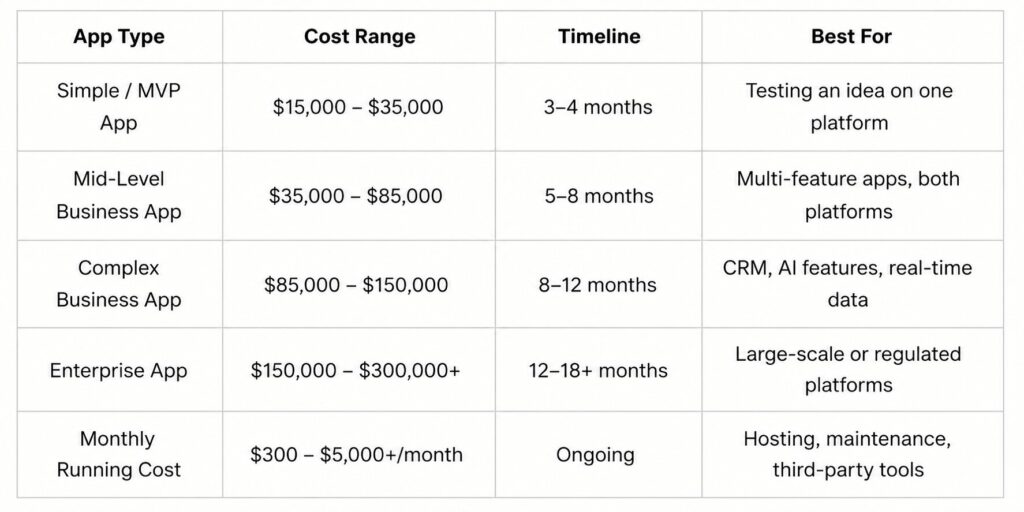
Quick Answer: Mobile app development cost in 2026 ranges from $15,000 for a simple MVP to $300,000+ for a complex enterprise app. Most business apps fall between $50,000 and $120,000. Your final number depends on app size, platform, feature count, and where your development team is based.
One question comes up in almost every early conversation we have with founders and business owners: How much will my app actually cost?
The honest answer is: it depends. But that answer is only useful if you know what it depends on.
In this guide, we'll walk you through real 2026 pricing, the six factors that push costs up or down, hidden expenses most people miss, and how to estimate your own budget before you talk to a single developer.
By the end, you'll have a clear picture of what to expect and a formula you can use right now.
How Much Does It Cost to Build an App in 2026?
If you need a fast reference, here it is. We'll unpack each tier in the sections below.
What Makes an App Cost More?
App costs are not random. Six things decide your final number. Once you understand each one, you can start making smart choices before you spend a dollar.
App Size and Complexity
The bigger and more complex your app, the more hours it takes to build. More hours means more cost.
Here's a simple way to measure your app's size:
- Small app: 5–10 screens, 1–2 core functions (login, display content, simple form)
- Mid-size app: 12–25 screens, 6–12 functions (user accounts, payments, search, notifications)
- Large app: 25+ screens, 12–20 functions with third-party integrations
- Enterprise app: 25+ screens, 20+ functions, high security and compliance needs
In my experience, most founders start thinking their app is a "mid-size" project. After we go through the feature list together, it often turns out to be larger. That's not a bad thing — it just means planning the budget accurately from the start matters a lot.
A small app needs roughly 300–600 development hours. A large one can need 2,000–5,000+ hours. That's the core reason for the wide price range you see in the market.
The Platform You Choose
Your platform decision affects your budget more than most people realize — not just today, but for years of maintenance ahead.
Here are your main options:
iOS only: Cheapest way to start. Good if your audience is iPhone users. Android only: Larger global market share, especially outside North America.
Both platforms (native): Nearly twice the cost. Two distinct codebases, two test sets, and two release sets.
Cross-platform (Flutter or React Native): One codebase runs on both iOS and Android. Costs 30–50% less than building two native apps.
Progressive Web App (PWA): Works like an app inside a browser. No App Store needed. Good for content-heavy apps with tight budgets.
For most business apps in 2026, cross-platform is the smarter financial choice. The performance gap between cross-platform and native is small — usually 5–15% — and most business apps never need that extra performance.
Features and Integrations
Every feature adds development hours. And some features cost a lot more than they seem.
Here's a realistic cost range for common app features:
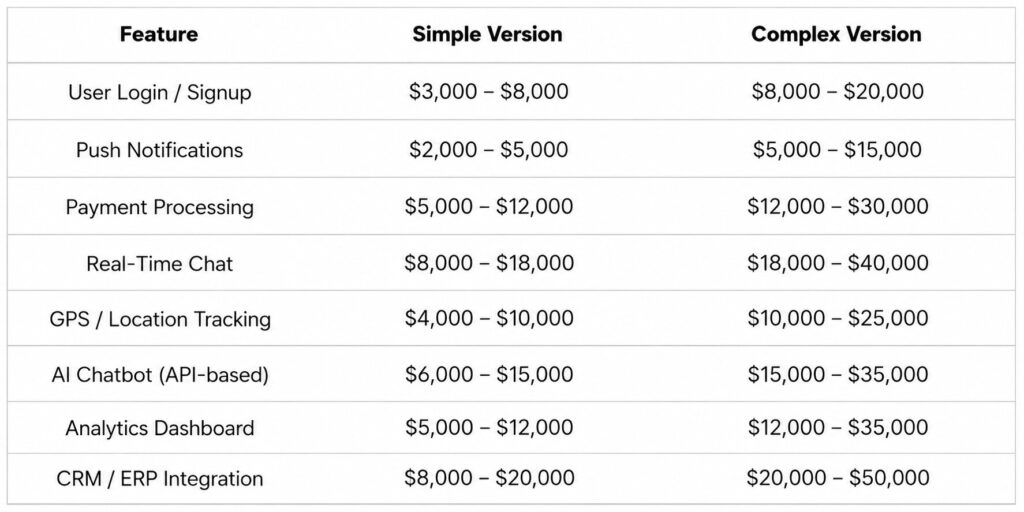
The complexity version costs more because it needs more error handling, more testing, and ongoing maintenance as the third-party service changes over time.
One thing many founders underestimate: third-party integrations are rarely plug-and-play. Connecting your app to Salesforce, Stripe, or a legacy ERP system takes real engineering time.
Design Quality
Design is often where budget gets squeezed, and it's usually the wrong place to do it.
Apps with good design keep users. Apps with poor design lose them in the first session. That's not an opinion; it's measurable in retention and review data.
Here's what different design levels cost:
- Template-based design: $5,000 – $15,000. Functional, but generic. Works fine for internal tools or early MVPs.
- Custom UX/UI design: $15,000 – $50,000 Branded, user-tested, and built around your specific workflows.
- Premium interactive design: $50,000+ Sophisticated animations, micro-interactions, and competitive differentiation.
If you're building a consumer-facing app in a crowded market, design is not where you cut corners. If you're building an internal field tool for 20 technicians, a clean template works perfectly well.
Where Your Dev Team Is Based
Location is one of the biggest levers in your budget. The same 1,000-hour project costs very different amounts depending on where your team sits.
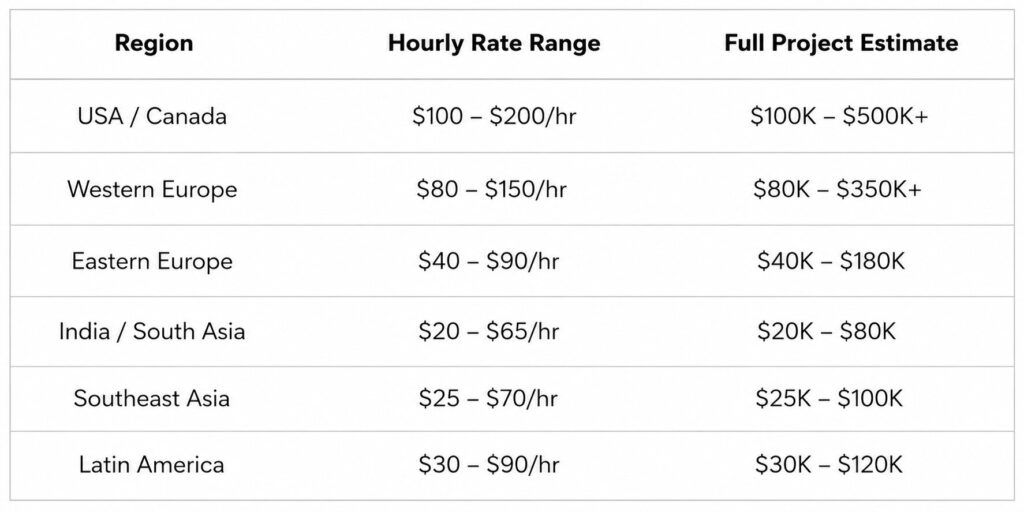
Offshore development can reduce your total project cost by 40–70% compared to US-based teams.
The key is how the team is managed, not where they're located. A well-run offshore team with daily updates and clear documentation consistently outperforms a disorganized local one. We have witnessed both US-based projects that exceeded budget twice and outstanding projects constructed in India. Location is a factor; process is the bigger one.
AI Features
AI is no longer a high-end add-on in 2026. In 2026, AI is no longer a premium add-on. Users expect smart features as a baseline.
Here's what different AI features cost:
- AI chatbot using an existing API (like OpenAI): $6,000 – $20,000
- Personalized recommendation engine: $15,000 – $40,000
- Custom machine learning model trained on your data: $50,000+
Most businesses do not need custom AI. Using existing APIs delivers strong results at a fraction of the cost. A $10,000–$20,000 AI budget is enough to add genuinely useful intelligent features to most apps.
Plan for AI from the start, though. Adding it to an architecture not designed for it costs two to three times more than building it in from day one.
iOS, Android, or Cross-Platform: Which Costs Less?
Let's go one level deeper.
Native development makes sense when your app needs deep hardware access, Bluetooth, NFC, advanced camera processing, ARKit, or high-performance graphics. Games and AR apps are good examples.
Cross-platform development makes sense for the vast majority of business apps, booking tools, service portals, e-commerce apps, dashboards, and field service tools. The cost savings are real, and the performance gap is negligible for these use cases.
PWAs are worth considering if your app is content-focused and you want to avoid App Store approval delays (which can take 1–3 weeks). They won't appear in app store search results, which limits discoverability.
Quick decision guide:
- Pick cross-platform if your app is a standard business app, you need both iOS and Android, and budget matters.
- Pick native if you need cutting-edge hardware features or are building a graphics-heavy consumer product.
- Pick PWA if you need a fast, low-cost launch and App Store presence isn't critical.
Costs Most People Forget to Budget For
This is where most app budgets fall short. The development quote is real. But it's not the full number.
Here's what to add on top of your development cost:
QA and Testing 15–25% of dev cost: Testing isn't a checkbox at the end. It runs throughout the project. It covers functional testing, load testing, security checks, and device compatibility. Skip this, and you'll pay for it in one-star reviews.
App Store Fees: Apple charges $99 per year. Google charges $25 once. Small numbers, but easy to miss.
Cloud Hosting $200 to $5,000+/month: Every live app needs a backend. For a small app under 10,000 users, expect $200–$500/month on managed services like Firebase or AWS. That scales fast as users grow.
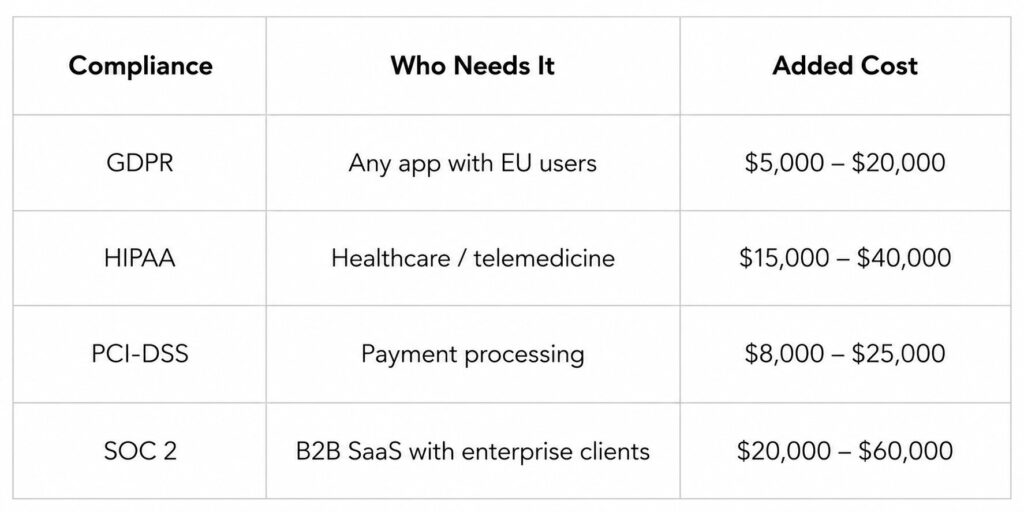
Compliance Costs $5,000 to $60,000+: If your app handles personal data, processes payments, or serves regulated industries, compliance is its own budget line.
Year 1 Maintenance 25–35% of dev cost: The standard industry figure is 15–20% annually. But in year one, it's almost always higher — closer to 25–35%. Real users find issues that testing didn't catch, and you'll iterate faster based on actual usage data.
User Acquisition $3,000 to $30,000+ for launch: An app no one downloads delivers zero ROI. Budget at least $3,000–$5,000 for a launch campaign. Apps that launch with no acquisition strategy often stall for weeks.
App Development Cost by Industry
If two apps have the same functionality but one is for healthcare and the other is for retail, their prices may range significantly. Industry determines compliance requirements, security architecture, and data handling complexity.
eCommerce App Cost
- Simple catalog app: $30,000 – $60,000
- Full platform with AI recommendations and AR previews: $150,000 – $350,000+
Main cost drivers: inventory sync with ERP systems, multi-currency payment handling, and GDPR-compliant data management for EU customers.
Healthcare App Cost
- Wellness or fitness app (no health data): $40,000 – $80,000
- Telehealth or patient portal (HIPAA required): $100,000 – $250,000+
If your app touches any protected health information, HIPAA compliance is non-negotiable. Budget an extra $15,000–$40,000 for this alone.
Fintech App Cost
- Personal finance or budgeting app: $50,000 – $100,000
- Full digital banking or lending platform: $200,000 – $500,000+
KYC (Know Your Customer) verification, AML transaction monitoring, and PCI-DSS compliance add $20,000–$60,000 to a standard development budget in this space.
On-Demand / Delivery App Cost
- Simple booking or scheduling app: $40,000 – $80,000
- Full marketplace with real-time tracking (Uber-style): $200,000 – $500,000+
On-demand apps need separate experiences for users and service providers, real-time GPS tracking, two-sided payment flows, and rating systems. That's where the cost comes from.
Real Estate App Cost
- Basic property listing app: $40,000 – $65,000
- Full marketplace with MLS integration and AI valuation: $150,000 – $400,000+
MLS/property API integration alone adds $10,000–$30,000 to a real estate app budget.
How to Get a Rough Cost for Your App in 5 Steps
You don't need a developer to get a working estimate. Here's a simple process you can run right now.
Step 1: List your must-have features only: Write down the 5–8 features your app absolutely needs at launch. Drop everything else. Features that are "nice to have" should be in version 2, not version. Every extra feature adds cost non-linearly.
Step 2: Count your screens: Go through your feature list and count the unique screens. 5–10 screens = small app. 12–25 = mid-size. 25+ = large. This one number gives you a solid starting point.
Step 3: Choose your platform: Single platform = lowest cost. Cross-platform (Flutter or React Native) = best balance of cost and market reach. Two native apps = the highest cost and the longest timeline.
Step 4: Estimate your development hours:
- Small app (5–8 features): 300–600 hours
- Mid-size app (10–15 features): 800–2,000 hours
- Large app (15+ features with integrations): 2,000–5,000+ hours
Step 5: Apply hourly rates and add a 35% buffer: Multiply your hours by the hourly rate for your target region. Then add 30–40% to cover QA, hosting, and the first three months post-launch.
Formula: Total Budget = (Dev Hours × Hourly Rate) + 35% Buffer Example: 1,000 hours × $50/hr = $50,000 + $17,500 buffer = $67,500 total
How to Lower Your App Development Cost (Without Compromising Quality)
These are the strategies that actually work. We've seen all of them used on real projects.
- Start with one platform only. Launch on iOS or Android first. Validate the idea with real users. Then add the second platform once you know what to build.
- Build an MVP, not a complete app. Launch with 5–8 core features. Gather user feedback. Invest in the next set of features based on what users actually want — not what you assumed they'd want.
- Choose cross-platform development. Flutter and React Native both save 30–50% vs. building two native apps. For most business apps, the trade-off is worth it.
- Use third-party APIs instead of building from scratch. Payments, authentication, maps, push notifications, and AI features are all available as proven services at a fraction of the custom build cost.
- Do a discovery and scoping phase first. A 2–4 week scoping engagement costs $5,000–$15,000. It prevents the most expensive thing in app development: unclear requirements discovered mid-build.
- Split must-haves from nice-to-haves ruthlessly. Every feature you push to version 2 is money saved for features users actually request after launch.
- Consider an offshore or hybrid development team. India and Eastern Europe offer experienced developers at 40–70% lower cost than US-based teams. Quality comes down to process, not location.
- Reuse UI component libraries. Building on an established design system in the first two weeks saves 15–20% of total front-end hours over the project lifecycle.
Frequently Asked Questions
Q. How Much Does It Cost To Build An App In 2026?
Ans: Between $15,000 and $300,000+ depending on size and complexity. Most business apps fall between $50,000 and $120,000. The biggest factors are feature count and where your development team is based.
Q. What Is The Time Frame Required To Develop A Mobile Application?
Ans: Simple apps take 3–4 months. Mid-level apps take 5–8 months. It can take 12 to 18 months or longer to develop complex enterprise apps. Timeline depends on the feature.
Q. What Is The Affordable Way To Build A Mobile App?
Ans: Build an MVP with cross-platform technology (Flutter or React Native) using an offshore development team. This combination can bring a solid basic app in under $25,000 while keeping quality high.
Q. Do I Need To Budget For App Maintenance After Launch?
Ans: Yes. Plan for 15–25% of your original development cost per year. In year one, expect 25–35% because real user data drives faster changes than testing alone can predict.
Q. What Hidden Costs Do Most People Miss?
Ans: QA testing, cloud hosting, compliance costs (GDPR, HIPAA), App Store fees, and year-one maintenance. Together, these add 30–40% on top of your base development quote.
Author Name: Ajay Chaudhary
Author Bio: AJ Chaudhary, CEO of Apptechies. He is a full-stack & AI Mobile app developer with 10+ years of experience developing web & mobile applications. He has successfully delivered projects for different industries and helped companies turn concepts into scalable solutions. Passionate about technology, he simplifies complicated tech topics for entrepreneurs and startups by sharing insights.